

When queues grow and routing rules multiply, contact centers 1 need simple building blocks to keep order. Agent groups are one of the most important of those blocks.
An agent group is a logical set of agents who share something in common—such as language, product line, site, or channel—so queues can route interactions and reporting can roll up performance for that cohort.
Agent groups 2 give structure to what would otherwise be one big pool of agents. They become routing targets, WFM units 3, and reporting slices. In many deployments I see, we start from a messy mix of skills, ad-hoc teams, and local rules. Once we design sane groups, everything else becomes easier: queue design, SIP trunk capacity planning 4, intercom and emergency line coverage, and even how supervisors manage coaching and permissions.
How do I structure groups for queues?
Many teams mirror their org chart in agent groups. That makes sense on paper, but it rarely matches how customers contact the business.
Structure agent groups around queues, intent, and channels first, then align them with sites and supervisors so routing, forecasting, and reporting all speak the same simple language.

Design from traffic, not titles
The best starting point is the contact mix, not job titles. Look at which queues carry the most volume and which intents really need different handling. For example:
- General service vs. technical support
- Billing vs. collections
- Sales vs. renewals
- Emergency vs. routine building calls
From there, define agent groups that can fully support one or more queues. In many platforms, queues do not point to individual agents. They point to groups. So a clear mapping matters.
For voice and SIP-based scenarios, this includes calls from IP phones, door intercoms, and emergency telephones. An “Emergency” group might handle elevator phones, blue-light poles, and on-site SOS endpoints, while a “Resident Services” group handles normal building inquiries.
Layer context with geography and channel
Next, add geographic and channel layers. You still want a small set of core group patterns, but with enough detail to plan and report by site and medium.
A common structure looks like this:
| Group name | Primary queue(s) | Notes |
|---|---|---|
| Service_US_Voice | US general service voice | Main inbound line |
| Service_US_Digital | Web chat, email, social | Shared with same supervisors |
| Tech_EMEA_AllChannels | Technical support, all channels | Covers SIP devices and network issues |
| Billing_Global_Voice | Billing inquiries, voice | Language mix handled via skills |
| Safety_Onsite_Voice | Emergency phones, intercoms, SOS | 24/7 coverage with strict SLAs |
Each group maps to one or more queues. During a spike, bullseye routing can expand from a primary group to a backup group. For example, if “Service_US_Voice” reaches a wait threshold, calls may overflow to “Service_US_Digital” agents who are cross-trained.
Keep governance simple and visible
Documenting the rules sounds boring, but it prevents chaos later. I find three habits make a big difference:
- Clear naming standards for groups.
- Written criteria for membership.
- Scheduled audits, so you remove agents who have moved roles or sites.
When groups drift, queues start to behave oddly. Some are overstaffed, some starved, and routing logic slowly loses meaning. Clean groups keep the platform honest and give you a stable base for skills and AI routing on top.
What’s the difference between groups and skills?
Teams often mix “groups” and “skills” in daily speech. That leads to strange routing designs and confusing reports.
Agent groups are routing and reporting containers, while skills are attributes of individual agents; groups answer “which cohort?” and skills answer “who inside the cohort is best for this interaction?”.
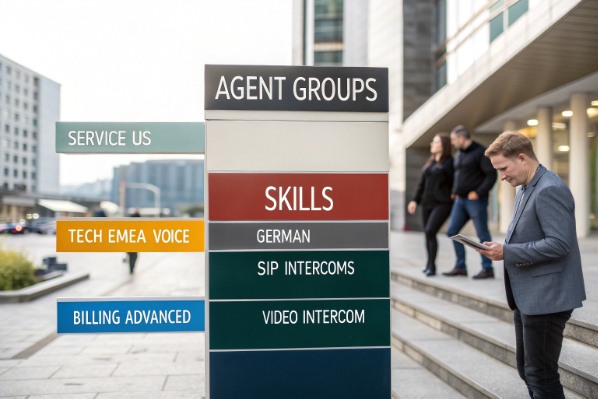
Think “who we are” vs “what we can do”
Groups usually line up with organizational and operational boundaries:
- Line of business (support, sales, collections)
- Geography or site (US, EMEA, APAC)
- Channel (voice only vs. omnichannel)
- Supervisor or team ownership
Skills are more granular and personal:
- Languages
- Product families
- Technical depth
- Special certifications or permissions
Routing flows normally use both. A queue targets one or more groups. Within those groups, skills-based routing 5 picks the best agents.
Here is a simple comparison:
| Aspect | Agent groups | Skills |
|---|---|---|
| Purpose | Routing targets, WFM units, reporting | Match contacts to the best available agent |
| Scope | Shared by many agents | Set per individual agent |
| Change rate | Relatively stable | Changes as people learn and switch roles |
| Examples | “Service_US”, “Tech_EMEA_Voice” | “German”, “SIP intercoms”, “Billing_Advanced” |
Avoid overloading groups with skill logic
One common anti-pattern is to create dozens of tiny groups, each trying to represent a skill. That makes maintenance hard and breaks the point of skills-based routing. Instead:
- Keep groups coarse and aligned with queues and supervisors.
- Keep skills fine-grained and focused on what matters for matching.
- Use skills levels or proficiency scores if the platform allows it.
This separation pays off when you introduce AI or predictive routing. Models can use skills and outcomes to learn who performs best on certain contacts, while groups keep the routing, permissions, and reporting structure understandable for humans.
In our SIP and intercom projects, we often use groups for site and responsibility (like “Campus_Security” vs “Property_Management”) and skills for device types or protocols. That way, any guard in the Campus_Security group can get calls from emergency phones, but only those with “Video_Intercom” skill handle camera-enabled endpoints.
Can agents belong to multiple groups?
As needs evolve, some agents become flexible players. The question is how to use that flexibility without losing clarity or burning people out.
Yes, agents can belong to multiple groups, and in most platforms they often should, but you need clear priorities, concurrency limits, and governance so multi-group membership helps queues instead of confusing them.

Many-to-many membership as a strength
Modern cloud contact centers 6 treat group membership as many-to-many by design. An agent might sit in:
- “Service_US_Voice” for core support
- “Safety_Onsite_Voice” for backup emergency coverage
- “Outage_WarRoom” for temporary incident handling
This flexibility helps with:
- Overflow and bullseye routing.
- Coverage during small peaks without hiring.
- Project-based work like migrations or outages.
For SIP environments, the same guard or operator may appear in a “Normal_Desk” group and a “Night_Shift_Emergency” group. Different queues and SIP trunks can then use these groups for time-of-day routing and follow-the-sun coverage.
Control the behavior with priorities and limits
Multi-group membership does not mean “answer everything.” You still need to control:
- Queue and group priorities.
- Maximum simultaneous contacts per channel.
- Which queues can interrupt or pre-empt others.
A simple structure might be:
| Group | Priority | Example effect |
|---|---|---|
| Safety_Onsite_Voice | 1 (highest) | Emergency devices can pre-empt other work |
| Service_US_Voice | 2 | Standard inbound calls |
| Service_US_Chat | 3 | Chat drops when voice and safety are busy |
An agent in all three groups would still see emergency calls first, then voice, then chat. This keeps multi-group membership helpful and predictable.
Audit membership to prevent silent failures
When you rely on multi-group agents, audits matter even more. People leave teams, change roles, or go on long leave. If their group memberships are not cleaned up, you may think you have backup coverage that does not really exist.
I like to review:
- Group membership lists monthly or quarterly.
- Agents who appear in many groups and may be overloaded.
- Queues that depend on a very small number of cross-members.
Done well, multi-group membership becomes a way to build resilience and career paths. Done poorly, it becomes a source of hidden risk and unfair workload.
How do I report by group performance?
If groups drive routing and staffing, they must also drive reporting. Otherwise, you end up optimizing individuals while missing the bigger structural picture.
Reporting by agent group means rolling up KPIs like AHT, SLA, abandonment, occupancy, and CSAT for each cohort, so you can see which groups are healthy, overloaded, or mis-designed.
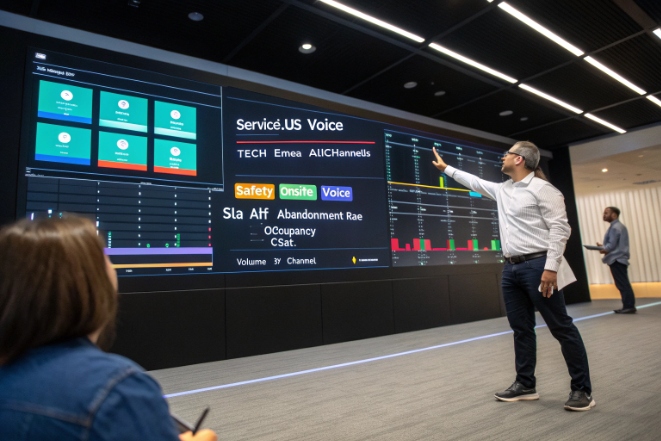
Use groups as a core reporting dimension
At a minimum, you want dashboards that show, by group:
- Volume by channel.
- Service level and average wait time.
- AHT and its parts (talk, hold, ACW).
- Abandonment rate.
- Occupancy and shrinkage.
- CSAT / NPS and quality scores.
This lets you answer questions like:
- Which group needs more training vs. more headcount?
- Which queues are starved because their group is too small?
- Where are emergency or high-priority calls at risk?
For example, if “Safety_Onsite_Voice” shows excellent service level but very low occupancy, you may accept the cost as a safety buffer. If “Service_US_Voice” shows high occupancy and long wait times, you may need more staff, better self-service, or different routing.
Tie reporting back to WFM and routing design
Workforce management 7 also thinks in cohorts. Forecasts and schedules usually align with group definitions. That means the same groups appear in:
- Forecast vs. actual comparisons.
- Adherence and occupancy reports.
- Seasonal planning and hiring decisions.
If you change group definitions, you should adjust reporting and WFM views at the same time. Otherwise, historical trend lines break. Before a big re-grouping, I usually:
- Export a baseline of current group performance.
- Plan how to map old groups to new ones.
- Update dashboards, WFM models, and QA scopes together.
A simple reporting table might look like this:
| Group name | SLA (voice) | AHT (voice) | Abandon rate | CSAT | Occupancy |
|---|---|---|---|---|---|
| Service_US_Voice | 79% | 5:10 | 6.5% | 4.3 | 88% |
| Tech_EMEA_AllChannels | 83% | 7:45 | 4.2% | 4.5 | 82% |
| Safety_Onsite_Voice | 97% | 2:30 | 0.3% | 4.8 | 54% |
With this view, you can have concrete conversations: do we accept low occupancy in safety? Do we invest in more automation for Service_US? Do we adjust Tech_EMEA staffing or routing rules?
Groups are also natural boundaries for supervisor scope. Each supervisor can see and coach their groups. Quality teams can sample by group. Security and admin teams can apply permissions by group, so only the right people can access emergency call recordings or sensitive SIP endpoint controls.
Conclusion
Agent groups turn a crowd of agents into clear, measurable cohorts; when we design them around queues, skills, and reporting, routing and WFM both become simpler and more reliable.
Footnotes
-
Explains what a modern contact center is and how it serves customers. Back ↩
-
Defines agent groups and their role in organizing call center agents. Back ↩
-
Overview of workforce management units and how WFM structures contact center staffing. Back ↩
-
Guide to calculating SIP trunk capacity and planning for concurrent call volumes. Back ↩
-
Description of skills-based routing and how it matches interactions to the best-qualified agent. Back ↩
-
Introduction to cloud contact center platforms and their advantages over traditional on-premise systems. Back ↩
-
Glossary explanation of workforce management and its use in forecasting and scheduling. Back ↩








