
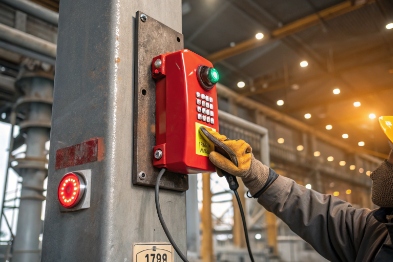
When panic hits in a hazardous area, people waste seconds searching for numbers. A simple mistake can delay help, and the risk grows fast.
The emergency call button turns an explosion-proof telephone into a one-action safety tool. It triggers a pre-defined response path, so help, paging, and local alerts start without dialing or guessing.
The emergency button exists for one reason: reduce decision time. In many plants, the phone itself is not the slow part. The slow part is human. People may be wearing gloves. People may be stressed. People may not know the right extension. The emergency button removes that choice. One press triggers a known emergency response path 1, a known paging behavior, or a known local alarm.
This also supports consistency and auditing. A site can document one standard response flow, drill it, and test it on schedule. That turns “a phone on a wall” into a managed safety point.
Key outcome: the same action produces the same result every time.
The emergency button is not an emergency shutdown (ESD) device unless your safety system explicitly designs it that way. It is an emergency communication trigger first. If the PBX, network, paging, or alarm rules are unclear, the button simply triggers confusion faster.
What to specify so the purpose is met
A good spec focuses on repeatability:
-
A clear target action (call, page, local alert, I/O, or a defined combination)
-
A clear priority level versus normal calls
-
Clear user feedback (LED, tone, beacon, message)
-
A clear reset method (auto reset, manual reset, or supervised reset)
| Goal | What the button should do | What can go wrong | Simple fix |
|---|---|---|---|
| Faster help | Auto-call the right team | Wrong number after PBX change | Central provisioning + periodic test |
| Clear alarm | Trigger a beacon/sounder | Accidental bumps or false calls | Guard + hold-to-confirm |
| Clear paging | Page a zone/talk group | Codec/priority mismatch | Fixed paging profile + priority rules |
| Controlled access | Door release where approved | Security/safety policy conflict | Separate logic + safety review |
The emergency button’s purpose becomes real only when its action is defined, integrated, and tested.
The emergency button can trigger auto-dial to dispatch, PTT-style paging/intercom, local beacon/siren outputs, and (where policy allows) controlled door release. The best choice is the one that matches the site emergency workflow.

1) Auto-dial and hotline behavior
Auto-dial is the most common use: one press calls a predefined SIP URI 2, extension, ring group, or queue.
Good practice:
-
Use a ring group or hunt list, not a single desk
-
Define failover if no answer/busy
-
Keep a call record for drills and incident review
2) PTT paging / talk-group behavior
Some sites want the button to open a fast voice path (hands-free intercom) or trigger a paging group. This can be powerful, but it must control false open-mic events in a hazardous area 3.
Good practice:
-
Prefer press-and-hold to talk (PTT) where false triggers are likely
-
Restrict auto-answer/paging to whitelisted sources
-
Fix paging codec and ptime so it never “sometimes works”
3) Local beacon/siren and relay outputs
Local outputs are valuable because they don’t rely on someone noticing a ring tone in a control room. A strobe can also help responders locate the caller quickly.
Button events can integrate through SIP calling to a URI, HTTP/MQTT to platforms, dry contacts to PLCs, and PAGA priority rules. The strongest designs pair a primary comms path with a local alert fallback.

SIP URI for voice-first response
-
Button triggers a call to a SIP URI / extension / ring group
-
PBX handles priority, routing, logging, and failover
Tip: make the target a logical object (queue/ring group), not a person.
HTTP or MQTT for automation and incident workflows
-
Push an event to dashboards, alarm systems, or incident platforms using MQTT 4 for reliability.
-
Useful for “voice + data” workflows (location tag, zone, device ID)
PLC dry contact for deterministic local actions
-
Relay output drives PLC 5 input for reliable logic execution.
-
PLC triggers beacon/sounder logic independent of SIP call success (as long as local power exists)
PAGA priorities and override rules
If the button triggers paging, the system must adhere to PAGA priority rules 6 to ensure urgent messages take precedence.
| Integration method | Strength | Dependency | Best for |
|---|---|---|---|
| SIP call | Fast voice response | PBX + network | Dispatch workflows |
| HTTP event | Rich data + automation | Platforms + security | Dashboards/tickets |
| PLC contact | Deterministic local output | Local power + wiring | Beacons/sirens |
| PAGA rules | Mass notification control | Paging path + policy | Emergency announcements |
A true emergency control should look different, feel different, and be hard to hit by accident.
Use clear signage, consistent colors (often red button with yellow guard), and tamper-resistant hardware where misuse is a risk.
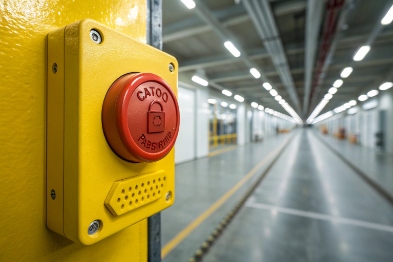
Good practice elements:
-
High-contrast red for emergency action
-
Yellow guard/shroud to reduce accidental activation
-
Clear label + symbol (readable with PPE, in low light)
-
LED feedback (“accepted”, “calling”, “fault”)
-
Tamper-resistant fasteners and event logging where needed
How should debounce, hold-to-confirm, and fail-safe logic be configured?
In harsh sites, vibration, gloves, and impacts create bounce and partial presses. Logic must reduce false triggers without slowing real emergencies.
Use clean debounce, optional short hold-to-confirm where needed, clear local feedback, and fail-safe behavior that still provides a local alert if call setup fails.
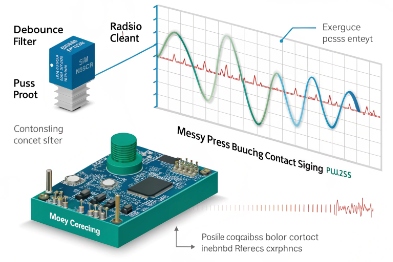
Practical configuration template
| Logic feature | Normal default | High false-trigger area | Notes |
|---|---|---|---|
| debounce 7 | Short, stable | Same | Filters electrical noise |
| Hold-to-confirm | Off / very short | Short hold enabled | Give LED feedback |
| Event repeat | One per press | One per press | Avoid PBX floods |
| Local feedback | LED + tone | Stronger blink | Confirms action |
Commissioning test you should always run: press the button and then simulate a failure (unplug network / block PBX route). Confirm what still happens locally and how it is logged.
Conclusion
The emergency call button exists to trigger a fast, defined safety response. Its value comes from a single, agreed action per area, reliable integration, and obvious identification with PPE-friendly design.
Footnotes
-
Understand the coordination of resources and personnel during critical industrial incidents. ↩ ↩
-
A technical guide to identifying resources within the Session Initiation Protocol for communication. ↩ ↩
-
Learn about safety requirements for environments with explosive gas or dust. ↩ ↩
-
A lightweight messaging protocol ideal for industrial IoT and automation workflows. ↩ ↩
-
Detailed overview of digital computers used for automating electromechanical processes. ↩ ↩
-
Exploring Public Address and General Alarm systems for site-wide mass notification. ↩ ↩
-
Technical explanation of how to filter out rapid switching noise in electronic controls. ↩ ↩








