

When an incident happens, a phone call helps one person. A PA announcement moves everyone. If these two systems stay separated, response becomes slow and uneven.
Yes. An explosion-proof (Ex) telephone can connect to a PA/PAGA system through SIP paging (unicast or multicast), audio line-out to an amplifier, relay triggers to a PA controller, or by controlling 70/100 V paging equipment through approved interfaces and zoning rules.
PA integration is about architecture, not one cable
The goal: one SOS action that reaches people and records evidence
A PA connection is valuable because it turns a point alarm into a site-wide action. The most common workflow is simple: a user presses an emergency key or calls a paging extension, and the system plays a message in the right zones. The PA system may also trigger beacons or horns. The dispatch team then talks back on the phone channel. This gives both mass alert and two-way confirmation.
In my work at DJSlink, the cleanest designs follow one rule: keep voice paging on the IP side when possible, and keep high-voltage speaker lines inside the PA domain. This reduces wiring risk and makes future expansion easier. Still, many brownfield plants already have 70/100 V lines and legacy amplifiers. Those sites can still integrate well, but the interface must be chosen carefully.
Where integration can happen
There are four practical integration “layers”:
- SIP paging layer: the Ex phone sends paging audio via Session Initiation Protocol (SIP) 1 (unicast to a paging server) or via multicast RTP.
- Audio layer: the Ex phone or a paging gateway outputs analog audio (line-out) into an amplifier or matrix.
- Control layer: relays (dry contact) trigger zone selection, pre-recorded messages, or amplifier wake-up.
- Power and supervision layer: the PA system monitors speaker lines and keeps paging working during outages.
A single project can use more than one layer. For example: SIP call to the paging server + relay output to flash a local beacon.
| Integration layer | What it does | Strength | Typical caution |
|---|---|---|---|
| SIP unicast paging | Phone calls a paging “extension” | Easy zoning and priority in PBX | Codec/ptime must match paging server |
| SIP multicast paging | Phone sends RTP to multicast group | Fast and scalable | Network multicast control is required |
| Line-out to amplifier | Sends analog audio to PA amp | Works with legacy amps | Audio level and isolation must be correct |
| Relay trigger | Triggers PA controller or beacon | Deterministic OT-style control | Needs proof testing and reset rules |
A PA connection is only useful if it stays predictable under load. That means priorities, zones, and power plans must be defined before the first cable is pulled.
The next sections go point by point through interfaces, certifications, zone/priority rules, and wiring and power.
Which interfaces enable PA integration—SIP multicast/unicast, line-out, relay triggers, or 70/100 V amplifier control?
If the interface choice is wrong, the page will not play, or it will play in the wrong place. In emergencies, that becomes a real safety gap.
PA integration is enabled by SIP unicast paging to a paging server, SIP multicast RTP to configured zones, analog line-out into a PA amplifier or paging interface, relay outputs to trigger zones or alarms, and controlled interfacing to 70/100 V systems through paging amplifiers or matrix controllers rather than direct high-voltage switching inside the phone.
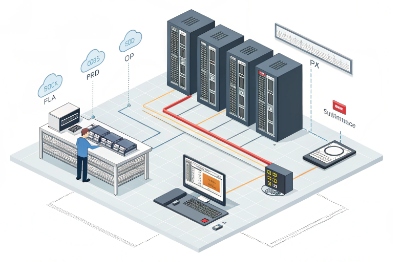
SIP unicast paging: the easiest to govern
With unicast paging, the Ex phone dials a paging “number.” A paging server, IP PBX, or SBC then routes the audio into the PA system. This is simple because access control is familiar. Users can be allowed or denied. Pages can be recorded. Priorities can be set in the PBX. For plants with many zones, this model scales well because zone logic stays centralized.
Key details that must be aligned:
- Paging codec support (often G.711 or G.722; Opus only when supported end-to-end)
- Packetization time (ptime) that the paging server accepts
- One-way audio behavior (no echo issues, but start delay must be controlled)
SIP multicast paging: the fastest path, with stricter network rules
Multicast paging sends Real-time Transport Protocol (RTP) 2 to a multicast address. Endpoints subscribed to that group play audio immediately. This is great for wide announcements and for low setup time. It is also the most sensitive to network configuration. Multicast needs correct VLAN boundaries, IGMP snooping 3, and careful control so audio does not flood every switch port.
This path fits well when:
- many speakers or endpoints must play at once
- the plant wants fast “all-call” behavior
- the network team can manage multicast properly
Line-out and analog paging interfaces: best for brownfield
Some installations use an audio line-out from a gateway or paging interface into an amplifier input. This is common when the PA core is older and expects analog. It works, but it needs correct level setting:
- line-level into amplifier line-in
- balanced/unbalanced matching
- isolation to prevent ground loops
In harsh plants, ground loops are a frequent cause of hum and unclear pages. Isolation transformers and correct shielding reduce this risk.
Relay triggers and 70/100 V control: keep HV in the PA system
A phone should not directly switch 70/100 V speaker lines. High-voltage distribution and supervision belong to the amplifier or paging controller. The Ex phone can still “control” these systems by:
- triggering a relay that the PA controller reads
- calling a paging server that activates a zone relay card
- triggering an external Ex-rated interface module that is designed for the area and the voltage class
| Interface | Best fit | Typical design pattern | What to test |
|---|---|---|---|
| SIP unicast | Modern SIP PBX + PAGA | Phone calls paging extension | Zone mapping, priority, codec |
| SIP multicast | Large-scale paging | Phone triggers multicast RTP | IGMP, VLAN, packet loss behavior |
| Line-out | Legacy PA amps | SIP gateway to amp line-in | Level, hum, clipping |
| Relay trigger | PLC/PA controller | Phone relay to controller input | Proof test, latch/reset logic |
| 70/100 V systems | Industrial speakers | Control via PA amp/matrix | Supervision and isolation |
In practice, the safest approach is: SIP does the voice, the PA controller does the high-voltage distribution, and relays handle deterministic triggers.
Do Ex-rated horns and amplifiers need matching ATEX/IECEx or C1D1/C1D2 approvals and IP/IK ratings?
A PA system is only as safe as its loudest device. If the horn or amplifier is not approved for the same area, the project fails inspection and creates operational risk.
Yes. Equipment installed inside hazardous zones usually needs the correct hazardous-area approvals (ATEX/IECEx for many regions, or Class/Division for North America) that match the zone/classification, plus IP and IK ratings that match weather, washdown, impact, and corrosion exposure.
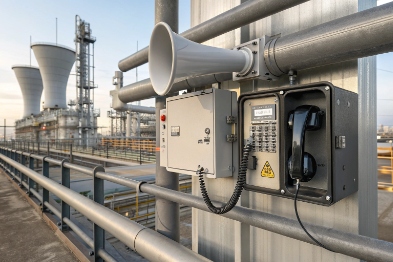
Match approval to the physical installation location
The key question is not “does the PA system have approvals,” but “where is each component installed.” In Europe, equipment conformity is commonly aligned with the ATEX Directive 2014/34/EU 4, while many global projects use the IECEx Certified Equipment Scheme 5. In North America, designs often reference the Class/Division hazardous location system 6 for installation rules.
Many plants keep amplifiers in a safe control room and only place horns/speakers in the hazardous area. This reduces certification cost and service risk. In that design:
- The amplifier may not need hazardous certification if it is outside the hazardous zone.
- The horns/speakers installed in the zone must have the correct Ex marking for that zone.
If a project places an amplifier or junction box inside Zone 1 (or Class I Div 1), then approvals become more demanding. It also changes maintenance rules and enclosure selection.
IP and IK ratings are not cosmetic in PA systems
PA equipment lives outdoors, on towers, near chemical washdowns, and near vandal-prone areas. IEC’s Ingress Protection (IP) ratings 7 are widely used to specify dust/water resistance, while impact expectations are commonly defined using the IEC 62262 IK code 8. IP66/67 is common for washdown and driving rain. IK ratings matter for impact, especially in public or traffic areas, or where tools and hoses strike equipment.
Also, sour and coastal sites need corrosion thinking:
- stainless fasteners and brackets
- sealed cable entries
- UV-stable materials
A practical procurement checklist
Write the approvals for each device type, not just the “system.” This avoids surprises when procurement substitutes a different horn model.
| PA component | Where it is usually installed | Approval focus | Environmental focus |
|---|---|---|---|
| Horn speaker / loudspeaker | Hazardous field area | ATEX/IECEx gas group/EPL or Class/Div | IP66/67, IK, corrosion resistance |
| Paging amplifier | Safe rack room (preferred) | Standard industrial safety | Ventilation, surge protection |
| Zone controller / matrix | Control room or field cabinet | Depends on location | Temperature and dust |
| Junction boxes | Field, sometimes hazardous | Ex marking if in zone | IP sealing, gland quality |
A stable plant design keeps as much electronics as possible in safe areas. Then only the rugged, passive, and approved sound devices live in the hazardous area.
How are zones and priorities configured so emergency paging preempts calls and background audio?
A PA system without priority control becomes a noise source instead of a safety tool. Emergency audio must win, every time, and it must do so in a predictable way.
Zones and priorities are configured by defining paging groups, access rules, and override levels in the SIP PBX or paging controller, then mapping those to PA zones so emergency pages preempt background music and even active calls where policy allows, with clear tones and logs.
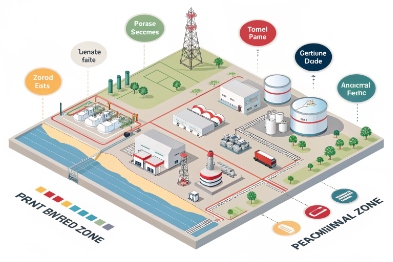
Zone design: follow plant geography and response roles
Zones should match how people move and how responders are assigned. Common zone models:
- Unit-based zones (Unit A, Unit B, Tank Farm)
- Safety function zones (Muster points, Control rooms, Egress routes)
- Time-based zones (Night shift areas, maintenance areas)
A zone plan that is too detailed becomes hard to maintain. A zone plan that is too broad causes alarm fatigue. The best plan often starts simple, then expands only when the workflow demands it.
Priority levels: define what can interrupt what
Priority rules must cover three audio classes:
- Background audio (music, routine announcements)
- Routine paging (operations instructions)
- Emergency paging (evacuation, shelter-in-place, SOS)
Emergency paging should preempt background and routine paging. Preempting active phone calls is policy-dependent. Some sites allow barge-in only to phones in common areas, not to private offices. In hazardous field stations, priority override is often acceptable because safety beats convenience.
A clear operator experience helps trust:
- A short attention tone before emergency page
- A clear “end of message” tone
- A consistent volume policy by zone
Queueing and escalation: handle busy operators
If emergency paging requires a dispatcher action, then queueing matters. A common pattern:
- SOS button triggers a call to dispatch
- If not answered in X seconds, system triggers an emergency page automatically
- Local beacon stays active until ack
This protects against human delay without creating constant false pages.
| Policy item | Recommended approach | Why it helps | What to avoid |
|---|---|---|---|
| Emergency vs background | Emergency always overrides | Prevents missed alarms | “Mixed audio” that masks speech |
| Routine vs emergency | Emergency overrides routine | Keeps priority simple | Too many priority tiers |
| Who can page | Whitelist by role/device | Reduces misuse | Open paging from all extensions |
| Zone mapping | Simple, geography-based | Easy training and maintenance | Zones that change every project |
| Logging | Record who triggered and when | Audit and drills | No evidence after an incident |
A zone and priority plan should be validated with drills. The drill should include a busy PBX moment and a network load moment. That is when weak priority design appears.
What wiring and power rules apply—PoE vs 24 VDC, impedance, line supervision, and surge protection?
PA integration fails more often from wiring and power mistakes than from SIP settings. Plants are harsh on cables. Lightning, VFD noise, and long runs punish weak design.
Wiring and power rules depend on the interface: PoE is clean for SIP paging endpoints, 24 VDC is common for field reliability and backup, 70/100 V lines need correct impedance/taps and supervision, and surge protection is essential for long outdoor runs and mixed grounding environments.
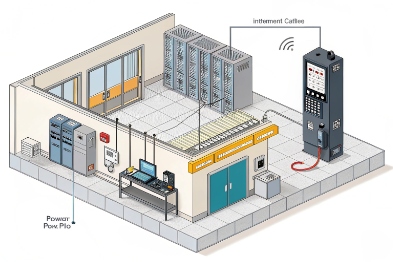
PoE vs 24 VDC: choose based on network and outage strategy
Power over Ethernet (PoE) 9 is convenient because one cable carries power and data. It is also easy to back up with UPS at the switch. This works well when:
- the network closets are on UPS
- the plant has good switch management
- Ethernet runs are within limits
24 VDC is common in industrial control because batteries and DC buses are familiar. A 24 VDC feed can be backed by plant DC systems and can be routed with control wiring practices. In hazardous areas, DC power interfaces must follow the area rules and use approved glands and enclosures.
A robust design sometimes uses both: PoE primary, 24 VDC fallback, or separate DC feed for PA controllers while phones stay on PoE.
Impedance and 70/100 V speaker lines: design for load, not guesswork
In constant-voltage speaker systems, each speaker uses a transformer tap (for example, 5 W, 10 W), so understanding 70/100 V line loudspeaker tappings 10 is essential. The total tap wattage across the zone must stay below the amplifier rating, with margin. Long runs add line loss, so cable gauge matters.
Also, mixing different speaker types requires consistent polarity and correct transformer settings. Mis-tapped speakers create hot spots and dead spots, which reduces intelligibility during evacuation.
Line supervision: detect open and short faults early
Safety paging systems often require line supervision so the system can detect:
- open circuit (broken cable)
- short circuit (water ingress or damage)
- ground faults (in some designs)
Supervision is usually done by the PA amplifier/controller using end-of-line devices, pilot tones, or impedance monitoring. This is not a phone feature. Still, the phone integration must respect it. For example, do not bypass supervised circuits with ad-hoc splices.
Surge protection and grounding: treat outdoor runs as lightning antennas
Outdoor horns and field phones often connect through long cable runs. These runs can bring surges into the rack room. Protection should include:
- surge protectors for Ethernet near building entry
- correct shield termination practice (one end vs both ends based on design)
- bonding and earthing that matches the plant standard
- protection on relay I/O lines that exit the building
| Topic | Best practice | Why it matters | Typical mistake |
|---|---|---|---|
| Power for SIP endpoints | PoE on UPS, or 24 VDC with battery | Keeps paging alive in outages | No UPS runtime testing |
| 70/100 V loading | Sum tap watts with margin | Prevents amp overload | Adding speakers without recalculation |
| Cable gauge and run length | Use proper gauge for zone length | Reduces loss and improves clarity | Using thin cable for long runs |
| Supervision | Use PA controller supervision methods | Detects faults before emergencies | Ignoring EOL devices |
| Surge protection | Protect at entry and near equipment | Prevents damage and resets | Only protecting one side of a long run |
In commissioning, two tests catch most wiring issues:
- a supervised line fault test (simulate open/short and confirm alarms)
- a power loss test (confirm paging and phones stay alive for the required runtime)
Conclusion
Explosion-proof telephones can connect to PA systems through SIP paging, audio outputs, and relay control. The best results come from correct approvals, clear priority zoning, and disciplined power, wiring, supervision, and surge design.
Footnotes
-
SIP standard reference for signaling, session setup, and interoperability in IP voice systems. ↩ ↩
-
Defines RTP media transport basics used for real-time audio over unicast or multicast networks. ↩ ↩
-
Explains IGMP snooping behavior to control multicast flooding and keep paging traffic predictable. ↩ ↩
-
Official EU legal text for ATEX requirements covering equipment used in potentially explosive atmospheres. ↩ ↩
-
Overview of IECEx certification workflows used globally for hazardous-area Ex equipment compliance. ↩ ↩
-
U.S. regulatory definitions for hazardous (classified) locations and related electrical installation expectations. ↩ ↩
-
IEC guide to IP ratings for enclosure resistance to dust and water ingress. ↩ ↩
-
IEC standard reference defining IK impact protection ratings for electrical enclosures. ↩ ↩
-
Technical overview of PoE power classes and delivery concepts for robust network-powered endpoints. ↩ ↩
-
Practical explanation of 70/100 V line transformer taps to size speaker loads correctly. ↩ ↩








