
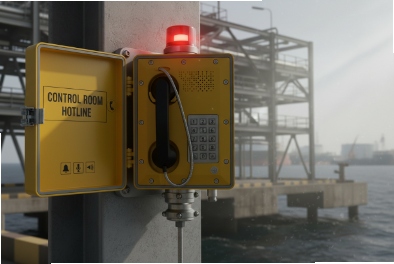
In a hazardous site, a phone that can dial anything is a cost risk and a safety risk. One wrong call can also create noise during an incident.
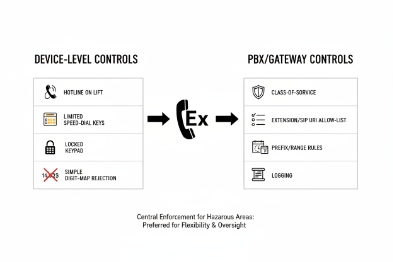
Yes. Explosion-proof SIP telephones can support whitelist dialing control either on the endpoint, through the PBX, or with both. The most reliable approach uses PBX-side policy for enforcement and endpoint-side whitelist for local speed keys and offline behavior.
Whitelist control is easiest when you decide where enforcement lives?
Whitelist dialing can be implemented in three places:
- On the phone (endpoint policy): the phone blocks numbers before sending a call.
- On the PBX/SBC (network policy): the call server blocks or allows patterns and routes.
- Hybrid (both): the phone restricts local dialing and the PBX enforces final policy.
In hazardous sites, PBX-side enforcement is usually the safest because it is centralized and auditable. Still, endpoint-side whitelist has value when:
- The phone supports local speed keys and you want them locked.
- The phone should stay safe even if it registers to a fallback proxy.
- The site wants to prevent “fat finger” calls even inside the LAN.
A good policy design also separates two use cases:
- Normal operations: restrict to control room, supervisor groups, and local plant extensions.
- Emergency operations: always allow emergency codes and pre-defined hotlines, even if other rules block.
| Enforcement location | Strength | Weakness | Best use |
|---|---|---|---|
| Phone whitelist | Stops dialing at source | Harder to audit centrally | Locking local keys and basic patterns |
| PBX/SBC whitelist | Central control + logs | Needs correct PBX design | Compliance and large deployments |
| Hybrid | Strongest overall | More design effort | Large hazardous sites and projects |
This article answers your four questions in a way you can paste into a tender spec: whitelist modes, bulk provisioning, emergency exceptions, and compliance logging.
Which whitelist modes are available—SIP URI, E.164, extension ranges, or time-based rules?
Whitelist modes depend on whether the policy is placed on the endpoint or in the PBX. Endpoints tend to support simpler lists and pattern rules. PBXs can support richer dial plans and time controls.
Common whitelist modes include SIP URI allow-lists, extension ranges and pattern matches, E.164 and country-code blocks, and time-based routing rules when enforced at the PBX. A clean design uses pattern rules for plant extensions and explicit entries for emergency hotlines and services.
SIP URI allow-list (good for direct SIP calling)
This mode allows calls only to defined SIP URIs 1 like:
- sip:controlroom@domain
- sip:area-supervisors@pbx
- sip:ptt-zone-a@paging-server
It works well when the site uses SIP URIs for paging and for fixed services. It is also clean for multi-site designs where extensions differ but URIs are consistent.
Extension ranges and pattern rules (best for local PBX dialing)
For plants with internal extension plans, allow rules often look like:
- 1xxx for control and safety desks
- 2xxx for maintenance
- 9xxx for paging services
- Block everything else
Pattern rules are easier to manage than long per-number lists.
E.164 rules and international blocks (best on PBX/SBC)
Blocking international and premium-rate routes is usually done on the PBX/SBC because the PBX controls outbound trunks. You can allow only:
Time-based rules (mostly PBX-side)
Time rules control what a phone can dial during:
- Night shift
- Maintenance windows
- Shutdown and turnaround periods
This is usually PBX-side because PBX scheduling is stable and auditable. Endpoints rarely implement complex scheduling safely without a management platform.
| Whitelist mode | Where it works best | What it is good at | What to watch |
|---|---|---|---|
| SIP URI list | Phone or PBX | Services and groups | Keep URI naming consistent |
| Extension ranges | Phone or PBX | Local plant dialing | Avoid overlaps with service codes |
| E.164 controls | PBX/SBC | Trunk and international control | Handle + and 00 prefixes correctly |
| Time-based rules | PBX | Shift and maintenance control | Keep time sync and holidays correct |
The safest tender language is: “Whitelist supports explicit numbers plus pattern rules, and policy can be enforced centrally at PBX/SBC.”
Next is deployment. Whitelist policies fail when each phone is configured by hand. Large hazardous sites need bulk provisioning that is predictable and auditable.
How can teams bulk-provision whitelist policies—TR-069, HTTP API, CSV auto-provisioning, or PBX templates?
Bulk provisioning is not only about speed. It is about consistency. One wrong whitelist rule on one phone can create a weak spot.
Teams typically bulk-provision whitelist policies using auto-provisioning via a config server (XML/CFG), PBX templates, or device management tools. CSV is often used for mapping MAC-to-location and extension plans. TR-069 and HTTP APIs are useful when the vendor supports them as part of a centralized management system.
PBX templates: best for call permissions and outbound restrictions
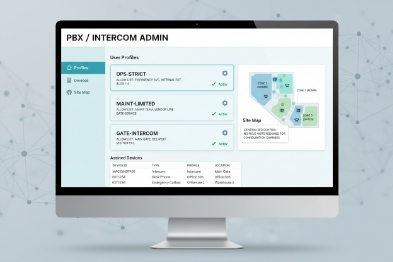
For compliance-heavy sites, the PBX should enforce:
- Which endpoints can dial external routes
- Which endpoints can access international
- Which endpoints can call premium-rate patterns
- Which endpoints can access paging services
PBX templates also make auditing easier because all phones inherit one policy class like “Ex-Process-Phones” or “Muster-Point-Phones.”
Auto-provisioning files: best for endpoint-side limits and speed keys
Many SIP phones support auto-provisioning:
- A config file per phone or per group
- Server-based delivery via HTTP/HTTPS/TFTP (site policy dependent)
- MAC-based mapping to apply the right profile
This method can carry:
- Whitelist patterns
- Locked keypad behavior
- Hotline numbers
- Speed dial keys
CSV mapping often sits “outside” the phone. It is used by the provisioning server to map MAC → extension → location → policy group.
TR-069 and HTTP API: best when a device management platform exists
TR-069 3 and HTTP APIs 4 are strong when you have a fleet management tool. They enable:
- Push policy changes across thousands of phones
- Pull status and configuration for audits
- Record who changed what and when
In hazardous sites, centralized control is valuable because it reduces unauthorized changes.
| Provisioning method | Best for | Why it fits hazardous sites | One practical guardrail |
|---|---|---|---|
| PBX template | Outbound permission control | Central enforcement and CDR logs | Use role-based admin accounts |
| Auto-provisioning | Endpoint whitelist + keys | Repeatable config across devices | Use HTTPS and signed configs if possible |
| CSV mapping | Fleet organization | Reduces human mistakes | Change control and review steps |
| TR-069 | Large fleet updates | Central push and audit | Segment management VLAN |
| HTTP API | Automation and compliance | Integrates with NMS/ITSM | Token control and rate limits |
A stable deployment usually uses PBX templates for call permission and auto-provisioning for endpoint configuration. That hybrid gives both central control and local usability.
Now the key policy question: can whitelist allow emergency codes while blocking international and premium-rate calls? Yes, but it must be designed carefully.
Emergency calling should never be blocked by a cost-control policy. Still, many sites want to block international dialing and premium-rate patterns to prevent misuse and fraud.
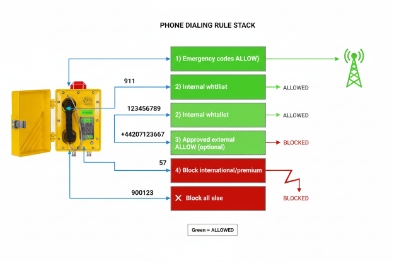
Yes. A safe whitelist design explicitly allows emergency hotlines and service codes, while blocking international and premium-rate routes at the PBX/SBC. Use explicit allow rules for emergency numbers, and use deny rules for international prefixes and premium-rate patterns. Keep emergency routes separate and tested.
Use explicit allow rules for emergency and safety services
Allow lists should include:
- Emergency hotline extensions (control room, fire team, ERT)
- Site-specific emergency services
- Paging services if required for evacuation and muster
Do not rely on pattern rules alone for emergency. Explicit entries prevent mistakes when extension plans change.
Block by route at PBX, not only by number at the phone
International and premium-rate blocking is stronger at the PBX because:
- The PBX controls the outbound trunk
- The PBX can block by route regardless of what the phone sends
- The PBX logs denied attempts
Common deny patterns include:
- International prefixes (+, 00, 011 depending on site)
- Premium-rate prefixes defined by the country rules
- Unknown external routes
Keep emergency calling independent of time rules
Time-based rules should not block emergency calling. If time rules exist, emergency routes should be excluded and always active.
Test the emergency path like a safety instrumented function
At commissioning:
- Confirm emergency hotlines work from every Ex phone.
- Confirm blocked routes are blocked (international test number patterns).
- Confirm logs show allow/deny events.
| Policy goal | Best rule type | Where to enforce | What to test |
|---|---|---|---|
| Always allow emergency | Explicit allow | Phone + PBX | Hotline call completes |
| Block international | Route deny | PBX/SBC | Attempt is denied and logged |
| Block premium-rate | Pattern deny | PBX/SBC | Attempt is denied and logged |
| Limit to plant numbers | Pattern allow | Phone + PBX | Normal calls stay within scope |
With rules designed, the last question is compliance: how do you prove control, enforce roles, and keep audit trails for hazardous-site governance?
How are whitelist logs, audit trails, and role-based access enforced for hazardous-site compliance?
Compliance teams do not want “trust me.” They want evidence: who changed policy, when it changed, and what calls were attempted and blocked.
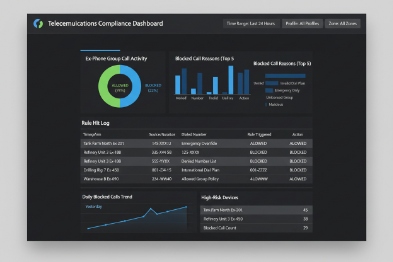
Audit and role control are best enforced at the PBX/SBC and the provisioning platform. Use role-based admin accounts, change control logs, and call detail records. On the device side, lock local menus, restrict web UI access, and export logs to syslog/SIEM or NMS when possible.
What to log for a complete compliance record
A complete record should include:
- Configuration changes (who, when, what changed)
- Whitelist policy version per device group
- Call attempts (allowed and denied), with destination and time
- Emergency call attempts and success confirmation when feasible
- Device identity (MAC, extension, location tag)
PBX CDRs 5 are the strongest evidence for calls. Provisioning logs are the strongest evidence for configuration.
Role-based access control (RBAC): limit who can change dialing
- Separate roles for helpdesk, network admins, and security admins
- Two-person review for policy changes in high-risk sites
- Read-only access for most operational staff
- MFA on management portals where possible
Device hardening: stop local tampering
Endpoint-side controls include:
- Lock keypad dialing to whitelist only
- Disable or password-protect local web UI
- Disable local factory reset or require physical action inside the enclosure
- Restrict provisioning server access to a management VLAN
Compliance-friendly reporting
For tenders and audits, the site can provide:
- A dialing policy document (what is allowed and why)
- A provisioning change log export
- PBX CDR extracts that show blocked attempts
- Periodic compliance reports (monthly or quarterly)
| Compliance control | Where it should live | Why it matters | Simple implementation |
|---|---|---|---|
| CDR and denied call log | PBX/SBC 7 | Proof of enforcement | Store logs for defined period |
| Config change audit | Provisioning platform | Proves who changed policy | Versioned profiles and approvals |
| RBAC | PBX + provisioning | Prevents unauthorized changes | Role separation and MFA |
| Device lock-down | Phone | Prevents local bypass | Disable menus and lock web UI |
In hazardous sites, this approach also reduces operational disputes. When someone claims “the phone failed,” the logs show whether the call was blocked by policy or failed by network.
Conclusion
Explosion-proof SIP phones can support whitelist dialing when policies are enforced at the PBX and reinforced on endpoints. Bulk provisioning, emergency exceptions, and audit logs make the solution safe and compliant.
Footnotes
-
SIP URIs Session Initiation Protocol Uniform Resource Identifier; the addressing scheme used to initiate SIP calls (like an email address for VoIP). ↩
-
E.164 The international telephone numbering plan that ensures each device on the PSTN has a globally unique number. ↩
-
TR-069 Technical Report 069; a standard protocol for remote management of end-user devices by broadband service providers. ↩
-
HTTP APIs Application Programming Interfaces that use HTTP requests to access and manipulate data on a server or device. ↩
-
CDRs Call Detail Records; data records produced by a telephone exchange containing details of a phone call (time, duration, source, destination). ↩
-
RBAC Role-Based Access Control; a method of restricting network access based on the roles of individual users within an enterprise. ↩
-
SBC Session Border Controller; a network element used to protect SIP-based VoIP networks, handling security, interoperability, and routing. ↩








