
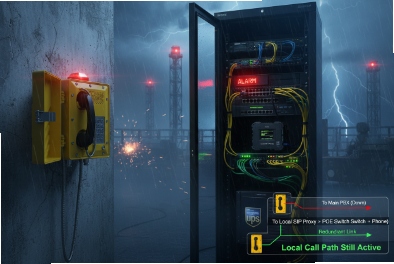
A phone that shows “offline” is not just an IT issue. In hazardous sites, it can become a life-safety gap if crews lose the only reliable voice path.
Yes, explosion-proof SIP telephones can still place calls in several “offline” scenarios, but the method depends on what is offline: PBX, WAN, or the entire IP network. The most reliable designs combine local peer calling or hotline targets, SIP failover with DNS-SRV, and a non-IP fallback such as FXS/PSTN or cellular for worst-case outages.
“Offline” has three meanings, and each needs a different solution
Teams often say “offline” as one word, but there are three different failures:
1) PBX/SIP server outage: the phone has IP connectivity but cannot register.
2) WAN outage: the site LAN still works, but the WAN to the central call platform is down.
3) Local IP network down: switches, PoE, or cabling is down, so phones cannot reach anything over IP.
A phone can solve the first two cases with SIP design. The third case usually needs power resilience and a non-IP fallback path.
A useful way to plan is to define “minimum service” per scenario:
- During PBX outage, at least emergency phones should call a local control room.
- During WAN outage, on-site calling should continue with a local registrar or cached routes.
- During IP network outage, critical locations should still have a way to reach help, even if that is one analog line or a cellular backup.
| Offline scenario | What is still available | Best calling option | What you must design in advance |
|---|---|---|---|
| PBX down | LAN + phones | Peer SIP or preset hotline | Fixed IP targets and peer dial plan |
| WAN down | LAN + local servers | Secondary registrar or local PBX | DNS-SRV, failover proxy, local routing |
| LAN down | Little or nothing | PSTN/FXS or cellular | UPS, alternate path, gateway location |
This framework prevents false expectations. A SIP phone cannot magically call if it has no power and no network path. Still, a system can be designed so that “offline” does not mean “silent.”
Next, the first question: what options allow calling without a PBX?
What offline options enable calling—peer-to-peer SIP, preset IP hotline, and multicast paging without a PBX?
When a PBX is unavailable, a phone can still communicate if it can reach another endpoint or a simple local service. The key is to keep targets stable and avoid dependencies on complex features.
The most common offline options are peer-to-peer SIP calling (direct IP calling), preset hotline to a fixed IP or local gateway, and multicast paging for one-to-many announcements without a PBX. Each option has limits, so most sites use at least two methods.
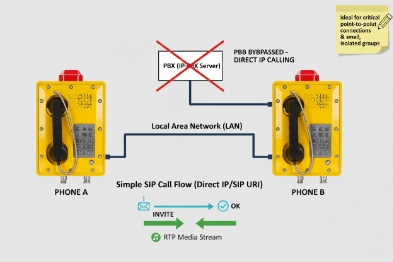
Peer-to-peer SIP (direct IP calling)
Peer SIP 1 means the phone calls another device by IP address or by a local URI that resolves on the LAN. This works when:
- Both endpoints are on the same LAN/VLAN
- Routing between VLANs is allowed
- NAT is not involved
Strengths:
- No PBX dependency
- Fast and simple
Limits:
- No central directory or hunt groups
- Harder to manage at scale unless provisioning is strong
- Security policy may restrict direct device-to-device SIP
Preset IP hotline
A preset hotline sends calls to one defined target without dialing. Targets can be:
- A control room SIP console IP
- A paging server IP
- A gateway IP (FXS, radio, or analog)
Strengths:
- Easy for users in stress
- Stable behavior in outages
Limits:
- Only one or a small set of destinations
- Must ensure the target is always reachable and powered
Multicast paging (no PBX needed)
Multicast paging 2 allows a station to transmit voice to a group of endpoints that subscribe to a multicast address. This can provide:
- Area announcements
- Muster instructions
- Emergency broadcast
Strengths:
- One-to-many, low latency
- Can run without PBX registration
Limits:
- Requires network switches to handle multicast well
- Needs QoS to avoid audio breakup in busy networks
- Two-way conversation is not the goal; it is broadcast
| Option | Best use case | What it provides | Key requirement |
|---|---|---|---|
| Peer SIP | Local point-to-point calls | Two-way voice | Same LAN reachability |
| Preset hotline | Emergency help points | One-touch calling | Stable target IP and UPS |
| Multicast paging | Area announcements | One-to-many audio | Multicast control and QoS |
In real projects, the “offline minimum” is usually: hotline to control room + multicast paging for emergencies. Peer SIP is useful for small clusters or special stations.
Next: can SIP failover and registrar techniques keep service when the WAN or SIP server is down? Yes, if the system is designed correctly.
Can SIP failover, DNS-SRV, and registrar caching maintain service during WAN or SIP-server outages?
Failover is not a magic checkbox. It is a set of behaviors that must be tested under outage conditions.
Yes. SIP failover can keep service during WAN or SIP-server outages using primary/secondary proxies, DNS-SRV records, and registrar behavior. Some designs also use local survivable call control so phones stay registered locally when the WAN fails. The best approach is to keep local calls local and reserve WAN paths for external calls.
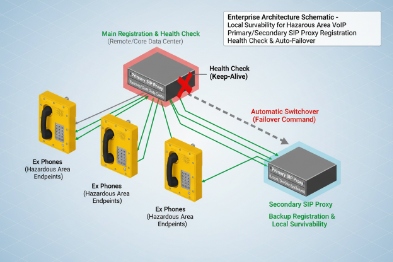
Primary and secondary SIP proxies (most common)
Phones can be provisioned with:
- Primary proxy
- Secondary proxy
- Optional tertiary proxy
When the primary fails, the phone re-registers to the secondary. The failover timers must avoid flip-flop. A stable design uses:
- Reasonable heartbeat/OPTIONS intervals
- A hold-down timer before returning to primary
DNS-SRV for service discovery
DNS-SRV 3 can publish multiple SIP servers with priorities and weights. This reduces manual configuration and supports failover when one server is down. It works best when:
- DNS is reachable in outages (local DNS server)
- TTL values are reasonable
- The phones and PBX both support SRV behavior consistently
Registrar caching and survivable designs
“Registrar caching” is often misunderstood. Many SIP endpoints do not keep calling ability purely from cached registration if the server is gone, because calls still need a route. What works better is:
- A local survivable PBX or local registrar on site
- A gateway that can accept calls and route them locally
In plants and refineries, a common pattern is a local call server for the site and a trunk to the central system. If the WAN fails, local calls continue.
| Failover method | What it protects against | What it does not protect against | One setup tip |
|---|---|---|---|
| Secondary proxy | Server outage | LAN outage | Use hold-down timers |
| DNS-SRV | Partial server loss | DNS outage | Use local DNS in site |
| Local survivable PBX | WAN loss | Power loss | Place on UPS and redundant links |
Failover keeps VoIP alive during server or WAN problems, but it does not help if the IP network itself is down. That is where FXS or cellular fallback comes in.
Do FXS gateways or GSM/LTE routers provide PSTN or cellular fallback when the IP network is down?
If the LAN is down, SIP phones cannot reach each other. In that case, you need a separate communication path. Some sites treat this as a “last-resort” design for critical stations only.
Yes. An FXS/FXO gateway can provide PSTN fallback paths, and a GSM/LTE router can provide cellular fallback. These options work best when the gateway and power are protected and when the phone workflow is simple, such as a hotline to a fixed number.
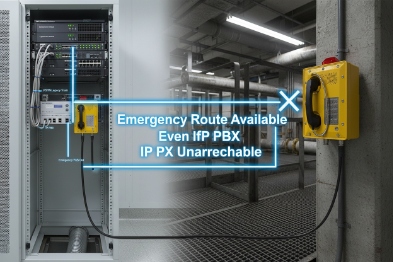
FXS/FXO gateway fallback
There are two common patterns:
- FXS gateway provides analog ports for analog phones. This is useful if the site keeps a small analog emergency line system.
- FXO gateway connects to PSTN 4 lines or PABX analog trunks, providing a backup route for calls.
For SIP Ex phones, the gateway still needs IP in the local segment. If the whole LAN is down, a gateway does not help unless there is a separate protected subnet and switch that stays up on UPS. That is why gateway fallback is usually paired with a “survivable cabinet” design: UPS, protected switch, and a small gateway.
GSM/LTE fallback
A cellular router or gateway can provide:
- Backup trunk for the PBX during WAN outage
- Direct emergency calling path when wired networks fail
This design must consider:
- Coverage in the hazardous zone (often external antennas are needed)
- SIM and carrier policy
- Cybersecurity rules and segmentation
- Whether cellular use is allowed in that area and under what certification and installation constraints
What to specify for a realistic fallback design
Fallback should be limited to the most critical stations:
- Muster points
- Control room help points
- High-risk process areas
It should not be assumed as “every phone has PSTN backup.” That is expensive and complex.
| Fallback option | Best for | Key dependency | Common failure if ignored |
|---|---|---|---|
| PSTN via gateway | Last-resort voice | UPS 5 + protected cabinet | Gateway loses power during outage |
| LTE router trunk | WAN backup | Coverage and policy | No signal in plant interior |
| Dedicated analog line | Highest assurance | Separate wiring | Maintenance and testing neglected |
Once fallback paths exist, resilience is the final piece. Resilience is mostly power and network discipline: UPS on PoE, loop control, dual paths, and watchdog alerts.
What resilience is needed—PoE with UPS, dual LAN, STP/RSTP loops, and watchdog alerts for offline scenarios?
Resilience is not one feature. It is a set of small decisions that keep the phone reachable when something breaks.
For offline scenarios, the core resilience needs are UPS-backed PoE, redundant uplinks (often fiber rings), careful loop control with STP/RSTP, optional dual LAN only when it is truly redundant, and watchdog plus monitoring alerts so failures are detected early.
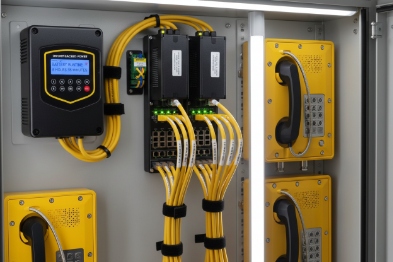
PoE with UPS: keep endpoints alive
PoE phones die when switches die. A practical design includes:
- UPS for critical PoE 6 switches
- PoE budget margin for peak loads
- Monitoring of PoE events and brownouts
A refinery or offshore project often places a small UPS in each communications cabinet for the zone. That local UPS prevents “one cabinet power dip = many dead phones.”
Dual LAN: only useful when it is real redundancy
Dual LAN can mean a pass-through port, which does not create redundancy. True redundancy needs:
If the site uses a ring, a managed switch at the endpoint is often cleaner than relying on phone pass-through ports.
STP/RSTP loop control: prevent broadcast storms
Tunnel and plant networks can suffer from accidental loops. A loop can make phones appear “offline” even though nothing is broken physically. Using STP/RSTP 8 and disciplined port settings prevents storms. It also protects multicast paging performance.
Watchdog and alerts: detect offline before crews do
Devices should expose:
- SIP registration state
- Link status
- PoE voltage events if available
- Reboot reason codes
Alerts can be sent via SNMP 9 traps or syslog to NMS. A good policy also includes a “degraded” state before “offline” to reduce false alarms.
| Resilience feature | What it prevents | Best practice | Where to apply first |
|---|---|---|---|
| UPS-backed PoE | Mass endpoint loss | UPS per zone cabinet | Muster points and CCR paths |
| Redundant uplinks | Single cable cut outages | Fiber ring or dual uplink | Long corridors and remote zones |
| STP/RSTP | Loop storms | Managed switch discipline | Paging and CCTV shared networks |
| Monitoring alerts | Silent failures | SNMP traps and syslog 10 | All critical phones |
| Failover proxies | PBX outages | Secondary SIP proxy | Control room and ERT stations |
A strong offline strategy is staged:
- Keep local calling alive without WAN.
- Keep emergency hotline alive even when PBX fails.
- Provide one non-IP last resort path for critical points.
- Keep power and switching protected so “offline” becomes rare.
Conclusion
Explosion-proof SIP telephones can place calls when “offline” in PBX or WAN outages using hotline, peer SIP, multicast, and SIP failover. True LAN-down resilience needs UPS-backed PoE and an independent fallback path like PSTN or cellular for critical points.
Footnotes
-
SIP Session Initiation Protocol; a signaling protocol used for initiating, maintaining, modifying and terminating real-time sessions. ↩
-
Multicast paging A network efficiency method where a single audio stream is sent to a group of IP devices simultaneously. ↩
-
DNS-SRV A Service record in the Domain Name System used to identify computers that host specific services. ↩
-
PSTN Public Switched Telephone Network; the traditional circuit-switched telephone network. ↩
-
UPS Uninterruptible Power Supply; a device that provides emergency power when the input power source fails. ↩
-
PoE Power over Ethernet; technology that passes electric power along with data on twisted pair Ethernet cabling. ↩
-
failover A backup operational mode in which the functions of a system component are assumed by secondary system components. ↩
-
STP/RSTP Spanning Tree Protocol / Rapid Spanning Tree Protocol; network protocols that prevent loops in bridge/switch networks. ↩
-
SNMP Simple Network Management Protocol; a standard for collecting and organizing information about managed devices on IP networks. ↩
-
syslog A standard for message logging that allows separation of the software that generates messages from the system that stores them. ↩








