

Manual provisioning of Ex phones eats shutdown time and invites mistakes. One wrong SIP proxy or VLAN tag can leave a hazardous zone without a working hotline.
Some explosion-proof SIP telephones support TR-069 remote management, but it is not universal. If you need it, confirm TR-069 plus the right voice data model, secure HTTPS to an ACS, and a tested NAT/firewall plan.

A practical TR-069 blueprint for Ex SIP phones in hazardous sites
First, separate “Ex compliance” from “remote management”
Explosion-proof certification covers ignition risk. TR-069 covers remote configuration and monitoring. These topics meet in one place: installation. The phone may sit in Zone 1 or Zone 2, but the ACS and management tools should sit in a safe control room network. That design keeps audits simple and reduces risk during maintenance.
Know what TR-069 can and cannot do for a SIP phone
TR-069 is strongest when the same policy must be applied to hundreds of endpoints: SIP credentials, proxy lists, QoS markings, VLAN tags, syslog targets, and firmware levels. TR-069 is weaker when the device vendor only implements a small subset of the data model 1. In that case, the ACS can “see” the phone, but it cannot change the key voice objects you care about.
A useful project rule is: treat TR-069 support like a feature set, not like a checkbox. A vendor should show the supported data model objects and a sample parameter tree. A short lab test should confirm that a change pushed from the ACS actually updates the SIP behavior.
Use a minimum “TR-069 readiness” checklist
| Item | What “good” looks like | Why it matters in hazardous operations |
|---|---|---|
| Data model coverage | Voice objects + network objects are writable | Enables real policy control, not read-only |
| Secure transport | HTTPS with modern TLS, strong auth | Prevents config tampering |
| Firmware delivery | Controlled download + verification | Reduces bricking and rollback risk |
| NAT/firewall plan | CPE-initiated sessions + tested keepalive | Keeps remote management stable |
| Change control | Logs, roles, and approvals | Supports compliance and audits |
A short story from the field
On a coastal terminal project, a site had only manual provisioning for phones on jetties. A storm caused power cycling, and several endpoints returned to default SIP settings. The control room could not see which phones were misconfigured. A simple remote management layer with locked templates would have prevented the outage window from turning into a troubleshooting week.
The next sections break TR-069 into four decisions: standards coverage, zero-touch setup, secure delivery, and NAT/firewall behavior.
If these decisions are clear on paper, deployment becomes simple on site.
Which TR-069/TR-369 standards should an Ex SIP phone support?
A vendor can say “TR-069 supported,” but the phone still may not expose voice objects. Then the team ends up managing SIP settings by hand again.
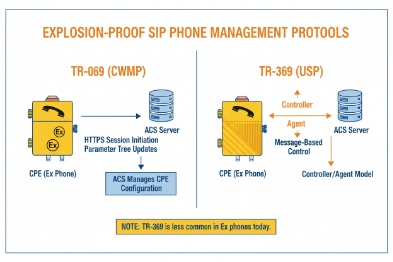
For SIP endpoints, the most practical target is TR-069 with a voice data model (TR-104 VoiceService) and the modern device model (TR-181 Device:2). TR-369 (USP) is the newer path, but support is less common in industrial endpoints today.
TR-069 (CWMP): the management protocol layer
TR-069 2 defines how the device talks to the ACS using HTTP/SOAP. This is the “remote management pipe.” If the pipe exists but the data model is missing, you still cannot manage SIP well.
TR-104: the voice feature layer
TR-104 defines VoiceService objects for VoIP CPE. A SIP endpoint that truly supports TR-104 3 can expose parameters for lines, SIP servers, codecs, and service behavior. This is the main difference between “TR-069 visible” and “TR-069 manageable” for voice.
TR-181 and TR-106: the device model layer
TR-181 Device:2 is widely used for network objects, interfaces, and management server settings. TR-106 is a template for defining data models and profiles. In procurement language, it is enough to ask for “TR-181 Device:2 coverage for network and management objects, plus TR-104 for voice.”
TR-369 (USP): the newer management framework
TR-369 4 (USP) is positioned as a successor to TR-069. USP supports different message transport options like MQTT, STOMP, and WebSocket. That can be attractive for event-driven monitoring. Still, many industrial SIP devices are not USP agents. If the site has a strong reason to standardize on USP, request it, but do not assume it is available.
| Standard | What it controls for a SIP phone | What to ask the vendor to show |
|---|---|---|
| TR-069 (CWMP) | Remote sessions, RPC, file transfer | Supported protocol version + ACS settings objects |
| TR-104 | Voice provisioning objects | A parameter tree showing VoiceService objects |
| TR-181 (Device:2) | Interfaces, IP, VLAN, management server | Supported profiles and writable parameters |
| TR-369 (USP) | Modern event and controller model | Which MTP is supported and how auth works |
A simple tender line that works well is: “TR-069 with TR-104 VoiceService and TR-181 Device:2 data model support, including writable parameters for SIP lines, proxy lists, and firmware management.”
Once standards coverage is clear, the next step is bootstrapping. Zero-touch provisioning is where most rollouts save time.
How do you enable zero-touch provisioning with TR-069?
A phone that requires manual entry of ACS URL and credentials is not “remote managed” in a real project. It is a maintenance trap.
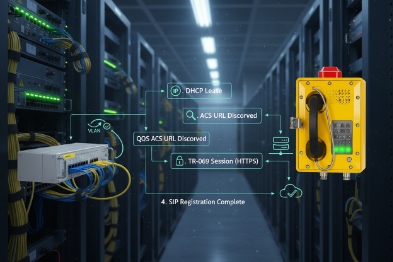
Zero-touch TR-069 usually uses DHCP options to deliver provisioning pointers, then the phone contacts the ACS URL with stored credentials and sends periodic Inform messages. The clean goal is: power on, get an IP, reach ACS, receive config, and register to SIP without a technician typing anything.
Step 1: Decide the bootstrap method
Common bootstrap methods include:
-
DHCP Option 66 for a server reference (often used for provisioning servers)
-
DHCP Option 43 5 for vendor-specific data
-
A factory default ACS URL baked into firmware (less flexible)
-
A DNS name that resolves to the ACS inside the management VLAN
In many hazardous sites, the simplest setup is a dedicated voice VLAN that provides the right DHCP options and DNS. This keeps phones from “wandering” into the wrong network during replacement work.
Step 2: Define the ACS URL and credentials workflow
Credentials can be set in several ways:
-
Unique per device (stronger security, more admin effort)
-
Per site or per group (easier operations, tighter RBAC needed)
-
Mutual TLS with certificates (best security, more PKI work)
The ACS URL should be reachable from the site LAN even during WAN outages if survivability matters. Many plants place the ACS inside the site data center or in the control network with controlled routing.
Step 3: Set Inform behavior that fits plant networks
Periodic Inform is how the phone checks in. Too frequent can create noise. Too slow can delay updates and alarms. A practical approach is:
-
Short interval during initial onboarding
-
Longer interval during steady operation
-
Faster check-in for critical phones like muster points
Step 4: Use profiles, not per-device hand edits
A good ACS design uses templates:
-
“Process Unit Ex Phones”
-
“Tank Farm Ex Phones”
-
“Muster Point Phones”
Each profile sets the same SIP and network policy for that zone.
| Provisioning input | Typical use | Best practice in industrial sites |
|---|---|---|
| DHCP Option 66 | Provisioning pointer | Use a dedicated voice VLAN scope |
| DHCP Option 43 | Vendor bootstrap data | Document sub-options and keep it stable |
| ACS URL | Management endpoint | Use DNS name, not hard-coded IP |
| Periodic Inform | Check-in and tasks | Tune intervals per phone criticality |
Zero-touch is only safe when delivery is secure. Firmware and config channels must be protected so a phone cannot be hijacked.
Can firmware and configs be delivered securely via TR-069?
A remote management channel is also a remote attack path. That risk is higher in critical infrastructure and hazardous sites.
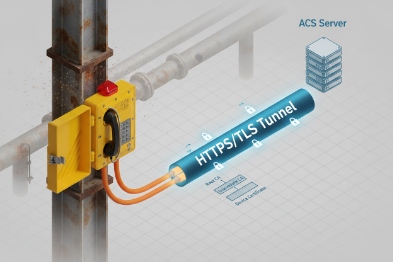
Secure TR-069 delivery should use HTTPS/TLS for ACS sessions, strong authentication (digest or certificates), and controlled file downloads for firmware and configs. A secure design also uses signed firmware, staged rollout groups, and rollback rules to avoid mass outages.
Use HTTPS/TLS as the baseline
HTTP should not be used for management in a modern industrial deployment. TLS protects credentials and config payloads in transit. It also reduces the chance of a man-in-the-middle attack on a shared plant network.
Pick an authentication method that fits your operations
Common choices:
-
HTTP Digest authentication 6 for ACS sessions
-
Client-side certificates (mutual TLS) for high-security environments
-
Device-bound credentials with strict RBAC on the ACS
Client certificates improve identity assurance, but they require certificate lifecycle handling. Digest is simpler but depends on strong secrets and transport security.
Treat firmware like a controlled change, not a file copy
Firmware delivery should follow rules:
-
Use a test group first (lab and one field zone)
-
Roll out by zone, not by the whole refinery at once
-
Verify firmware integrity and version after upgrade
-
Keep a rollback plan if call quality changes
Control who can push what
A hazardous site often needs role separation:
-
Helpdesk can view status
-
Voice engineer can change SIP templates
-
Security admin controls certificates and credentials
-
Only a small group can push firmware
| Security control | What it protects | What to implement |
|---|---|---|
| TLS to ACS | Confidentiality and integrity | HTTPS only, modern ciphers |
| Strong auth | Device identity | Digest + strong secrets or mutual TLS |
| Signed firmware | Anti-tamper | Vendor signing and device verification |
| Change control | Operational safety | Staged rollout, approvals, audit logs |
Security is not finished until the system works across the real network perimeter. Many sites have NAT, firewalls, and segmented VLANs. A TR-069 plan must handle this without constant manual work.
Will TR-069 work across NAT and firewalls?
Many teams worry about NAT because they imagine the ACS must “reach in” to the phone. That is not how steady-state TR-069 usually works.
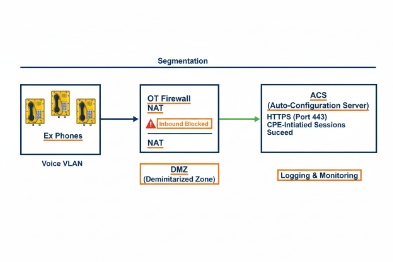
TR-069 is NAT-friendly because the device normally initiates sessions to the ACS. Remote “connection requests” can be harder behind NAT, so sites rely on periodic Inform, or use NAT traversal methods like STUN-based keepalive where supported.
Start with the default TR-069 behavior: CPE-initiated sessions
In normal operation, the phone opens an outbound HTTP/HTTPS session to the ACS and exchanges RPC. Firewalls usually allow outbound traffic from the voice VLAN to a defined ACS address. This is the cleanest model for industrial sites because it is easy to audit.
Understand the connection request problem
A connection request 7 is when the ACS tries to trigger the device to start a session now. If the phone sits behind NAT, inbound requests may fail. This is the cleanest model for industrial sites because it is easy to audit.
They depend on:
-
Periodic Inform check-ins
-
Shorter Inform intervals for critical phones
-
Scheduled maintenance windows for major pushes
When you need near-real-time actions
Some deployments use NAT gateway traversal 8 techniques with STUN keepalive, so the ACS can send a request through a maintained binding. This needs careful tuning:
-
Keepalive interval must be shorter than the NAT binding timeout
-
The site must allow the necessary UDP/TCP flows
-
The phone must support the feature consistently
Use proxy settings and split DNS where needed
Plants often use proxies or segmented routing. A stable design includes:
-
A management ACL that allows the phone to reach the ACS
-
Local DNS that resolves ACS names during WAN outages
-
Clear proxy behavior if HTTPS inspection exists
| Network obstacle | What breaks | Fix that usually works |
|---|---|---|
| Strict firewall | ACS unreachable | Allow outbound HTTPS to ACS only |
| NAT behind gateways | Inbound connection request fails | Use periodic Inform or STUN keepalive |
| WAN outage | Central ACS unreachable | Local ACS or survivable management node |
| VLAN segmentation | Wrong DHCP/DNS | Dedicated voice VLAN with stable options |
For hazardous sites, the simplest and most reliable rule is: keep the ACS reachable from the site LAN, and rely on outbound sessions and periodic Inform for most operations. Use connection requests only when the vendor proves it works through your real firewall design.
Conclusion
TR-069 can work well on Ex SIP phones when the device truly supports voice data models, onboarding 9 is zero-touch, delivery is secure, and NAT/firewall 10 behavior is planned and tested before rollout.
Footnotes
-
[Standardized object definitions used by TR-069 to manage device features and configurations.] ↩
-
[Technical Report 069, a protocol for remote management of end-user devices via ACS.] ↩
-
[Broadband Forum standard defining data models for provisioning VoIP services on CPE devices.] ↩
-
[User Services Platform, the evolution of TR-069 designed for IoT and complex environments.] ↩
-
[DHCP option used to provide vendor-specific configuration information to devices during boot.] ↩
-
[Authentication method verifying identity using a cryptographic hash of the password.] ↩
-
[Mechanism allowing the ACS to initiate a management session with the CPE on demand.] ↩
-
[Techniques used to establish connections across Network Address Translation boundaries.] ↩
-
[Automated process of configuring devices for network access without manual intervention.] ↩
-
[Security system monitoring and controlling incoming and outgoing network traffic.] ↩








