
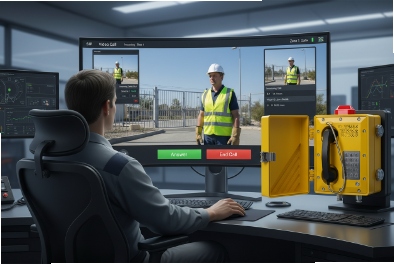
Many teams order an Ex phone and only later realize the guard needs to see the visitor. Then the site adds a random camera and the workflow breaks.
Yes, some explosion-proof telephones support video intercom, but only when the product is designed and certified as a video SIP endpoint. Many Ex phones are audio-only, so video is usually done with an Ex-rated camera module or a separate IP camera and a clean network plan.
A simple decision map before you talk to any vendor
Video support is not “a firmware feature” in hazardous areas
Video adds a camera, optics, LEDs, higher power draw, and often a bigger window or display. In hazardous zones, those parts must still meet the same safety targets as the phone enclosure. That is why many Ex telephones stay audio-only. The design and certification work is easier, and long-term reliability is higher.
Two architectures that work in real projects
Most industrial projects end up in one of these setups:
1) Integrated Ex video intercom device
A single Ex-certified unit includes camera + SIP video + optional ONVIF/RTSP. This is clean for installation and user training. It is also the hardest to certify and the most expensive to change later.
2) Ex audio telephone + separate IP camera
The Ex phone handles calls and alarms. A nearby camera handles video. The camera can be Ex-rated if it is in the hazardous zone, or it can be placed outside the boundary and aimed at the door or gate. This option is flexible and often cheaper to maintain.
A quick table to pick the right path
| Project goal | Recommended approach | Why it fits |
|---|---|---|
| One device, one cable, simple operations | Integrated Ex video intercom | Fewer boxes and fewer integration points |
| Fast deployment, low maintenance risk | Ex audio phone + separate camera | Easier replacements and more camera choices |
| VMS recording is mandatory | Separate camera with ONVIF/RTSP + Ex phone | VMS 1 workflows are mature with IP cameras |
| Harsh washdown and salt fog | 316L Ex phone + 316L Ex camera or remote camera | Keeps optics and seals manageable |
| Future upgrades likely | Separate camera architecture | Camera technology changes faster than phones |
In my experience, a clear architecture choice early saves weeks later. It also prevents the classic problem where a PBX supports video, but the endpoint cannot, and the site discovers it during FAT.
Now the next sections break down the standards, camera pairing options, network and power needs, and integration with PBX, PAGA, and recording.
If you want fewer surprises, treat video intercom as a full system: endpoint, camera, network, recording, and operations.
Which video standards are supported—SIP video, H.264/H.265, ONVIF/RTSP, and dual-stream for VMS?
Procurement often asks for “video capable,” but that phrase hides a lot. Some devices can show video on an app but cannot talk to a VMS. Some can stream RTSP but cannot do SIP video calling.
Most video-capable SIP intercom endpoints use SIP signaling with RTP media and encode video using H.264. H.265 shows up on some platforms, but H.264 is still the safer compatibility choice. ONVIF/RTSP is used when the video must go to a VMS/NVR, and dual-stream helps by separating a high-quality recording stream from a lower-bandwidth live call stream.

SIP video: what it really means
SIP video intercom usually means the endpoint can negotiate a video call through a SIP PBX or SIP server, then deliver video over RTP 2. This is great for guard stations, softphones, and indoor stations. Still, not every PBX handles video the same way. Many projects solve this by defining the exact call endpoints:
-
guard client type (softphone, indoor station, desk phone, web client)
-
codec set (H.264 profile and level)
-
resolution and frame rate for live viewing
H.264 vs H.265: why many sites still choose H.264
H.265 can reduce bandwidth at the same quality, but compatibility can be weaker across PBX clients, mobile apps, and recording systems. H.264 3 is widely supported and easier for mixed platforms. For hazardous sites, stability and compatibility often beat the “best compression” story.
ONVIF and RTSP: for VMS and NVR workflows
If the site wants the video in a VMS, the easiest path is an RTSP stream, and ONVIF can help for discovery and profile-based control. In many projects, the SIP call is for interaction, while the RTSP stream is for recording and evidence.
Dual-stream: the detail that stops bandwidth fights
Dual-stream 4 is valuable because live calls and recording have different needs:
-
A live call can use lower resolution to reduce latency and bandwidth.
-
Recording should use higher resolution and a stable bit rate.
| Standard or feature | What it is used for | What to specify in a tender |
|---|---|---|
| SIP video | Live intercom calls | SIP video supported, codec list, call endpoints defined |
| H.264 | Broad compatibility | H.264 profile and resolution range |
| H.265 | Lower bandwidth option | Optional support only if PBX/VMS confirms compatibility |
| RTSP | Streaming to NVR/VMS | RTSP URL format 5, authentication, stream stability requirements |
| ONVIF | VMS discovery and control | ONVIF profile support and events support if needed |
| Dual-stream | Separate live and record streams | Main stream + sub stream settings and bitrate limits |
A video spec becomes solid when it lists what must work together. A simple rule helps: SIP is for calls, ONVIF/RTSP is for surveillance workflows, and dual-stream keeps the network stable.
How do Ex telephones pair with cameras—integrated Ex d camera or remote IP camera near hazardous zones?
Many buyers assume the camera can be added later. In hazardous zones, that is often the moment the project gets expensive.
Explosion-proof video intercom is done either with an integrated Ex-certified camera inside the same enclosure concept, or with a separate camera near the point of use. If the camera sits inside the hazardous zone, it must match the zone, gas group, and temperature class. If it sits outside the zone boundary, a standard IP camera can be used, but the field of view and mounting must still meet operational needs.

Option 1: Integrated Ex video unit
An integrated Ex video unit is clean for installers. One device, one mount, one network drop. It is also clean for operators, because the call and the video come from the same source.
The tradeoffs are real:
-
Camera windows and seals become critical in washdown, dust, and salt fog.
-
Power draw increases, which can push PoE requirements up.
-
If the camera module fails, the whole unit might need service in the hazardous area.
Option 2: Separate camera in the hazardous zone
If the camera must be close and inside the zone, then the camera must be Ex-rated. This works well when the site already has an Ex camera program and spare parts. It also allows higher-performance cameras than many integrated intercom units.
The key detail is workflow:
-
The Ex phone triggers the call.
-
The guard client opens the associated camera view in the VMS or a linked RTSP stream.
-
Event triggers link phone button presses to camera bookmarks.
Option 3: Remote camera outside the zone boundary
This is the most flexible approach when the hazardous boundary 6 is near the door or gate. The phone stays Ex inside the zone. The camera sits outside and looks in. This can reduce cost and simplify maintenance, but it needs careful planning:
-
avoid backlighting and glare
-
avoid blind spots from pipe racks and structures
-
ensure night lighting is stable
| Camera pairing approach | Compliance path | Best fit use case | Main risk |
|---|---|---|---|
| Integrated Ex video intercom | One Ex-certified device with camera | Simple gates and doors | Harder service if camera fails |
| Ex audio phone + Ex camera | Both are Ex-rated | High-security sites with VMS standards | More integration work |
| Ex audio phone + non-Ex camera outside boundary | Camera outside hazardous area | Tank farms and terminals with clear boundaries | Field of view and lighting issues |
A good project starts with the hazardous area drawing and the camera view plan together. That avoids the common mistake where the phone is installed correctly, but the camera ends up seeing only helmets and not faces.
What network and power options are required—PoE/PoE+, dual LAN, VLAN/QoS, and multicast?
Video intercom is easy on paper and hard on weak networks. If the switch is underpowered or the VLAN plan is messy, video becomes unstable first.
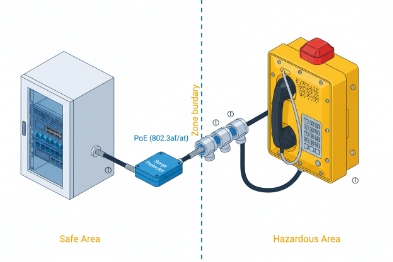
Video-capable Ex intercom endpoints usually need PoE or PoE+ with clear power budgeting, plus a network design that supports VLAN separation and QoS. Dual LAN is helpful for redundancy or daisy-chain layouts, and multicast is used for paging and mass alert tones when the site runs PAGA or plant-wide paging.
PoE and PoE+: power budget must match real load
Audio-only SIP endpoints often fit standard PoE. Video adds camera load, IR or white LEDs, and sometimes heaters. That can push the device into PoE+ 7 territory. The correct step is to size the power budget with headroom:
-
per port budget (what the switch can deliver)
-
cable length voltage drop
-
peak load during ringing, streaming, and LED use
Dual LAN: why some industrial sites ask for it
Dual LAN can support:
-
ring or redundant paths in industrial Ethernet designs
-
separation between voice network and security network in some architectures
-
simplified field wiring in specific layouts
Still, dual LAN is not a cure for poor network design. It must match the site’s switching and redundancy rules.
VLAN and QoS: keep voice stable while video runs
Video can use more bandwidth than voice. If the site does not control traffic, video bursts can harm call quality. A practical approach is:
-
a voice VLAN for SIP endpoints
-
QoS marking for SIP and RTP
-
rate control where needed on uplinks
-
correct IGMP snooping 8 when multicast paging is used
Multicast: very useful for alarms and paging
Many sites use multicast paging for:
-
tone broadcast
-
emergency instructions
-
zone paging
This can work well with video intercom, but it requires network readiness. Without IGMP control, multicast can flood ports and cause strange failures.
| Network feature | Why it matters | What to write in a tender |
|---|---|---|
| PoE / PoE+ | Stable power for video and LEDs | PoE class requirement and max watt draw |
| Dual LAN | Redundancy or topology needs | Dual LAN required only if network supports it |
| VLAN | Segmentation and security | Voice VLAN support and 802.1Q tagging |
| QoS | Call stability under load | DSCP marking support and priority queues |
| Multicast | Paging and alarms | IGMP support and multicast paging features |
| Security | Prevent misuse | TLS/SRTP options and strong password policy support |
A strong network plan makes video intercom feel simple. A weak plan makes it feel random. For harsh sites, stability always wins.
Can video calls integrate with PBX, PAGA, and recording—NVR compatibility, event triggers, and API/SDK?
A video intercom that cannot integrate becomes a standalone toy. The goal is a workflow: call, view, record, alert, and report.
Yes, video intercom can integrate with PBX, PAGA, and recording when the endpoint supports SIP video for calls and RTSP/ONVIF for VMS. Event triggers can be done through DTMF, SIP events, dry-contact relays, or HTTP-style APIs. A clean API/SDK and clear recording options are what make the system scalable across terminals and platforms.

PBX integration: define the video endpoints and the call flow
PBX integration is easy when the PBX supports SIP video and the operator client can decode the chosen codec. A reliable call flow includes:
-
who gets called first (guard group, control room, mobile)
-
what happens on no-answer (fallback group)
-
whether recording is required at the PBX level
If PBX video is uncertain, many sites keep PBX for audio and use VMS for video. This avoids call client mismatch issues.
Recording: two clean ways to do it
Recording usually follows one of these patterns:
-
NVR/VMS recording via RTSP/ONVIF streams, which is standard for security teams.
-
Call recording in the voice system, which captures audio and sometimes video depending on the platform.
In industrial projects, security teams often trust NVR recording more because it fits their retention, export, and evidence workflows.
PAGA integration: alarms need priority rules
A phone alarm should be able to:
-
trigger a local siren or strobe
-
trigger a paging message
-
override normal paging with emergency priority
This is often done using multicast paging, SIP paging groups, or a relay output that signals a paging controller. The key is priority. If emergency paging competes with routine announcements, it will fail at the worst time.
Event triggers and API/SDK: the difference between “demo” and “deployment”
Large sites need automation:
-
button press triggers camera pop-up on the guard console
-
call connects triggers recording bookmark
-
door release triggers access control event log
-
alarm input triggers paging and strobe sync
Endpoints can support this by:
-
DTMF triggers
-
dry-contact relay outputs
-
SIP event messages (like NOTIFY in some designs)
-
ONVIF events 10 in camera systems
| Integration target | Best method | What to verify before rollout |
|---|---|---|
| PBX call control | SIP (audio + video if supported) | Codec compatibility and client support |
| VMS recording | RTSP + ONVIF | Stream stability, auth, dual-stream control |
| PAGA paging | Multicast or SIP paging | Priority rules and network multicast readiness |
| Strobe/siren | Relay output or local control | Wiring, contact ratings, and test procedure |
| Automation | API/SDK + event mapping | Documentation quality and version control |
When integration is planned well, video intercom becomes a reliable part of a safety and security workflow. It stops being a “nice feature” and becomes a tool the site actually uses every day.
Conclusion
Explosion-proof video intercom is possible, but it must be designed as a certified video SIP endpoint and planned with camera placement, PoE budget, VLAN/QoS, and VMS/PAGA integration from day one.
Footnotes
-
[Software used to manage camera streams, recording, and video analytics in security systems.] ↩
-
[Network protocol used for delivering audio and video over IP networks.] ↩
-
[Industry-standard video compression format widely used for recording and streaming.] ↩
-
[Feature allowing cameras to send two separate video streams for different purposes like viewing and recording.] ↩
-
[Network control protocol designed for use in entertainment and communications systems to control streaming media servers.] ↩
-
[Specific area within a plant where explosive atmospheres may occur, requiring strict equipment certification.] ↩
-
[Enhanced Power over Ethernet standard delivering higher wattage for devices like PTZ cameras and heaters.] ↩
-
[Network switch feature that constrains multicast traffic to only the ports that have requested it.] ↩
-
[Methods allowing different software applications to communicate and exchange data.] ↩
-
[ONVIF pr ↩








