

A SIP Ex telephone can work on day one, but still feel “invisible” to operations. Then alarms get missed and maintenance becomes reactive.
Yes. Explosion-proof telephones can integrate with SCADA through network protocols, alarms via relays/IO, and middleware. The cleanest approach is to expose call states and faults as SCADA tags, then secure and test the full path end-to-end.
A practical SCADA integration blueprint for Ex telephones
Start with the integration goal, not the protocol
Many teams begin with “Does it support Modbus?” The better first question is “What does SCADA need to know and do?” In most plants, SCADA wants three things: status, alarms, and control. Status means the phone is online and registered. Alarms mean emergency call, tamper, door open, or line fault. Control means triggering a siren, strobe, or paging output, or forcing a call workflow through the voice platform.
Use a layered architecture that fits hazardous sites
An Ex telephone sits at the edge. SCADA 1 usually lives deeper in the network. A simple layered plan helps:
-
Edge layer: the Ex phone and any local IO modules in the hazardous zone.
-
Control layer: PLC/RTU or an industrial gateway in a cabinet (often safer to service).
-
Supervisory layer: SCADA server, historian, alarm management, and operator HMI.
This is why many successful projects do not require the phone to speak OPC UA directly. The phone exposes events via SIP, SNMP, HTTP, or relay outputs. A gateway maps that to SCADA tags.
Choose one of three proven patterns
Pattern A: Direct network integration
This fits when IT and OT are aligned and the phone supports a stable interface such as SNMP traps or webhooks. It is fast for digital status.
Pattern B: PLC-based hardwired integration
This fits when SCADA teams trust discrete IO more than IP events. The phone triggers a relay. The PLC reads the input. The PLC pushes tags to SCADA.
Pattern C: Middleware event broker
This fits large sites with many endpoints and a need for rich events. A server collects SIP events, device status, and alarms. It publishes to MQTT, OPC UA, or REST.
| Integration pattern | Best for | Strength | Weak point |
|---|---|---|---|
| Direct IP (SNMP/webhooks) | Small to mid sites | Quick and low wiring | Needs good network security |
| Relay to PLC | Safety-first plants | Simple and trusted in OT | Limited detail unless more IO is used |
| Middleware broker | Large sites and multi-vendor | Rich data and scale | Needs server support and change control |
Define success criteria early
A phone is “integrated” only when operators can see it, alarms are actionable, and the system survives failures. A strong success statement is simple:
-
SCADA shows online/registered, fault, emergency, and heartbeat.
-
SCADA logs events with timestamps and device IDs.
-
Alarms still work during network issues, using local paging or relay logic.
If this part is clear, protocol selection becomes easy. The next sections show the interface options, the tag mapping, the security rules, and a commissioning plan that plants accept.
This is the point where many projects either become clean and repeatable, or become custom work every time.
Which interfaces connect to SCADA—Modbus TCP, OPC UA, MQTT, SNMP traps, or REST webhooks?
When a buyer asks for “SCADA integration,” they often expect the phone to speak an OT protocol natively. Many SIP endpoints do not. Still, integration is straightforward when the right interface is chosen.
The most common SCADA interfaces for Ex telephones are SNMP (polling and traps), REST webhooks, and relay/IO to a PLC. Modbus TCP, OPC UA, and MQTT are often delivered through an industrial gateway or middleware that converts phone events into OT-friendly data.

Modbus TCP 2 is simple and widely used, but most telephones do not publish Modbus registers by default. The clean path is:
-
phone event → gateway → Modbus registers
-
or phone relay output → PLC input → SCADA tags
Modbus shines when SCADA wants stable integer registers and bitmaps. It is also easy for OT teams to maintain.
OPC UA: best for standardized data models and long-term OT strategy
OPC UA fits sites that want secure, structured data and vendor-neutral integration. For telephony events, OPC UA usually comes from middleware, not from the handset device. The advantage is clean naming and security methods. The cost is extra system components.
MQTT: best for event streaming and large fleets
MQTT fits when the site wants event-driven messaging and fleet monitoring. A broker can collect:
-
phone status
-
emergency events
-
fault events
-
heartbeat signals
MQTT is very efficient, but it needs a good security plan and clear topic naming.
SNMP traps: the practical favorite for device status
SNMP 3 is common because many network devices already use it. For SIP phones, SNMP can cover:
-
registration status
-
link up/down
-
power and reboot events
-
alarm states if the vendor supports MIB objects
Traps are useful for “push” events. Polling is useful for dashboards.
REST webhooks: best for modern integrations and custom workflows
Webhooks are simple. The phone or a server sends an HTTP call when an event happens. This is very useful for:
-
emergency button pressed
-
tamper switch triggered
-
device fault
-
call connected or ended
A webhook is easy to route into an event broker, a SCADA integration service, or a ticketing system.
| Interface | Best use | Typical data type | Notes for Ex phone projects |
|---|---|---|---|
| Modbus TCP | PLC tag mapping | Bits, ints, words | Often via gateway or PLC |
| OPC UA | Unified OT model | Structured nodes | Usually via middleware |
| MQTT | Event streaming | Topics and payloads | Great for fleets and analytics |
| SNMP | Monitoring and traps | Status and alarms | Fast win for network teams |
| REST webhooks | Workflow triggers | Event messages | Easy to integrate with many systems |
A practical reality is this: the protocol choice should match the plant’s operating model. If the plant lives in PLC logic, use relays and Modbus. If the plant lives in IT monitoring, use SNMP and webhooks. If the plant needs scale, add MQTT or OPC UA 4 through middleware.
Next, tags and alarms must be designed. Without a clean tag map, SCADA screens become noise and operators ignore them.
A SCADA point list that is too large becomes unreadable. A point list that is too small becomes useless. The goal is a small set of high-value tags.
Call states and alarms are mapped as discrete SCADA tags, often grouped into status, alarm, and control sets. The core tags are off-hook, call active, emergency event, device fault, relay state, and a heartbeat that proves end-to-end health.

Many plants get strong results with a compact tag set per device. The tags can be Boolean bits plus a few integers. A clean structure looks like this:
-
Status bits: online, registered, link up, off-hook, call active
-
Alarm bits: emergency, tamper, fault, power issue
-
Control bits: trigger strobe, trigger siren, reset alarm latch
-
Health values: heartbeat counter, last event code, last event timestamp
This design supports operations and maintenance without creating an endless tag list.
Emergency events should not disappear when the call ends. Many sites use a latch rule:
-
Emergency goes TRUE and stays TRUE until acknowledged.
-
The acknowledgment is logged with user and time.
-
The phone can also flash a local indicator until acknowledged.
This matches how operators work. It also supports incident reviews.
Heartbeat is the most important tag
A phone can look online while the integration path is broken. A heartbeat proves the full chain. There are two common methods:
-
a counter increments every X seconds (SCADA expects it to change)
-
a toggle bit flips every X seconds
If the heartbeat stops changing, SCADA alarms “integration loss” even if the phone still powers on.
Map relays and inputs like a small IO module
If the phone has dry-contact relays and inputs, treat them like IO:
-
Relay1_State, Relay2_State
-
Input1_State (door contact, tamper)
-
Input2_State (external alarm)
This keeps logic simple and matches PLC thinking.
| SCADA tag | Type | Meaning | Typical alarm rule |
|---|---|---|---|
| Phone_Online | Bool | Device reachable | Alarm if FALSE > 60s |
| SIP_Registered | Bool | Registered to PBX | Alarm if FALSE > 60s |
| OffHook | Bool | Handset lifted | Log only, alarm optional |
| Call_Active | Bool | In call | Log for analytics |
| Emergency_Active | Bool (latched) | Emergency button or code | High alarm until ack |
| Fault | Bool | Device self-fault | Medium alarm |
| Tamper | Bool (latched) | Cover or bracket switch | High alarm in security areas |
| Relay1_State | Bool | Siren or strobe control | Track for proof of action |
| Heartbeat | Int or Bool | Integration health | Alarm if not changing |
If the plant wants more detail, use one integer tag:
-
Last_Event_Code (example: 1001 emergency, 1002 fault, 1003 tamper)
-
Last_Event_Text can be kept in the middleware log 5, not in SCADA
This avoids tag explosion while still allowing smart alarms.
Now the integration is “data complete.” The next step is “safe and stable.” OT networks and hazardous sites require strict security and predictable traffic behavior.
What network and security requirements apply—VLAN/QoS, TLS, VPN, firewall rules, and read-only roles for operators?
A SCADA link that is open and flat will get blocked by IT later. A link that is locked down without planning will fail on day one. Both outcomes waste time.
Explosion-proof telephones integrate best when voice and SCADA data are segmented with VLANs, QoS is applied for RTP, and security is enforced with TLS, VPN where needed, firewall rules, and role-based access. Operators should have read-only roles for status screens, while only authorized admins can change device or integration settings.
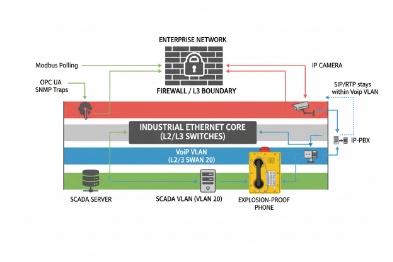
VLAN and QoS: stop voice from fighting control traffic
Voice and video are sensitive to jitter. SCADA is sensitive to reliability. A practical setup:
-
Voice devices in a Voice VLAN
-
SCADA collectors or gateways in an OT services VLAN
-
QoS marking 6 for SIP and RTP so calls remain stable during network load
-
Multicast control if paging is used
This is simple and it scales. It also makes troubleshooting easier.
Firewall rules: allow only what is needed
A common pattern is a controlled “SCADA DMZ” or services zone:
-
Phones talk to the PBX and the monitoring gateway.
-
SCADA reads tags from the gateway, not from the phones directly.
-
The firewall allows only specific ports and directions.
This reduces exposure and keeps compliance teams happy.
TLS and VPN: protect management and event paths
For SIP endpoints, TLS and SRTP can protect signaling and media when required by the project. For SCADA integration, protect the event channel:
-
HTTPS for webhooks
-
TLS for MQTT
-
secure OPC UA modes where applicable
VPN is useful when sites connect multiple terminals or remote depots. Still, VPN should be owned by the network team and documented.
Read-only roles: stop accidental changes
A common failure is an operator “fixing” a phone by changing network settings. A good role model is:
-
Operator role: view status, acknowledge alarms
-
Maintenance role: run tests, reboot device under control
-
Admin role: change configuration, firmware, and security keys
This also improves audit readiness.
| Security control | What to implement | Why it matters |
|---|---|---|
| Segmentation | VLANs and ACLs | Limits blast radius |
| Least privilege | Read-only operator views | Prevents accidental changes |
| Encryption | TLS/HTTPS, secure MQTT/OPC UA | Protects data and credentials |
| Firewall policy | Allow-list rules | Cuts down attack surface |
| Logging | Syslog or central logs | Speeds incident review |
| Change control | Versioned configs and approvals | Prevents drift across batches |
A secure plan is not only about hacking. It is also about uptime. Less chaos means fewer strange faults and fewer midnight calls.
Now the final step is commissioning. A SCADA integration is only real after it passes acceptance tests, including failover and local PAGA behavior.
How do I test and commission—point lists, simulator tools, acceptance criteria, and failover with local PAGA paging?
Many integrations look perfect on paper and fail in the field because the test is too shallow. A good test proves behavior, timing, and recovery.
Commissioning should use a point list, event simulation, and clear acceptance criteria for each tag and alarm. The test should also prove failover behavior, including local PAGA paging or relay-based alerts when the SCADA path is down.

Step 1: build a point list that matches the HMI
A point list is not a spreadsheet exercise. It is the contract between OT and voice teams. A good point list includes:
-
tag name, type, and scaling
-
alarm priority and delay
-
latch and acknowledgment rules
-
source of truth (phone, gateway, PLC)
-
expected update rate
This avoids the common fight where voice teams deliver events and SCADA teams do not know how to display them.
Step 2: use simulator tools and controlled triggers
Testing should not rely only on “real emergencies.” Use controlled triggers:
-
lift handset (off-hook)
-
place and end a call (call active)
-
trigger emergency (button, DTMF, input)
-
simulate fault (disconnect Ethernet, remove PoE, block SIP)
-
test relay outputs (strobe and siren)
A gateway or middleware should also provide a simulator mode, so SCADA can be tested before field devices arrive.
Step 3: define acceptance criteria that operations trusts
Acceptance criteria should be measurable:
-
Tag update within X seconds
-
Alarm latches correctly
-
Acknowledge clears latch and logs user/time
-
Heartbeat changes at defined interval
-
After power loss, phone returns and registers within a defined time
-
After network loss, system recovers without manual edits
Step 4: prove failover and local alerting
In hazardous sites, a SCADA outage must not stop emergency awareness. A practical plan:
-
phone emergency triggers a local siren/strobe via relay
-
phone triggers local PAGA paging via multicast or contact to a paging controller 7
-
SCADA receives the event when it comes back, with proper timestamps
This “local first” behavior keeps safety actions reliable.
| Test case | How to trigger | Expected result | Pass rule |
|---|---|---|---|
| Heartbeat loss | Block gateway to SCADA | Alarm “integration loss” | Alarm within defined delay |
| Emergency event | Press emergency / DTMF | SCADA alarm + local strobe | Latch + log + local action |
| SIP registration drop | Disable PBX route | SIP_Registered FALSE | Alarm after delay, auto-recover |
| PoE loss | Remove PoE | Phone_Online FALSE | Alarm and recovery on restore |
| Relay action | Trigger alarm output | Relay tag changes | Output matches tag state |
| Failover paging | Break SCADA link | Local PAGA still works | Paging works without SCADA |
Step 5: document as-built and lock it
After acceptance, lock:
– firmware versions
– device config templates
– gateway mapping tables
– firewall rule set
– backup and restore method
This protects future expansion. It also makes batch QC traceability 8 easier for B2B deployments.
Conclusion
Explosion-proof telephones can integrate with SCADA when events become clean tags, networks are segmented and secured, and commissioning proves alarms, heartbeat, and failover with local PAGA support.
Footnotes
-
[Supervisory Control and Data Acquisition systems used for monitoring and controlling industrial processes.] ↩
-
[Communication protocol enabling devices to exchange data over Ethernet networks.] ↩
-
[Simple Network Management Protocol used for managing and monitoring network devices.] ↩
-
[Open Platform Communications Unified Architecture, a machine-to-machine communication protocol for industrial automation.] ↩
-
[Software that acts as a bridge between an operating system and applications, facilitating data management.] ↩
-
[Quality of Service mechanisms that prioritize specific data traffic to ensure network performance.] ↩
-
[Device managing public address announcements and alarm signals in industrial communication systems.] ↩
-
[Process of tracking product quality through manufacturing stages to ensure consistency and compliance.] ↩








