

Wrong time breaks incident reports. It also breaks call logs. Then a real emergency turns into an argument about what happened first.
Explosion-proof SIP telephones usually sync time using NTPv4 or SNTP. Better systems add secure NTS authentication, redundant servers, and an RTC fallback so logs stay usable during outages, audits, and maintenance windows.

The time-sync basics that keep Ex phones audit-ready
Why time sync matters more for hazardous-area phones
An Ex telephone is often used during incidents. The phone is also used during drills. That means call records are not only for billing. They are evidence. A one-hour offset can ruin a timeline. A one-day offset can kill trust in the whole system.
Time also touches safety features:
-
Scheduled tone tests
-
Priority paging windows
-
Door release logs
-
Alarm input timestamps
What “good time” looks like in the field
A practical target is simple:
-
The phone is within a few seconds of the site reference clock.
-
The phone stays stable after power loss and network loss.
-
The phone reports when time is not trusted.
-
The system logs include timezone and DST rules clearly.
The three layers of time sources
Explosion-proof phones normally rely on a layered time plan:
1) Primary: NTP/SNTP from an on-prem server
2) Secondary: backup NTP servers (same site or another site)
3) Fallback: local RTC 2 that keeps time moving until NTP returns
A stable design also avoids the “jump back and forth” effect. A phone that keeps stepping time forward and backward can make logs confusing. A small drift is better than random jumps.
| Time source | Strength | Weak point | Best use |
|---|---|---|---|
| On-prem NTP (Stratum 1/2) | Stable and low latency | Needs good site setup | Primary for refineries and terminals |
| Public NTP | Easy to reach | Often blocked and risky | Only for small non-critical sites |
| PBX time sync | Simple for call logs | Not always precise | Useful as a secondary reference |
| Local RTC | Works offline | Drifts over days | Short outages and PoE bounce |
A clear plan makes the phone boring. That is a compliment. It means time is not a daily problem.
The next sections cover protocols, server setup, security rules, and timezone/DST handling so the logs stay clean for audits.
Which time protocols are supported—NTPv4/SNTP, NTS authentication, or local RTC fallback?
Cold boots, PoE drops, and network segmentation are normal in industrial sites. The time protocol must survive those realities.
Most explosion-proof SIP telephones support NTPv4 or SNTP. Some platforms add NTS for authenticated time. Almost all designs rely on an RTC fallback to keep the clock running during short outages, then resync when the network returns.
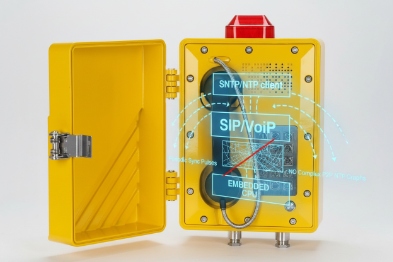
NTPv4 vs SNTP in plain terms
NTPv4 is the full protocol. It supports better filtering and control. SNTP 3 is a lighter version. Many SIP endpoints say “SNTP” but behave like basic NTP clients.
For hazardous-area phones, the practical difference is not the label. The difference is behavior:
-
Can the phone handle multiple servers?
-
Does it keep time stable between sync cycles?
-
Does it log sync loss?
-
Does it avoid large sudden time jumps?
NTS: secure time for high-trust environments
NTS (Network Time Security) adds authentication so the device can trust the time source. This matters when:
-
the network is shared
-
the site has strict audit rules
-
the phone triggers alarms or access workflows based on time
NTS is not always available on embedded SIP endpoints. When it is missing, the normal solution is to secure time at the network layer using on-prem servers and strict allowlists.
RTC fallback: the quiet feature that saves audits
RTC fallback is the safety net. It keeps time moving when:
-
PoE power bounces
-
switches reboot
-
NTP is blocked during maintenance
Still, RTC is never perfect. Drift is normal. Drift depends on temperature and component quality. In outdoor -40 to +70°C environments, drift can be more visible.
A simple rule works:
-
RTC covers minutes and hours.
-
NTP covers days and weeks.
-
Logs should mark whether time is “trusted.”
What to request in a vendor checklist
| Feature | What to ask for | Why it matters |
|---|---|---|
| Protocol support | NTPv4 4 /SNTP and number of servers | Redundancy and stability |
| Secure time | NTS support or secured on-prem NTP design | Prevents spoofed time |
| RTC behavior | Drift spec or typical drift range | Predicts offline log accuracy |
| Sync status | Web UI or SNMP/syslog sync state | Helps commissioning and audits |
When these points are clear, the phone becomes easy to manage across many sites.
Next, the server side decides most outcomes. A good NTP server setup fixes many endpoint issues without touching firmware.
How should servers be configured—DHCP Option 42, primary/secondary pools, and on-prem Stratum 1 with GPS?
Many projects hardcode a single NTP IP. Then the server is patched, and every phone drifts at the same time.
A strong setup uses DHCP Option 42 (or provisioning) to push NTP servers, at least two servers in a primary/secondary pool, and an on-prem Stratum 1 reference using GPS where the site needs high trust.
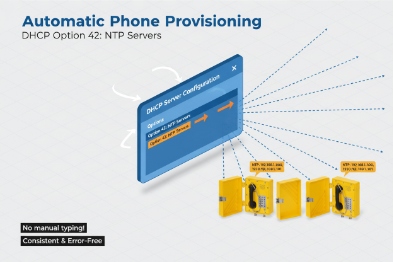
Use on-prem NTP for industrial sites
For refineries, tank farms, and terminals, on-prem NTP is the most stable choice. Public NTP is often blocked. Even when it is reachable, it can create policy and security problems.
A common pattern that works well:
-
One GPS-backed clock source (Stratum 1 5) in the main control building
-
One secondary NTP server (Stratum 2) in another cabinet or another building
-
Phones point to both servers
This setup also reduces latency. Low latency reduces jitter. Low jitter improves stability.
Primary/secondary pools and why two is the minimum
Two servers cover most maintenance events. Three or four servers cover larger sites and multi-building networks.
A simple pool plan:
-
Primary: local Stratum 1 or Stratum 2 inside the OT zone
-
Secondary: another local server on a different switch stack
-
Optional: a third server at a disaster recovery site
The phone should not “spray” the network with frequent queries. The server should also rate-limit and log.
DHCP Option 42: the clean way to scale
DHCP Option 42 6 can push NTP server IPs to endpoints. This is useful when the site has hundreds of devices. It is also useful when replacing servers.
Still, DHCP is not always used for voice endpoints. Many SIP deployments use static IP or device provisioning. In that case, the same idea still applies:
-
Put NTP servers in the provisioning template
-
Version the template
-
Keep change control tight
GPS Stratum 1: when it is worth the effort
GPS-backed NTP is worth it when:
-
audits require a traceable time source
-
incident timelines must match other systems (DCS, CCTV, access control)
-
the plant runs multi-site correlation and SOC tools
In smaller sites, a Stratum 2 server synced to a trusted upstream can be enough. The key is consistency.
| Server design choice | Best practice | Practical note |
|---|---|---|
| NTP count | 2 minimum, 3 preferred | Prevents single point failure |
| Reference clock | GPS for high-trust sites | Place antenna and cable carefully |
| Distribution | Local Stratum 2 servers per area | Reduces cross-site dependency |
| Endpoint config | DHCP Option 42 or provisioning template | Avoid manual per-phone edits |
Once servers are set, security becomes the next gate. Many OT teams block UDP 123 by default. That is normal. The design must work with that reality.
What network and security rules apply—UDP 123 allowlists, TLS for NTS, and offline drift thresholds?
Time is a service. Services need rules. Without rules, NTP becomes a security hole or a blocked port that breaks logs.
Most sites allow NTP using UDP 123 with strict allowlists to local NTP servers only. If NTS is used, key setup also needs TLS to the NTS server. A strong operations plan sets drift thresholds and alarms when a phone has not synced for a defined time window.
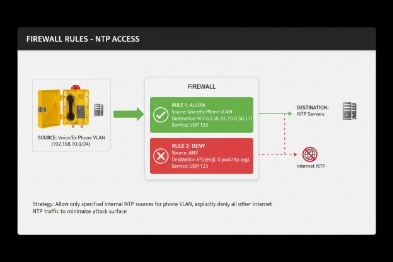
Allowlist rules that keep OT teams calm
A simple firewall rule set often works:
-
Phones (voice VLAN) can send UDP 123 only to the local NTP servers.
-
Phones cannot reach public NTP servers.
-
NTP servers can reach their upstream sources, if needed, from a controlled zone.
This makes audits easy. It also reduces attack surface.
NTS security detail that is easy to miss
If NTS is used, the device needs a secure key exchange. That typically means a TLS session to the NTS-capable server. Some networks forget this and allow only UDP 123. Then NTS fails and the device falls back to unauthenticated time or no time.
A clear rule helps:
-
Allow UDP 123 to the NTP/NTS server 7.
-
Allow the required TLS path to the same server for NTS, if the endpoint supports it.
-
Block everything else.
Offline drift thresholds: a real operational policy
A phone will go offline sometimes. The key is how long it stays “time blind.”
A practical policy for audits:
-
If no NTP sync for 15 minutes: warning
-
If no sync for 60 minutes: alarm for critical phones
-
If no sync for 24 hours: service ticket and investigation
The exact numbers depend on site needs. The important part is having a rule at all.
Make time status visible
Time sync should not be hidden. A good deployment exposes:
-
last sync time
-
current NTP server in use
-
sync state (synced / holdover / unsynced)
-
drift estimate if available
This can be shown in a device dashboard or collected by SNMP and syslog.
| Security item | What to enforce | Why it matters |
|---|---|---|
| Port control | UDP 123 allowlist | Stops rogue NTP use |
| NTS support | TLS path for key exchange | Enables authenticated time |
| Rate limits | Limit NTP query burst | Prevents network noise |
| Monitoring | Alert on sync loss | Keeps logs audit-ready |
| Holdover policy | Drift thresholds and actions | Avoids silent long drift |
Now the last piece is the human-facing part. Operators read logs in local time. Auditors want clear stamps. Time zones and DST can ruin that if handled casually.
How are time zones, DST, and log stamps managed—auto time zone, PBX sync, and audit compliance?
A phone can have perfect UTC time and still confuse everyone if the timezone is wrong. Then the call log looks “off” even when the NTP is fine.
Best practice is to keep the clock synced by NTP in UTC, then apply the correct timezone and DST rules at the device or at the logging system. Large deployments often push timezone via provisioning. PBX sync can align call records, but NTP should remain the primary reference for audits.
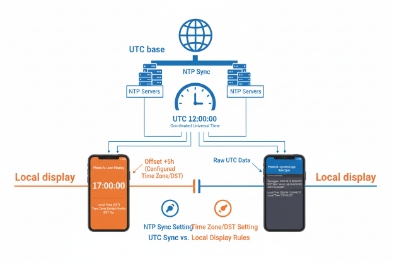
Use UTC as the technical truth
Many systems store logs in UTC 8. That reduces confusion across sites and time changes. The operator screen can still show local time.
A stable approach:
-
Devices keep accurate time (often UTC internally)
-
Logs include UTC timestamp
-
Reports display local time using a controlled timezone setting
This avoids DST “double hour” problems during the fall shift.
Auto timezone is not always available in industrial endpoints
Some devices can auto-detect timezone. Many cannot. In many real projects, timezone is set by:
-
provisioning file (most common)
-
PBX template and device profile
-
manual setting for small sites
The key is consistency. A site should not mix manual timezone settings across devices.
DST handling must be predictable
DST changes 9 can break scheduled tasks and confuse logs. A clean method is:
-
Define DST rules in the device provisioning template
-
Use region-based rules, not ad-hoc manual dates
-
Test DST behavior during FAT if the project is strict
If the plant does not use DST, disable it at the device and at the PBX. That sounds simple, but it prevents future confusion.
PBX sync: helpful, but not the main clock
Some PBX platforms can push time or at least align call records. That helps user experience, but it should not replace NTP. NTP is designed for time integrity. PBX time can drift if the PBX drifts.
A reliable audit approach uses:
-
NTP as the clock source
-
PBX logs and phone logs both tied to NTP
-
syslog collectors also tied to the same NTP
Audit compliance: make timestamps defensible
When audits matter, the evidence must show:
-
the time source used (server identity)
-
the last sync state near the incident
-
the timezone setting used for display
-
the device identity for each log entry
| Audit item | What to standardize | What it proves |
|---|---|---|
| Timestamp format | ISO-like format 10 with timezone offset | Clear human interpretation |
| Sync state logging | Synced vs holdover vs unsynced | Trust level of logs |
| Timezone policy | Provisioned, not manual | Repeatable across batches |
| Cross-system alignment | PBX, NVR, SCADA, syslog share NTP | Clean incident timelines |
This is where time sync becomes a business tool. It reduces disputes. It also reduces time wasted during investigations.
Conclusion
Ex telephones sync time best with redundant on-prem NTP, strict network allowlists, optional NTS, and a clear timezone policy that keeps logs consistent during outages and audits.
Footnotes
-
[Security Information and Event Management systems that analyze log data for threat detection.] ↩
-
[Real-Time Clock, a hardware component that tracks time even when the main device is powered off.] ↩
-
[Simple Network Time Protocol, a simplified version of NTP for time synchronization.] ↩
-
[IETF standard for Network Time Protocol version 4, ensuring accurate timekeeping.] ↩
-
[Reference time server level connected directly to a high-precision time source like GPS.] ↩
-
[DHCP option specifying the IP addresses of NTP servers for network clients.] ↩
-
[Protocol providing cryptographic security for NTP to prevent time spoofing.] ↩
-
[Coordinated Universal Time, the primary time standard for regulating clocks worldwide.] ↩
-
[Adjustments made to clocks to extend evening daylight, impacting system time settings.] ↩
-
[International standard for date and time representation to ensure global consistency.] ↩








