
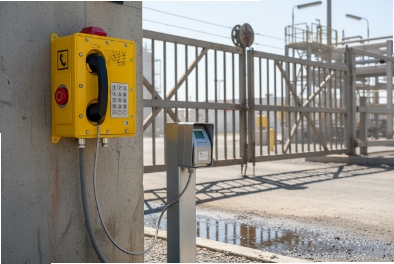
A door that does not unlock during an emergency is a safety risk. A door that unlocks too easily is a security risk. In hazardous areas, both risks get worse because maintenance is harder.
Yes. Explosion-proof SIP telephones can integrate with access control by using certified relay I/O for door strikes, linking SIP/video calls to operator actions, and exporting events to access platforms, VMS, and PSIM/BMS. The key is to keep the “secure side” logic in the safe area and keep hazardous-area wiring simple and compliant.
Access control integration is really three problems: wiring, workflow, and safety compliance?
A lot of projects start with “We need the Ex phone to open a door.” Then problems appear:
- The door strike draws more current than the phone relay can switch.
- The access control vendor wants OSDP and encrypted reader links, but the phone only has a dry contact.
- Fire code requires unlock on alarm, but the integration path is not defined.
- The hazardous-area certificate restricts what wiring and glands can be used.
A stable design treats access control integration as three separate problems.
1) Wiring and electrical interface
The phone can trigger a relay, but the access controller should still be the “authority” for door rules. In most industrial designs, the Ex telephone provides a trigger, not the full access control logic. This reduces risk and keeps audits clean.
2) Workflow and audit trail
Access control must be traceable. “Operator pressed a key” is not enough. The system should log: who unlocked, when, why, and from which call point. The best designs tie door unlock to a SIP 1 call record and a VMS clip.
3) Safety compliance and fail-safe behavior
In hazardous areas, compliance is strict. In public egress paths, fail-safe rules matter. During fire alarm, egress must not be blocked. During power loss, the door should behave according to the life safety plan. The phone integration must never defeat fire alarm interlocks.
| Design goal | Best practice in industrial access projects | What usually goes wrong |
|---|---|---|
| Safe wiring | Phone relay triggers controller input | Phone relay wired directly to lock power |
| Traceability | Unlock logged in PBX/VMS/access system | No event logging, hard to audit |
| Life safety | Fire alarm overrides access | Unlock logic ignores fire alarm |
| Compliance | Certified glands and segregation | Non-certified adapters and mixed cabling |
This foundation makes the next questions easier. The rest of this article answers your four points: interfaces, call flows, standards and rules, and platform connections.
Which interfaces handle door strikes and readers—dry contact relays, 12/24V, Wiegand, OSDP, RS-485, and PoE power budgets?
Most Ex telephones do not replace an access controller. They provide a reliable trigger and an intercom voice path. The access controller manages readers, credentials, schedules, and rules.
The most common interface is a dry-contact relay from the Ex telephone into an access controller or into a safe-area relay module. 12/24V door strikes should be powered by the access control PSU, not by the phone. Wiegand/OSDP/RS-485 are usually handled by the controller or reader, while the phone integrates via I/O, SIP, and platform APIs. PoE budgets must include phone load plus any powered accessories.
Dry contact relays: the safest and most universal method
A relay output from the phone can:
- Trigger a request-to-exit input on the controller
- Trigger a door unlock input on a relay module
- Trigger an alarm input for forced entry workflows
This works across vendors because it is simple. It also keeps high-current lock power away from the phone.
12/24V strikes: use the controller PSU and a proper relay module
Door locks can draw surge current. Many locks also need flyback suppression. The safe method is:
- Use the access controller or a certified relay module to switch lock power
- Let the Ex phone provide a low-power “unlock trigger”
- Keep lock power wiring in safe areas when possible
Wiegand and OSDP: reader buses belong to the controller
Wiegand 2 and OSDP 3 are reader interfaces. Ex telephones typically do not speak those protocols directly. If a project needs a keypad and reader at the door in a hazardous area, then the access control vendor should provide a certified reader and controller solution. The Ex phone stays as intercom and trigger.
OSDP is often preferred over Wiegand in modern projects because it supports better security features, but that decision is on the access control side. The phone does not need to “understand” OSDP to support intercom and unlock.
RS-485: common for door controllers and I/O expanders
- I/O expanders
- Elevator controllers
- Door modules
A phone can interface indirectly by triggering a controller input or by sending events to the platform that controls the RS-485 modules. Direct RS-485 from a phone is less common in hazardous-area phones, because it adds wiring and protocol complexity inside the Ex boundary.
PoE and power budgets: plan for worst-case load
PoE 5 power planning must include:
- The phone’s peak draw (not only idle)
- Any camera module if video is included
- Any beacon or backlight load
- Any PoE heater option if the phone supports it
A tight PoE budget can cause reboots and missed unlock actions. In access control, that is a real security issue.
| Interface | What it controls | Best practice | Why it is safer |
|---|---|---|---|
| Dry contact relay | Unlock trigger | Relay → controller input | Keeps access rules centralized |
| 12/24V lock power | Strike/maglock | Controller PSU + relay module | Handles current and suppression safely |
| Wiegand | Reader data | Reader → controller | Established access control model |
| OSDP | Reader data + supervision | Reader → controller | Better security and supervision |
| RS-485 | I/O expansion | Controller bus | Cleaner wiring and maintenance |
| PoE | Phone power | Margin and UPS | Prevents brownouts and flaps |
The wiring method is the base. The next question is the user experience: how does a call actually unlock a door, and how does the system log it?
How do call flows unlock doors—SIP call, video preview, DTMF code, timed relay, and event logging?
Unlock workflows must be fast, but also controlled. A seaport or refinery often needs remote gate release for deliveries, but every unlock must be auditable.
The typical workflow is: phone calls the guard desk or control room, operator verifies audio/video, operator sends DTMF or clicks an “unlock” button, and the controller triggers a timed relay. Events are logged in the PBX/intercom platform and in the access control system, with optional VMS clip linkage.
Workflow option 1: Operator unlock after SIP call (most common)
1) Visitor presses call button or lifts handset.
2) SIP call goes to guard desk group.
3) Operator answers and verifies request.
4) Operator unlocks door using UI or DTMF.
5) Access controller energizes strike for a fixed time (for example, 3–10 seconds).
6) Event is logged.
This workflow is simple and works even if video is not available.
Workflow option 2: Video preview + unlock
When the phone has a camera, video makes verification faster.
- The call triggers a video pop-up on the guard screen.
- The operator unlocks from the same screen.
- The VMS can store a clip linked to the call.
This is useful for unmanned remote gates and hazardous-zone doors.
Workflow option 3: DTMF code unlock with strict guardrails
- Trigger phone relay output directly
- Trigger a PBX feature code that calls an API or controller input
- Trigger a gateway that drives a relay module
DTMF is convenient, but it needs guardrails:
- Use per-operator codes or per-call session tokens when possible
- Rate-limit and lock out repeated failures
- Do not use universal codes shared across the site
- Log every attempt
Timed relay: always prefer timed unlocking
Timed relays reduce risk. An operator should not manually hold a relay open for long periods. A timed unlock also supports compliance with access rules. The unlock time should match door mechanics and user flow.
Event logging: make it audit-friendly
A complete audit story includes:
- Call record (caller ID, time, duration)
- Unlock event (who, when, which door, duration)
- Optional video clip reference
If the phone itself triggers a relay, the phone log should still export events to the monitoring platform.
| Unlock method | Who controls the decision | Audit quality | Risk level |
|---|---|---|---|
| Operator UI unlock | Access platform | Strong | Low |
| DTMF unlock via PBX | PBX policy | Medium to strong | Medium |
| Phone relay direct unlock | Phone | Weak unless integrated | Higher |
| Timed relay | Controller | Strong | Low |
| Video-assisted unlock | Guard desk | Strongest | Low |
Once workflows are clear, the next requirement is standards and safety rules. A door system in hazardous areas must obey Ex rules, and it must obey life safety rules like fail-safe egress.
What standards and safety rules apply—ATEX/IECEx, NEC Class/Division, fail-safe egress, fire alarm interlock, and intrusion panel links?
Access control touches life safety. In many jurisdictions, fire alarm systems override access control. In hazardous areas, Ex rules control wiring, glands, and energy limits.
You must match ATEX/IECEx or NEC Class/Division requirements at the device location, keep non-certified power and control gear in safe areas, and ensure doors follow fail-safe egress rules and fire alarm interlocks. Intrusion panel links should be read-only or controlled to avoid unsafe lock states during emergencies.
Ex compliance: keep it within the certified configuration
Key rules in practice:
- Use certified cable glands that match the phone entry thread and cable type.
- Do not add non-approved adapters that may change sealing or flame paths.
- Keep wiring segregation rules for intrinsically safe circuits when used.
- Treat relay I/O wiring as part of the installation scope.
When a phone is Ex i or when any circuit must be intrinsically safe, barriers or isolators usually belong in the safe area or certified enclosures. That avoids adding complexity in the hazardous area.
Fail-safe egress: doors must not trap people
Egress rules vary by site and jurisdiction, but the operational principle is consistent:
- People must be able to exit safely during emergency conditions.
- Power loss behavior must match the life safety plan.
- Manual release devices and emergency exit hardware must be respected.
An Ex phone should never be the only method to open an egress door.
Fire alarm interlock: fire overrides access
A safe access design includes:
- Fire alarm input to the access controller
- Defined “fire mode” behavior (unlock or hold open, as required)
- Clear testing procedure during commissioning
The Ex phone can help with incident communication, but it should not interfere with the fire logic.
Intrusion panel links: keep roles clear
Intrusion systems can receive door status and alarms. They can also drive lock states in some designs. In safety-critical doors, avoid designs where an intrusion panel can block egress or override fire mode. The best practice is “monitoring first,” then “controlled action” only where the site policy allows.
| Safety rule | Who should enforce it | Why it matters |
|---|---|---|
| Ex cable entry and wiring | Installer + safety inspector | Keeps certification valid |
| Door egress behavior | Access controller + hardware | Prevents trapped occupants |
| Fire override | Fire system + access controller | Life safety priority |
| Security override limits | Operator policy | Prevents unsafe lock states |
Now that safety rules are clear, the last question is platform connectivity. Many sites want one platform view: VMS + access + intercom + building management.
How can systems connect with VMS and platforms—ONVIF/RTSP, SIP multicast, HTTP API/SDK, and MQTT to PSIM/BMS?
Integration value appears when events move automatically: call starts → video pops up → door unlock logged → beacon triggers → alarm record created.
Systems connect using ONVIF/RTSP for video, SIP/multicast for paging and broadcast, HTTP APIs/SDKs for access events and commands, and MQTT when the site uses an OT message bus for PSIM/BMS. A clean integration uses one event broker or PSIM as the “single pane of glass,” while keeping access decisions inside the controller.
VMS integration: video pop-up and recording linkage
If the Ex phone includes a camera or is paired with a camera:
- RTSP provides video streams.
- ONVIF 7 can support discovery and event triggers in many setups.
- The platform can pop video on call events and store a clip linked to the call.
If the phone has no camera, the same event logic can still open the nearest fixed camera view.
SIP multicast: paging and emergency announcement
For large sites, multicast 8 paging can:
- Send emergency announcements to intercom endpoints
- Support area paging from the control room
- Trigger predefined “broadcast” actions during alarms
HTTP API/SDK: the strongest path for audit and control
Many modern access platforms expose APIs:
- Create an unlock event
- Validate operator action
- Pull door status and alarm history
An API integration improves audit quality compared with DTMF-only unlock because it records identity and context in the access platform.
MQTT to PSIM/BMS: good when the site uses an OT message bus
MQTT 9 is useful when the site already uses an event bus for alarms and telemetry. It can publish:
- Door forced open alarms
- Phone offline events
- Call active events
- Beacon active events
MQTT should be secured (TLS, authentication, topic governance). It should also be rate-limited to avoid event storms during outages.
| Platform | Best connection method | What to exchange | One practical control |
|---|---|---|---|
| Access control | API + I/O | Unlock commands and logs | Keep controller as authority |
| VMS | ONVIF/RTSP + events | Video pop-up and recording | Map events to camera IDs |
| PSIM | API + MQTT | Unified incident workflow | Use a single event schema |
| BMS | MQTT or gateway | Status and health | Publish only necessary states |
Conclusion
Explosion-proof telephones can integrate with access control when relays trigger controllers, call flows are simple and logged, safety rules override security, and platform APIs connect audio, video, and events into one incident workflow.
Footnotes
-
SIP Session Initiation Protocol; a signaling protocol used for initiating, maintaining, and terminating real-time sessions. ↩
-
Wiegand A standard interface used for card readers and sensors in access control systems. ↩
-
OSDP Open Supervised Device Protocol; a secure, bi-directional communication standard for access control devices. ↩
-
RS-485 A standard defining the electrical characteristics of drivers and receivers for use in serial communications systems. ↩
-
PoE Power over Ethernet; technology that passes electric power along with data on twisted pair Ethernet cabling. ↩
-
DTMF Dual-Tone Multi-Frequency signaling; the system used for telephone signaling over the line in the voice-frequency band. ↩
-
ONVIF An open industry forum for the development of a global standard for the interface of physical IP-based security products. ↩
-
Multicast A group communication method where data transmission is addressed to a group of destination computers simultaneously. ↩
-
MQTT A lightweight messaging protocol for small sensors and mobile devices, optimized for high-latency or unreliable networks. ↩








