
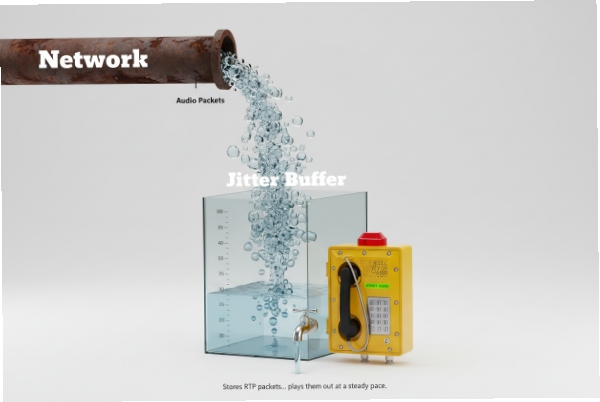
Choppy audio in a hazardous area feels like a hardware fault. Most times it is only jitter and late packets, so the phone “drops” parts of speech.
Yes, many SIP explosion-proof telephones allow jitter buffer tuning. The real limits depend on the embedded SIP stack, but fixed and adaptive modes are common, and PLC usually masks short loss bursts when the network is not overloaded.
How jitter buffer control works on Ex SIP telephones in the real world
Explosion-proof SIP telephones use the same RTP audio flow as standard enterprise SIP phones. The Ex housing protects against ignition risk. The jitter buffer 1 protects the user experience. These are separate topics, so adjusting jitter settings does not change Ex safety, as long as the firmware and configuration stay inside the certified product scope and change control.
A jitter buffer sits on the receive side. It stores RTP packets for a short time, then plays them out at a steady pace. If packets arrive late, the buffer can wait longer. If packets arrive too late, they get discarded and become “late loss.” If the buffer is too small, you hear gaps. If it is too large, you hear extra delay and talk-over.
Most industrial sites want stable speech first. That usually means an adaptive jitter buffer with a sensible maximum. Fixed jitter buffers still have a place, but only when the network delay variation is very stable and predictable.
The best way to think about tuning is a trade:
-
More buffering = fewer late packets, fewer gaps, more delay.
-
Less buffering = less delay, more late loss, more gaps.
Here is a simple view that procurement teams can understand:
| Goal | Better jitter mode | Typical downside | Best use case |
|---|---|---|---|
| Lowest delay | Fixed / Low | more late loss | clean LAN, short paths |
| Highest stability | Adaptive | more delay during congestion | WAN, Wi-Fi, shared links |
| Stable dispatch audio | Adaptive with capped max | small extra delay | refineries, terminals |
If a project has to work on day one, the safest plan is: start with adaptive, verify call quality, then tighten delay only after you see real network jitter.
Now it helps to break the topic into the exact questions that matter in FAT and commissioning.
A clear answer for each one keeps the phone team, the network team, and the Ex compliance team aligned.
Are dynamic and fixed jitter modes supported?
Jitter buffer settings are often hidden, and field teams only see the result: “good today, bad tomorrow.” That is a mode-control problem.
Many SIP stacks used in industrial and Ex telephones support both Adaptive (dynamic) and Fixed jitter buffer modes. Adaptive follows network conditions. Fixed holds a constant playout delay and is easier to predict but easier to break under sudden jitter.
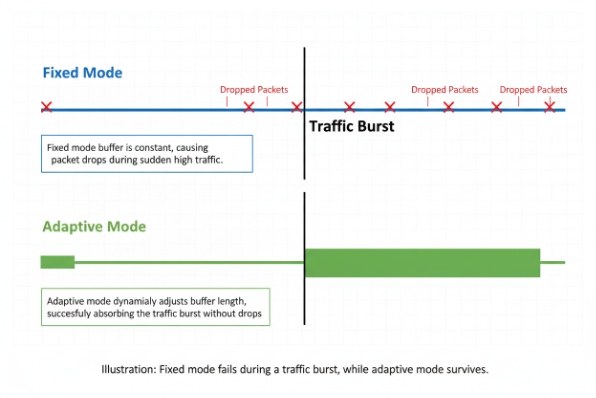
Adaptive mode is the default choice in many enterprise endpoints because it can expand when the network becomes busy. This reduces late loss. Fixed mode is useful when the network is controlled, such as a dedicated voice VLAN with strict QoS 2 and low jitter.
In the field, a fixed buffer can look perfect for ten minutes, then fail during a traffic burst. That is because fixed mode cannot absorb extra delay variation. Adaptive mode can.
For hazardous-area phones, the goal is usually reliability, not low-latency gaming. So the normal approach is:
-
Use Adaptive on WAN, Wi-Fi, radio backhaul, and mixed traffic.
-
Use Fixed only when the voice path is clean and measured.
Use this decision table during design review:
| Network path | Recommended mode | Why |
|---|---|---|
| Fiber LAN with QoS | Fixed or Adaptive | both can work, fixed gives lower delay |
| Shared LAN without QoS | Adaptive | absorbs bursts from data traffic |
| WAN / microwave link | Adaptive | jitter changes over time |
| Wi-Fi | Adaptive | jitter and loss vary per minute |
| Remote NAT + VPN | Adaptive | variable queuing and encryption delay |
A good FAT proves mode behavior by injecting jitter, not only by making a call on a quiet bench network.
What min/max jitter values can be configured?
Many projects ask for “min/max jitter settings,” but some phones only offer Low/Medium/High. That is still useful if the ranges are understood.
Configurable jitter ranges vary by platform. Some endpoints offer a simple “length” choice, while others allow explicit min/nominal/max values. In practice, common configurable buffers range from about 100 ms up to several hundred milliseconds, and some stacks can go higher when needed.
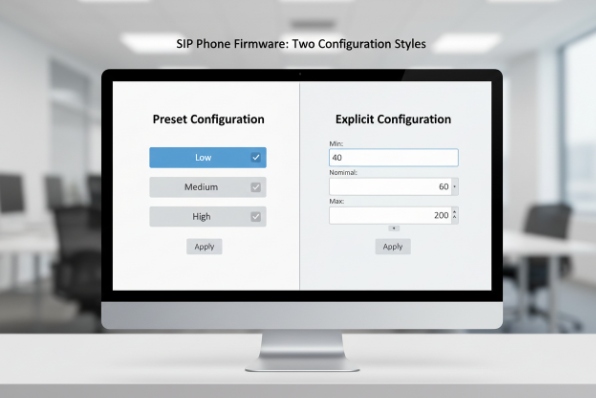
Two common configuration styles show up in the market:
1) Length presets
-
The phone exposes a “Jitter Buffer Length” menu.
-
You select 100 ms, 200 ms, 300 ms, and so on.
-
The phone may still be adaptive inside that envelope.
2) Explicit min/nominal/max
-
You set a minimum delay, a nominal delay, and a maximum delay.
-
Adaptive logic moves inside that range.
For specification writing, the safest approach is to request both:
-
Adaptive mode enabled.
-
A visible maximum buffer limit, so delay does not grow without bound.
Here is a practical range guide that fits most industrial voice paths, without making the call feel “slow”:
| Environment | Suggested min | Suggested max | Reason |
|---|---|---|---|
| Clean LAN | 20–40 ms | 80–120 ms | low delay, still absorbs small jitter |
| Typical enterprise LAN | 30–60 ms | 120–180 ms | handles bursts from data traffic |
| WAN / remote sites | 40–80 ms | 180–300 ms | protects speech under higher jitter |
| Very unstable links | 60–100 ms | 300–500 ms | stability first, accept delay |
These are engineering starting points, not universal truths. The real pass/fail is user experience plus measurements in packet captures and RTCP 3 stats.
Also remember one detail that teams often miss: if you increase the jitter buffer a lot, you should check echo control and overall one-way delay. A bigger buffer increases mouth-to-ear delay, which can change how users talk and how echo is perceived.
Does PLC conceal short bursts effectively?
When packets go missing, the phone has to hide the gap. That is what PLC is for. If PLC is weak, even small loss sounds harsh.
Yes, PLC usually conceals short loss bursts well, especially for one or two missing frames. PLC quality depends on the codec and the phone’s DSP. G.711 has standardized PLC guidance, and modern codecs often include built-in concealment logic.
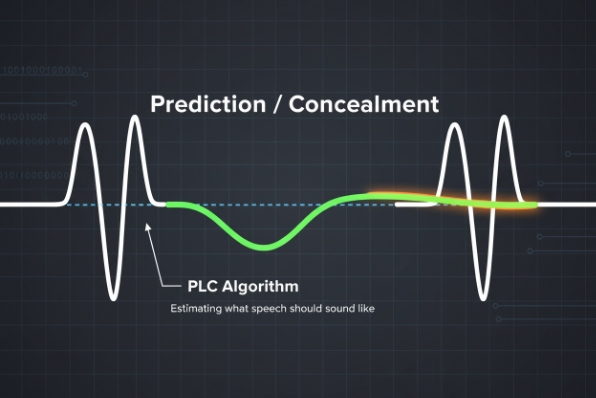
PLC 4 works best when the missing audio is short. The phone estimates what the speech should sound like based on the recent past. For short gaps, users often do not notice. For longer gaps, PLC can only “guess,” so the audio becomes robotic or silent.
In real industrial networks, PLC is most effective when:
-
packet loss is low on average
-
loss bursts are short
-
jitter does not cause many packets to arrive “too late”
PLC is not a replacement for network quality. It is a safety net.
Here is a simple way to explain PLC limits to a site team:
| Network condition | What PLC does | What users hear |
|---|---|---|
| 0–1% random loss | smooths tiny gaps | often unnoticed |
| Short burst loss | fills brief holes | slight roughness |
| Long burst loss | runs out of real speech cues | robotic sound, then silence |
| High jitter + late loss | PLC works, but too often | choppy speech, fatigue |
For Ex phones used as emergency points, I prefer to keep PLC as a backup and fix the network first. That means QoS, clean VLAN design, stable uplinks, and correct RTP prioritization.
How does jitter interact with packet loss thresholds?
Teams often treat jitter and loss as separate. In VoIP they are linked, because late packets behave like lost packets.
Jitter can turn into packet loss when packets arrive after the jitter buffer deadline. A larger buffer reduces “late loss,” but it raises delay. When true network loss rises or bursts grow, PLC and buffering cannot fully mask it, so speech breaks down.
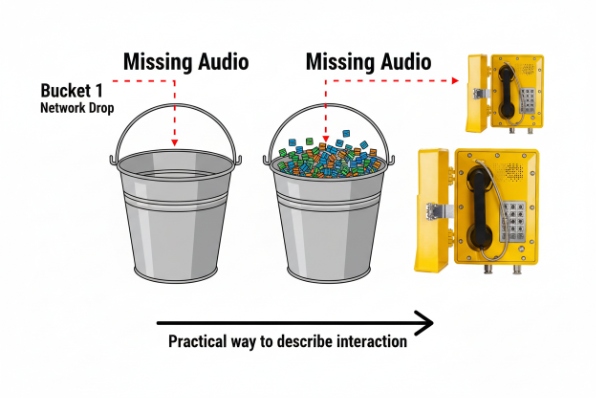
A practical way to describe the interaction is:
-
True loss: packets never arrive.
-
Jitter loss: packets arrive, but too late to use.
Both show up the same to the listener. Both trigger PLC.
So a network can show “low loss” on a router counter, yet the call sounds bad because the phone is discarding late packets. That is why jitter buffer tuning can improve audio even when “loss” looks fine.
Most plants also have a loss threshold where call quality drops fast. The exact number depends on codec and burst pattern, but the pattern is consistent:
-
Small loss + small jitter: good.
-
Small loss + high jitter: late loss rises, sounds choppy.
-
High loss: PLC and buffering cannot save it.
Use this tuning flow in commissioning:
| Step | What to change | What you should see |
|---|---|---|
| 1 | verify QoS and VLAN | jitter drops, fewer spikes |
| 2 | enable Adaptive jitter buffer | fewer gaps, stable speech |
| 3 | cap max jitter buffer | delay stays acceptable |
| 4 | check PLC outcome | short loss sounds smooth |
| 5 | confirm RTCP stats | late discards and loss are low |
A clean FAT simulates jitter and loss. It proves that the phone still sounds acceptable at the site’s worst expected conditions.
Conclusion
Most Ex SIP telephones can tune jitter buffering. Adaptive mode with a sensible max usually gives the best stability, while PLC hides short loss bursts but cannot fix heavy jitter or true packet loss.
Footnotes
-
The variation in the delay of received packets, which can cause audio distortion in VoIP. ↩
-
Quality of Service mechanisms used to prioritize traffic and reduce jitter. ↩
-
Real-time Transport Control Protocol, used to monitor data delivery in real-time applications. ↩
-
Packet Loss Concealment, a technique to mask the effects of missing audio data. ↩








