When hundreds of Ex phones sit across a plant, manual setup becomes slow and risky. One wrong IP or server breaks emergency calling and burns maintenance time.
Yes. Many explosion-proof SIP telephones support key DHCP options for zero-touch rollout, including provisioning URLs, SIP server discovery, and NTP time servers. The real question is which option set your model supports and how securely your network delivers it.
DHCP options are the fastest path to “replace-and-go” in hazardous sites
Why DHCP options matter more in hazardous areas
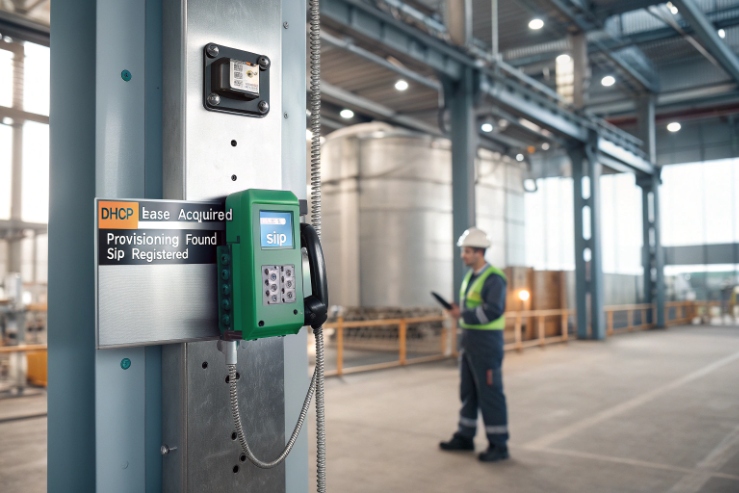
A normal office phone can be swapped with a laptop nearby. A phone in hazardous areas 1 often cannot. Access can require permits, escorts, and shutdown windows. That is why DHCP options are valuable. They reduce local touch. They also reduce human error. A replacement unit can boot, get the right network settings, pull a provisioning file, sync time, and register to the PBX with no laptop.
What “support” should mean in a tender
Many vendors say “supports DHCP.” That only means it gets an IP address. In a refinery or mine, the useful requirement is “supports specific options and fallback rules.” A clean tender should request:
-
supported DHCP option list (by number)
-
what formats are accepted (IP list, FQDN, URL, hex vendor data)
-
priority rules when both DHCP and manual settings exist
-
behavior when options are missing or wrong
-
how options interact with LLDP-MED voice VLAN and HTTPS provisioning
The safest rollout model
In real deployments, DHCP options should be used for bootstrap, not for uncontrolled long-term drift. A stable approach is:
1) DHCP gives the phone the minimum data to find the provisioning server and time server
2) Provisioning applies the real phone config (SIP accounts, VLAN tags, QoS, paging groups, keys)
3) The phone logs and reports what it used, so audits are easy
A simple “what to standardize” table
| Item to standardize | Why it matters | Best owner |
|---|---|---|
| Provisioning URL delivery | avoids manual typing | DHCP or LLDP + provisioning |
| NTP server(s) | keeps logs and TLS stable | DHCP option 42 or fixed |
| SIP registrar discovery | speeds replacement | provisioning first, DHCP second |
| Voice VLAN | prevents wrong subnet | LLDP-MED or switch policy |
| Fallback behavior | avoids dead endpoints | phone firmware + site policy |
If these pieces are defined, zero-touch provisioning 2 becomes real. If they are not defined, DHCP becomes a random variable.
The next sections break down the option numbers, vendor-class tricks, voice VLAN discovery, and the security rules that keep DHCP from becoming a weakness.
Which DHCP options are supported—Option 66/160 for provisioning, 120 for SIP domain, 42 for NTP, and 150/43 for TFTP/vendor data?
When option support is unclear, a site ends up with “half automation.” Phones get IP addresses, but still need manual server entry. That is where rollouts slow down.
Commonly used DHCP options for SIP endpoints include Option 66 and 160 for provisioning server addresses, Option 120 for SIP server discovery, Option 42 for NTP, and Option 150 or 43 for vendor-specific or TFTP-style data. Exact support depends on the phone firmware, so a one-page option matrix should be requested before purchase.

What each option typically does
Option 66 is widely used to point a device to a provisioning server. Many SIP endpoints 3 accept it as a hostname or URL, even if it was originally framed around TFTP usage in older ecosystems. Option 160 is also used by some SIP phone vendors as a provisioning server option. Option 42 is a clean win in industrial networks because NTP (Network Time Protocol) 4 improves logs and helps HTTPS certificate validation. Option 120 is often used to deliver SIP server FQDNs for registration. Option 150 is commonly used in voice deployments to provide one or more server addresses, often associated with TFTP/Call Manager file delivery in some ecosystems. Option 43 is vendor-specific. It can carry structured data that the vendor firmware understands.
What to demand in a vendor response
A useful answer is not “supported.” A useful answer looks like:
-
Option number supported
-
accepted payload types (IP list, FQDN, URL)
-
priority rules (DHCP vs manual vs provisioning)
-
max length and multi-server support
-
whether it works with dual-stack IPv4/IPv6 if that matters on site
A practical option matrix for tenders
| Option | Typical use in SIP endpoints | Payload style | What to check before rollout |
|---|---|---|---|
| 42 | NTP server(s) | IP list or FQDN | multiple servers, failover behavior |
| 66 | Provisioning server | hostname or URL | HTTP/HTTPS support, not only TFTP |
| 120 | SIP server discovery | domain/FQDN list | how it interacts with manual SIP settings |
| 150 | server list (often TFTP-style) | IP list | whether phone interprets it as provisioning or PBX data |
| 160 | provisioning URL (vendor used) | hostname or URL | vendor-specific meaning and precedence |
| 43 | vendor-specific info | encoded TLVs | exact format and decoding rules |
How it should behave in a hazardous-area workflow
A solid Ex phone should:
-
boot with DHCP and learn NTP fast
-
learn where provisioning lives without manual entry
-
only register to SIP after it has applied provisioning (to avoid wrong accounts)
-
log which DHCP options were used and which were ignored
This matters during shutdown work. A technician may only have a short window at the device. If the phone self-builds, the job is done in minutes instead of hours.
Can vendor class (Option 60) and Option 43 deliver model-specific URLs for zero-touch with Asterisk, 3CX, CUCM, or BroadSoft?
Zero-touch fails when one DHCP scope serves many phone models and every model expects a different option. Then the network team refuses to support it, and field teams go back to manual setup.
Yes. Vendor Class Identifier (Option 60) and vendor-specific Option 43 can be used to deliver model-specific provisioning URLs and parameters. This enables clean zero-touch across mixed fleets and mixed PBX platforms, as long as you standardize one “bootstrap rule” and test it on each phone firmware version.

How Option 60 helps in a mixed environment
Option 60 is the phone telling the DHCP (Dynamic Host Configuration Protocol) 5 server “what I am.” Many phones send a vendor string and sometimes a model family. A DHCP server can match that string and return a different set of options. This is the simplest way to separate:
-
Ex phones vs office phones
-
different vendors in one voice VLAN
-
different boot URLs per model family
For industrial deployments, this avoids per-MAC configuration. It scales better when hundreds of endpoints are replaced over years.
Where Option 43 fits
Option 43 is a container. Vendors use it to carry structured data. That can include:
-
provisioning URL
-
file path hints
-
vendor feature flags
-
redirection logic
The key point is that Option 43 is not universal. The phone must document the exact encoding. If that encoding is not stable, rollout becomes fragile.
PBX platform reality: Asterisk, 3CX, CUCM, BroadSoft
In practice, the PBX does not care about DHCP options. The phone does. Asterisk and BroadSoft-style deployments often rely on provisioning systems and templates that push SIP account and feature settings. 3CX has its own provisioning approach and device templates for many brands. CUCM environments often have established DHCP conventions that use specific options and TFTP-style server lists. The safest way to support all of them is to deliver one model-specific bootstrap URL by DHCP, then let the provisioning system handle the PBX-specific configuration.
A model-specific bootstrap pattern that works
| Phone group | DHCP action | Provisioning action | Result |
|---|---|---|---|
| Ex phones (Zone 1/2) | return HTTPS bootstrap URL | pull secure profile | fast safe replacement |
| Office SIP phones | return normal URL | pull office profile | avoids mixing configs |
| CUCM-style endpoints | return required server list | phone pulls correct config | fits existing CUCM workflows |
| BroadSoft-style endpoints | return provisioning URL | template sets SIP lines | consistent across sites |
What to request from the phone vendor
To make Option 60/43 practical, ask for:
-
exact Option 60 string examples
-
Option 43 encoding guide (byte layout or TLV map)
-
a tested example for your DHCP server type
-
a fallback rule when Option 43 is not present
This is the point where many projects become smooth or painful. A one-hour lab test with your DHCP server saves a week of on-site troubleshooting.
Are voice VLAN settings discoverable via Options 132/133 or 176/242, alongside LLDP-MED voice VLAN?
Voice VLAN mistakes are the number-one cause of “it powers up but does not register.” In hazardous sites, that mistake causes delays because the fix needs controlled access.
Some networks use DHCP options like 132/133 or 176/242 for voice VLAN or voice parameters, but support is vendor-specific and not consistent across all SIP endpoints. LLDP-MED voice VLAN is usually the most reliable standards-based method, with DHCP as a secondary tool for bootstrap.

Why LLDP-MED is usually the best first choice
LLDP-MED 6 was designed for edge deployment of voice endpoints. A switch can advertise the voice VLAN and QoS policy to the phone. This makes “plug-and-play” predictable. It also keeps VLAN policy in the network, not on each phone.
For Ex phones, this is helpful because:
-
installers swap devices quickly
-
the same phone model may be used across many units
-
the network team can control VLAN policy centrally
Where DHCP options for VLAN show up
Options 132/133 and 176/242 are often discussed in voice ecosystems. In real projects, they are seen when a legacy voice platform or a vendor-specific phone family expects them. That means:
-
the option may work perfectly for one vendor
-
it may do nothing for another vendor
-
it may conflict with LLDP-MED if both try to set VLAN behavior
So the safest approach is to choose one primary method:
-
LLDP-MED as the standard
-
DHCP VLAN-style options only when required by a known device family
How to avoid conflicts
Conflicts happen when:
-
the switch sends LLDP-MED voice VLAN A
-
DHCP options push a different VLAN B
-
the phone flips between them after reboots
A good policy is:
-
LLDP-MED owns voice VLAN when enabled
-
DHCP VLAN options are disabled in that VLAN scope unless the site has a clear reason
-
the phone has a manual fallback VLAN only for troubleshooting
A deployment comparison table
| Method | Works across vendors | Central control | Common failure mode | Best use |
|---|---|---|---|---|
| LLDP-MED | High | High | LLDP blocked on port | primary voice VLAN method |
| DHCP VLAN options (132/133) | Medium/low | Medium | unsupported by phone | legacy/vendor-specific cases |
| DHCP options (176/242) | Medium/low | Medium | conflicts with LLDP | specific PBX ecosystems |
| Manual VLAN tag on phone | High | Low | drift and human error | small sites or emergency fallback |
In a refinery, the simplest winning rule is: put the phone in the right voice VLAN by LLDP-MED or switchport policy, then let DHCP handle provisioning and time. That keeps VLAN logic stable and avoids surprises.
How are security policies handled—DHCP snooping, Option 82 relay, ACLs, and fallback to static settings if options are absent?
DHCP is powerful, but it can also be abused. A rogue DHCP server can push a fake provisioning URL, then the phone becomes a weak point in the network.
Secure DHCP design uses DHCP snooping on switches, Option 82 relay policies where needed, strict ACLs that limit where phones can talk, and safe fallback behavior when options are missing. The goal is “fail safe,” not “connect to anything.”

Stop rogue DHCP at the edge
DHCP snooping 7 is the core defense on managed switches. It blocks DHCP offers from untrusted ports. In industrial networks with contractors, this matters. A single laptop running a DHCP tool can break an entire VLAN.
A strong site baseline is:
-
mark uplinks and DHCP server ports as trusted
-
keep access ports untrusted
-
log snooping violations
-
pair it with ARP inspection if your network team uses it
Option 82: control and traceability
Option 82 allows the relay agent to tag requests with circuit information. This helps:
-
apply different policies per switchport or cabinet
-
trace where a device is connected during incidents
-
enforce “this cabinet gets this provisioning URL”
It is most useful when phones move across many cabinets and the site wants location-aware policy without manual work.
Use ACLs so DHCP options cannot widen access
DHCP can deliver a provisioning URL. It should not also grant broad network reach. The safe pattern is:
-
voice VLAN can reach only: DHCP, DNS, NTP, provisioning server, SIP registrar/SBC, and monitoring
-
block internet access unless explicitly required
-
block lateral traffic between endpoints
This makes the phone predictable and reduces risk if a device is compromised.
Fallback to static: define it so it does not become unsafe
Fallback behavior should be written clearly:
-
If DHCP options are absent, the phone should still get IP and keep a last-known good provisioning profile.
-
If provisioning fails, the phone should not “phone home” to unknown servers.
-
If a static profile is used, it should be a limited safe profile, not a wide-open default.
A threat-to-control table that buyers can use
| Risk | What causes it | Control to use | Expected outcome |
|---|---|---|---|
| Rogue DHCP server | untrusted device on VLAN | DHCP snooping | phones ignore fake offers |
| Wrong provisioning URL | scope misconfig | ACL + template validation | phones only reach approved server |
| VLAN confusion | mixed discovery methods | LLDP-MED primary, DHCP secondary | stable voice VLAN behavior |
| Silent drift | multiple systems write config | define “source of truth” | repeatable fleet config |
| Dead phone after swap | missing options on one scope | safe fallback + last-known good | faster replacement success |
In hazardous plants, security and uptime are the same goal. A secure DHCP design also reduces downtime because endpoints stay consistent across years of maintenance.
Conclusion
Yes, Ex SIP phones can use DHCP options for zero-touch, but option support and security rules must be defined. Use LLDP-MED for voice VLAN and provisioning for long-term control.
Footnotes
-
Overview of electrical safety standards and equipment classifications for hazardous areas in industrial plants. ↩ ↩
-
Exploring the benefits of zero-touch provisioning for automated device configuration and deployment. ↩ ↩
-
A guide to SIP endpoints and their role in modern VoIP communication systems. ↩ ↩
-
Official documentation for NTP (Network Time Protocol), used for synchronizing computer system clocks. ↩ ↩
-
Detailed technical description of DHCP (Dynamic Host Configuration Protocol) and its network operations. ↩ ↩
-
Technical background on LLDP-MED for discovery and management of network endpoints. ↩ ↩
-
Security guide explaining how DHCP snooping prevents unauthorized DHCP server activity. ↩ ↩