
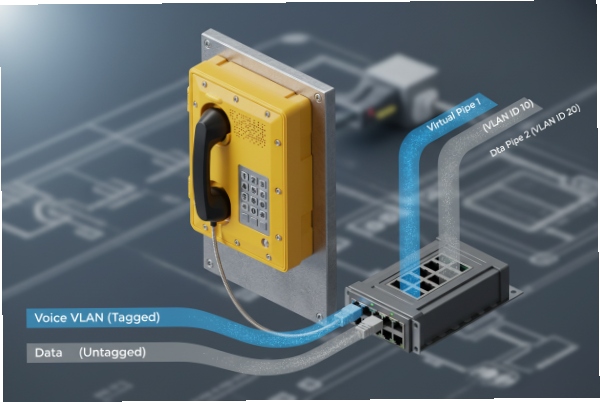
Voice calls can sound broken, and phones can “disappear,” when VLAN tagging is wrong. In hazardous areas, that becomes a safety and downtime issue.
Yes. Most SIP explosion-proof telephones can use IEEE 802.1Q VLAN tagging. Many models also support setting Voice VLAN ID, 802.1p (PCP), and DSCP, but the exact controls depend on the SIP module and firmware.
VLAN and QoS are network features, not Ex features
What 802.1Q tagging means on a hazardous-area phone
802.1Q 1 support means the phone can add a VLAN tag to Ethernet frames so switches can separate voice traffic from data traffic. For a SIP explosion-proof telephone, the “voice” part is not only RTP audio. It also includes SIP signaling, plus management traffic like NTP, provisioning, and SNMP if used. A clear VLAN plan keeps those flows predictable.
In practice, there are two common designs:
-
One VLAN only: everything is tagged the same way. This is simple, but the voice traffic competes with other traffic unless QoS is handled well.
-
Voice VLAN + Data VLAN: the phone tags voice to a dedicated VLAN, and either passes PC traffic untagged (or on a different VLAN) if the phone has a PC port. This is the classic enterprise pattern and works well in plants too.
Voice VLAN versus “PC pass-through” behavior
If the phone includes a PC port, the switchport has to support both device and PC traffic at once. Many phones handle this as “voice tagged, data untagged,” but some allow tagging on both ports. A common trap is assuming the phone will tag the PC port automatically. Some designs only allow manual VLAN settings on the PC port, so the PC side stays on the access VLAN while the phone uses a tagged voice VLAN.
PCP versus DSCP: where priority really happens
PCP (802.1p) is Layer 2 priority carried inside the VLAN tag. DSCP is Layer 3 marking inside the IP header. Plants often need both, because:
-
Switches can prioritize PCP on the local segment.
-
Routers and WAN devices often prioritize DSCP end-to-end.
The best practice is to define a trust boundary. Either the switch trusts the phone’s markings, or the switch overwrites them. Both can work. The key is to choose one and document it.
What to lock in the purchase spec
When a client asks “does it support VLAN,” the real requirement should be written as:
-
VLAN ID configurable (manual and auto where needed)
-
Tagging mode described (voice tagged only, or voice+data tagged)
-
PCP configurable (at least for RTP and SIP separately if possible)
-
DSCP configurable (at least for RTP and SIP separately if possible)
-
LLDP-MED support for voice VLAN policy if the site uses it
-
DHCP VLAN options only if the client’s phones and DHCP platform truly support them
FAT checks that catch VLAN mistakes early
A fast FAT test plan should prove:
-
The phone sends tagged frames with the intended VLAN ID
-
PCP and DSCP values match the defined policy
-
The phone recovers correctly after power loss and link flaps
-
LLDP-MED (or DHCP VLAN options) is honored when enabled
-
The switchport mode matches what the phone expects
| Item to verify | Where it is set | What “pass” looks like |
|—|—|—|
| VLAN ID | phone or LLDP-MED/DHCP | frames show correct tag |
| Tagging mode | phone + switchport | voice stays on voice VLAN |
| PCP | phone or switch QoS | RTP frames carry priority |
| DSCP | phone or router QoS | DSCP matches policy end-to-end |
| Persistence | phone config memory | same behavior after reboot |
If these basics are correct, the Ex phone behaves like a standard enterprise SIP endpoint, just in a certified enclosure.
Keep reading because the real questions are about how much control the phone offers per account, and how to keep that behavior stable across audits and power cycles.
Can voice VLAN ID, PCP, and DSCP be set?
If VLAN and QoS are not controllable, the phone can work on day one and then fail when the network gets busy. That hurts operator confidence.
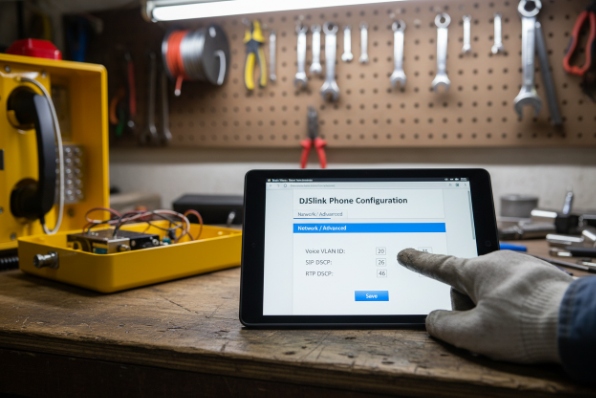
Most SIP explosion-proof telephones support setting a voice VLAN ID and QoS markings. The practical control points are VLAN tagging, PCP for Layer 2 priority, and DSCP for Layer 3 priority, often with separate values for SIP and RTP.
VLAN ID and tagging mode
A typical phone offers at least one VLAN ID setting for its LAN port. Some models support a dedicated “voice VLAN” concept, where the phone can keep management on one VLAN and voice on another, or keep PC traffic separate if the phone has a PC port. The critical part is whether the phone supports:
-
Tagged voice with untagged data on the same switchport
-
Tagged voice and tagged data (hybrid behavior)
-
Voice VLAN only (single VLAN for everything)
For industrial deployments, the most stable approach is to keep it simple:
-
One voice VLAN for the phone
-
One data VLAN for the PC side (often untagged) if used
-
No hidden “auto” rules unless the site uses LLDP-MED
PCP (802.1p) priority handling
PCP 2 is useful for switches that prioritize frames before routing happens. In many voice designs, RTP is given a higher PCP than signaling, because audio quality suffers first when queues get full. A practical requirement is:
-
RTP PCP configurable
-
SIP PCP configurable (may be different from RTP)
-
Management PCP either default or explicitly set
Even when a phone can set PCP, the switch may overwrite it. That is not a problem if the policy is clear and consistent.
DSCP marking and trust boundary
DSCP 3 matters when traffic crosses routers, firewalls, or WAN links. Many plants want DSCP for RTP and SIP. The hard part is consistency:
-
If the phone marks DSCP and the switch trusts it, DSCP is predictable.
-
If the phone marks DSCP but the network overwrites it, the phone setting is not the real policy.
So the purchase spec should define the trust boundary, not just “DSCP configurable.”
| Traffic type | Why it needs its own marking | What to lock in writing |
|—|—|—|
| RTP media | sensitive to loss/jitter | DSCP and PCP policy for audio |
| SIP signaling | needs reliability, less bandwidth | DSCP/PCP policy for SIP |
| Provisioning/NTP | supports uptime | default or low priority rules |
| SNMP/syslog | supports monitoring | keep separate from voice priority |
Common pitfalls seen on harsh sites
One frequent failure is setting DSCP correctly, but leaving PCP at default, then trusting PCP on the switch. Another is tagging the voice VLAN but leaving the PC port behavior undefined, which results in a “works only when the PC is unplugged” situation. A third is using different QoS rules on different switches, which makes voice quality inconsistent across the same site.
The clean fix is always the same: define VLAN ID, tagging mode, PCP, DSCP, and trust boundary as a single package, then validate with packet captures in FAT.
Is LLDP-MED or DHCP option 132/133 honored?
Manual VLAN entry is slow and risky at scale. Auto-provisioning sounds easy, but only if the phone and the switch speak the same discovery language.
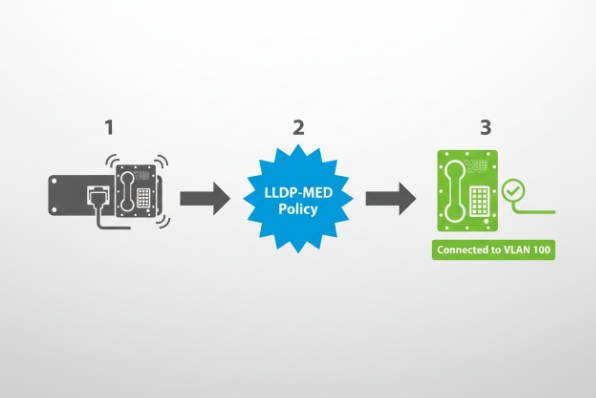
LLDP-MED is often the most reliable way to push a voice VLAN policy because the switch can advertise VLAN ID and priority settings to the phone. DHCP option 132/133 can work on some platforms, but support is vendor-specific and should be treated as “only if proven.”
LLDP-MED: why it is preferred on managed switches
LLDP-MED 4 can advertise a network policy profile that includes VLAN ID and Layer 2/Layer 3 priority attributes for voice applications. This is strong for industrial rollouts because:
-
The policy stays on the switch, not on the phone
-
You can move phones between ports without reconfiguring each phone
-
The switch can control tagging mode and priorities centrally
In field projects, LLDP-MED also reduces mistakes by installers because the phone learns the voice policy after link-up.
DHCP option 132/133: useful, but not universal
DHCP VLAN options are widely discussed in VoIP ecosystems, but real support varies by vendor and model line. Even when supported, there are common differences:
-
Some phones expect option values as integers, others as strings
-
Some use option 132 for VLAN ID and 133 for priority, but only on specific firmware families
-
Some phones only use DHCP VLAN if LLDP is not available
That means DHCP VLAN should never be the only plan for a refinery-wide rollout. It should be a tested feature, not an assumption.
Many phones apply a priority order such as:
1) LLDP-MED
2) Manual configuration
3) DHCP VLAN
This matters because the site may set DHCP options and see no effect, since LLDP already wins. The rollout guide should state the discovery order clearly.
| Method | Best advantage | Main risk | Best use case |
|—|—|—|—|
| LLDP-MED | centralized and consistent | requires managed switch config | large plants and EPC rollouts |
| DHCP 132/133 | works even on simple networks | vendor differences, parsing issues | small sites, limited switches |
| Manual VLAN | always works if done right | labor and human error | fixed cabinets, low volume |
What to ask in procurement to avoid guesswork
A strong supplier response should include:
-
Whether LLDP-MED network policy is supported
-
Whether DHCP 132/133 is supported, and on which firmware
-
The discovery order between LLDP, manual, and DHCP
-
Whether VLAN and QoS are per-account or global
If the supplier cannot give a clear answer, the safe plan is LLDP-MED plus manual fallback, and treat DHCP VLAN as optional.
Does tagged traffic persist after power cycles?
Phones restart. Switches reboot. Remote sites lose power. If VLAN behavior changes after recovery, calls will fail in the most confusing way.
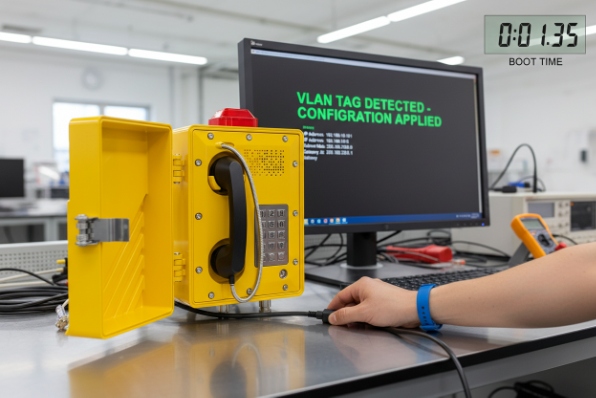
Tagged traffic behavior should persist across power cycles because VLAN settings are stored in the phone configuration. After a reboot, the phone must re-apply the tag and re-learn any dynamic policy (LLDP-MED or DHCP VLAN) before it becomes reachable for SIP and RTP.
What “persist” really means
A VLAN tag is not a state that stays alive. It is a configuration that is re-applied at boot. So persistence depends on:
-
The phone keeping its configuration in non-volatile memory
-
The phone re-running its VLAN discovery logic
-
The switchport coming up with the correct mode
-
DHCP and LLDP policy being available on the network
If the phone relies on LLDP-MED, it may start in a default mode, receive LLDP policy, then switch to the voice VLAN. That transition is normal, but it must be understood and tested.
The “two-stage DHCP” behavior to expect in some designs
Some phones request VLAN information first, then restart DHCP on the target VLAN. This can look like “two DHCP events” in logs. On large sites, this is not a problem. It is the expected process when VLAN ID is learned dynamically.
Recovery risks that show up on remote sites
Common real-world risks include:
-
LLDP delay after switch reboot, so the phone stays on a default VLAN longer
-
DHCP scope mismatch when the phone switches VLANs
-
Firewall policies blocking SIP until the correct VLAN is in place
-
Phones behind small unmanaged switches where LLDP does not pass correctly
A practical recovery test matrix
| Recovery event | What to watch | Pass condition |
|—|—|—|
| Phone power cycle | VLAN tag present after boot | phone registers and can place calls |
| Switch power cycle | LLDP policy restored | phone returns to voice VLAN without manual work |
| Link flap | VLAN and QoS remain correct | no “falls back to untagged” behavior |
| DHCP outage | phone holds last config | phone recovers and re-registers after DHCP returns |
What to document for commissioning teams
The commissioning document should explain:
-
expected boot timeline (link up → LLDP → VLAN switch → DHCP → register)
-
where to capture proof (switch LLDP neighbors, DHCP logs, packet captures)
-
what is acceptable delay and what is a failure
This prevents a lot of false alarms during SAT, especially at remote cabinets where the first boot can be slower than expected.
Are trunk and access port modes documented?
Many VoIP failures are actually switchport documentation failures. The phone is fine, but the port is configured like a PC port, or the voice VLAN is not allowed.
Yes, trunk and access port modes should be documented as part of the installation method statement. For voice VLAN phones, the switchport is often an access port with a voice VLAN policy, or a hybrid/trunk-style port that carries tagged voice and untagged data.
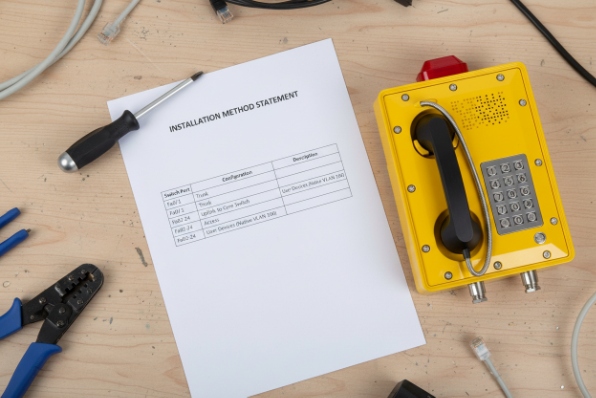
The three port patterns used in plants
Most industrial deployments use one of these:
1) Access-only (single VLAN)
The phone uses one VLAN and tagging is either off or fixed. This is the simplest approach in small cabinets.
2) Access + Voice VLAN policy
Data is the access VLAN, and voice is assigned via a voice VLAN feature, often advertised with LLDP-MED network policy. This is common in enterprise networks.
3) Hybrid/trunk-style port to the phone
The port carries tagged voice VLAN (and sometimes tagged data VLAN), while allowing a native VLAN for untagged frames. This is common when the phone has a PC port and the plant wants strict separation.
What the documentation must include
A good site document should state:
-
VLAN IDs used (voice, data, management if separate)
-
Tagging rule (tagged/untagged per port and per traffic type)
-
Allowed VLAN list on the port (if trunk/hybrid)
-
QoS trust boundary (trust phone markings or overwrite)
-
LLDP-MED policy configuration on the switch, if used
-
PoE class and power budget if the phone uses PoE
-
Any MAC authentication rules (802.1X or MAB), if used
Why this matters for audits and troubleshooting
When a phone sits in Zone 1 5 or Zone 2, site access can be limited. Clear switchport documentation reduces repeat visits. It also helps cybersecurity reviews because VLAN and QoS decisions become traceable.
A documentation table that works well in EPC submittals
| Document field | Example of what to write | Why it helps |
|—|—|—|
| Port mode | access / voice policy / hybrid | avoids wrong switch template |
| Voice VLAN ID | numeric ID | confirms separation |
| Native VLAN | numeric ID or “none” | prevents leakage across VLANs |
| QoS policy | PCP/DSCP trust or remark | prevents inconsistent priority |
| Discovery method | LLDP-MED or manual | makes rollout repeatable |
| Persistence check | reboot test required | proves uptime behavior |
A short field checklist for installers
Installers do not need a textbook. They need a clean checklist:
-
Confirm the port mode matches the design
-
Confirm LLDP-MED is enabled if used
-
Confirm the phone shows the expected VLAN ID
-
Confirm a packet capture shows the tag and markings
-
Confirm a reboot does not change behavior
This is the difference between “the phone is unstable” and “the network policy is stable and verified.”
Conclusion
802.1Q VLAN is common on Ex SIP phones, but the rollout succeeds only when VLAN discovery, QoS markings, recovery behavior, and switchport modes are written as testable requirements and proven in FAT.
Footnotes
-
IEEE standard for VLAN tagging on an Ethernet network. ↩
-
IEEE standard defining traffic class and priority within Ethernet frames. ↩
-
Architecture for classifying and managing network traffic and providing QoS. ↩
-
Link Layer Discovery Protocol – Media Endpoint Discovery extension for VoIP devices. ↩
-
Hazardous area classification where explosive gas atmosphere is likely to occur in normal operation. ↩








