
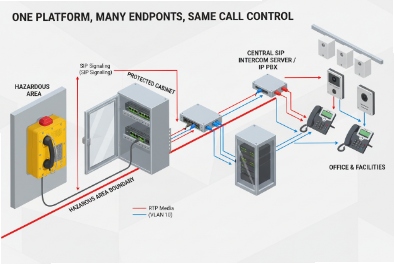
Many sites buy Ex phones and SIP intercoms from different vendors, then discover the systems “connect” but do not work as one workflow. That gap shows up during an incident.
Explosion-proof telephones integrate best with SIP intercom systems using a clear architecture (direct SIP, gateway, or hybrid), standard protocols (SIP/RTP, multicast paging, ONVIF/RTSP), and simple call flows (priority paging, PTT, emergency break-in). The network must enforce QoS/VLAN and the installation must match ATEX/IECEx or NEC rules.
Integration starts with one choice: where the “call control brain” sits?
A SIP intercom ecosystem can look simple. Every device registers to SIP and calls work. Still, real projects need more than calling. They need paging, priority override, video pop-up, and alarm triggers. That means there must be one “call control brain” that defines who calls whom, who can override, and where events go.
In most industrial deployments, there are three workable architectures:
- Direct SIP to IP PBX: Ex telephones and SIP intercom endpoints register to the PBX directly.
- Gateway architecture: a SIP gateway connects legacy PA/GA amplifiers, analog paging, or radio dispatch into SIP.
- Hybrid: PBX handles calls, while a dedicated intercom/PA server handles paging zones, priority rules, and video events.
Each architecture can succeed. Each can also fail if the call flows are not written clearly. A refinery and a tunnel may want different “brains” because the paging rules are different.
A second integration choice is “how much interoperability is needed.” Some sites only want calling. Some want full event integration with SCADA, CCTV, and alarm beacons. A higher integration level requires I/O and protocols beyond SIP.
Finally, compliance changes how integration is wired. In hazardous areas, some interfaces must stay in the safe area through barriers or certified enclosures. A simple rule helps: keep complex network gear in safe cabinets when possible, and keep hazardous-area devices as endpoints with controlled cable entries.
| Integration goal | Best architecture fit | What usually breaks it |
|---|---|---|
| Simple calling between Ex phones and intercoms | Direct SIP to PBX | Wrong dial plan and naming chaos |
| Paging and PA/GA announcements | Hybrid with paging server or gateway | No priority rules and QoS missing |
| Video pop-up and event workflows | Hybrid + VMS integration | No event mapping and weak metadata |
| OT alarms and PLC linkage | Hybrid + I/O and protocol bridges | No clear I/O ownership and wiring rules |
This section gives the big picture. The next sections answer the four questions in tender-ready detail: architecture, protocols/I/O, call flows, and compliance/networking.
What architectures connect Ex telephones to IP PBX, PAGA, and video intercom—direct SIP, gateways, or hybrid?
The architecture should reduce single points of failure and reduce integration friction between vendors. A good design also makes maintenance simple.
Three proven architectures are used: direct SIP registration to the IP PBX, gateway-based integration for PA/GA and legacy systems, and a hybrid design where PBX handles calls while a paging/intercom server manages paging zones, priorities, and video events.
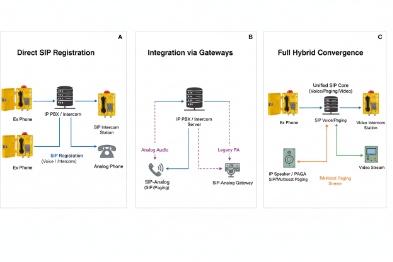
1) Direct SIP architecture (fast and clean when needs are simple)
- Ex telephones register to the IP PBX or SBC.
- SIP intercom endpoints also register to the same PBX.
- Calls are routed by extensions, groups, and ring policies.
Best when:
- The project mainly needs point-to-point calling and emergency hotline.
- Paging is limited or handled inside PBX features.
- Video intercom is handled by the intercom vendor platform separately.
Risks:
- PBX paging features may be limited for large zones.
- Priority override and break-in may be hard without a specialized paging server.
- Video events can be fragmented across systems.
2) Gateway architecture (best when PA/GA is analog or radio exists)
- PBX still runs SIP calls.
- A SIP paging gateway injects audio into PA/GA amplifiers.
- A radio gateway connects SIP calls to dispatcher/radio groups if needed.
Best when:
- The PA/GA system is amplifier-based and not IP-native.
- The site needs to reuse existing horns and speakers.
- There is a clear “one-way announcement” workflow.
Risks:
- Gateways become critical nodes, so they need redundancy and UPS.
- Misconfigured audio levels can harm intelligibility.
- Gateways need clear security and VLAN placement.
3) Hybrid architecture (best for industrial paging + video + alarms)
- PBX controls call signaling and extensions.
- A dedicated paging/intercom server controls paging zones, PTT groups, and priority override.
- VMS handles video and camera pop-up based on intercom events.
- PLC/SCADA receives alarm events via I/O, SNMP, or protocol bridges.
Best when:
- The site needs zone paging, emergency break-in, and event-driven actions.
- Video intercom needs clean integration with cameras and control room screens.
- The site wants monitoring and reporting in one place.
Risks:
- More system components mean more design effort.
- Ownership between PBX team and OT team must be defined.
- Redundancy design must be consistent across both servers.
| Architecture | PBX role | PA/GA role | Video intercom role | Best use case |
|---|---|---|---|---|
| Direct SIP | Main brain | PBX paging only | Often separate | Small to medium sites |
| Gateway | Main brain | Gateway injects to amps | Often separate | Legacy PA/GA reuse |
| Hybrid | Call control + extensions | Paging server or gateway | VMS + intercom platform | Large industrial plants |
In DJSlink projects, the hybrid approach is the most common for large plants because it keeps paging rules consistent and keeps video and alarms clean. Still, for small sites, direct SIP is faster and cheaper.
Once the architecture is chosen, interoperability depends on protocols and I/O. The next section lists what to require so devices from different vendors still work together.
Which protocols and I/O enable interoperability—SIP, RTP/Multicast, ONVIF/RTSP, dry contacts, and Modbus?
Interoperability is not one protocol. It is a set of “language layers.” SIP and RTP cover voice calls. Paging often uses multicast. Video uses RTSP and ONVIF. OT integration often uses dry contacts, Modbus, or a gateway.
The interoperability foundation is SIP for signaling and RTP for media. Multicast paging supports one-to-many announcements. ONVIF/RTSP support video streams and discovery. Dry contacts support alarms and beacons. Modbus works when a protocol gateway maps phone events into SCADA registers.
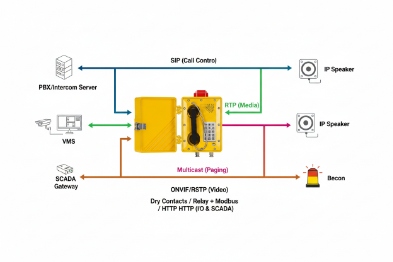
SIP and RTP: the base layer
For multi-vendor systems, the safest approach is to:
- Use standard SIP registration to the same PBX or SBC.
- Avoid vendor-specific SIP extensions unless needed.
- Keep codec lists consistent across endpoints to avoid transcoding errors.
Multicast paging: the paging layer
Multicast 3 is common for industrial paging because one transmitter can reach many endpoints. It is efficient and low-latency. It also needs good network design:
- IGMP snooping and multicast control on switches.
- QoS so multicast announcements do not fight with CCTV.
Video: ONVIF and RTSP for VMS alignment
If video intercom is involved:
This helps control rooms show video pop-up when an intercom call starts or when a door station triggers an alarm.
Dry contacts: simple and reliable OT linkage
Dry contacts are the easiest bridge to:
- Strobe beacons and horns
- PLC inputs for “call active,” “fault,” or “tamper”
- External emergency push buttons that trigger auto-dial or paging
Dry contacts also reduce integration risk because they do not require deep software compatibility.
Modbus: use a gateway when SCADA needs registers
Many telephones do not speak Modbus 5 natively. In those projects, a gateway can map:
- Phone status to Modbus registers
- Alarm events to Modbus coils
- Acknowledge actions from SCADA to phone actions (with care)
A simple rule helps: use Modbus for status visibility, not for safety-critical control unless the whole chain is certified and documented.
| Feature | Best protocol | What it enables | One practical caution |
|---|---|---|---|
| Calling | SIP + RTP | Ex phone ↔ intercom calls | Keep codec plan consistent |
| Paging | RTP multicast | Group announcements | Control multicast flooding |
| Video stream | RTSP | Live video view | Plan bandwidth and QoS |
| Video discovery/events | ONVIF | Camera pop-up workflows | Align event naming and mapping |
| Alarm linkage | Dry contacts | Beacons and PLC alarms | Define relay logic and latching |
| SCADA status | Modbus via gateway | Central status dashboards | Use clear ownership and security |
Interoperability is only useful when call flows are designed for the real site. A tunnel and a refinery handle emergencies differently. The next section focuses on call flows: paging groups, priority override, PTT, and emergency break-in.
How should call flows be designed—group paging, priority override, push-to-talk, and emergency break-in in high-noise zones?
Call flow design decides whether the system helps or confuses people. A perfect network can still fail if the call steps are too complex under stress.
Use a small set of repeatable call flows: normal calling, area paging, emergency hotline, priority override, and emergency break-in. High-noise zones benefit from PTT and auto-answer paging groups, plus local beacon triggers to show call state.
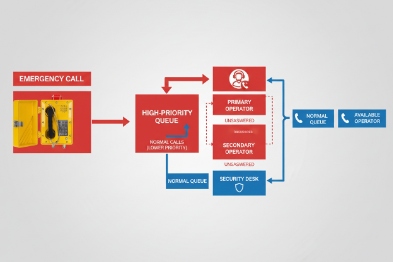
1) Normal calling (point-to-point)
- Ex phone calls a control room extension.
- Intercom stations call defined groups.
Rules:
- Use clear location naming for caller ID.
- Keep dialing simple with speed keys or hotline.
2) Group paging (one-to-many)
- A supervisor station or control room can page a defined area group.
- Paging can be multicast or server-based.
Rules:
- Use zone lists that match the site geography.
- Restrict who can page which zones.
- Keep paging as “auto-answer” endpoints in emergency zones if policy allows.
3) Priority override (when emergency must win)
Priority override means emergency calls and emergency pages can interrupt normal traffic. This is essential in plants with many operators.
Rules:
- Define priority levels, not only “priority on/off.”
- Ensure the PBX and paging server agree on priority.
- Add a log record every time override happens to prevent disputes.
4) Push-to-talk (PTT) for high-noise and fast commands
PTT reduces confusion in noisy zones because it forces a controlled talk pattern. It also reduces echo and double-talk issues.
Rules:
- Use PTT groups for crane areas, loading bays, and process decks.
- Keep group size reasonable so people do not ignore the channel.
- Use short tone prompts to indicate talk permission if supported.
5) Emergency break-in (call intrusion)
Break-in allows an emergency call to force through even when a station is busy. This can be implemented by:
- PBX forced intrusion features
- Paging server priority announcement
- Auto-answer emergency endpoints
Rules:
- Use break-in only for emergency extensions.
- Document it clearly so it is not abused.
- Ensure the behavior is consistent across Ex phones and intercoms.
| Call flow | Trigger | Target | Key setting to get right |
|---|---|---|---|
| Emergency hotline | Lift handset / press key | CCR emergency queue | Failover to backup proxy |
| Area paging | PTT key or control room console | Zone group | Priority level and multicast control |
| Priority override | Emergency event | Any active call/page | Consistent priority mapping |
| Break-in | Emergency call | Busy endpoint | Policy and access control |
| Routine calls | Dial/speed key | Person or group | Codec and QoS consistency |
For high-noise zones, an additional helper is a visible status indicator:
- Flashing LED during active emergency call
- Strobe beacon triggered by relay output during call
This makes it easier for nearby staff to understand that help has been requested.
The last part of integration is compliance and networking. Ex phones live in hazardous zones, but network gear often lives in safe cabinets. The design must follow both safety and IT standards.
What compliance and networking are required—ATEX/IECEx or NEC, PoE/PoE+, QoS/VLAN, dual LAN, and safe-area Ex barriers?
If compliance is wrong, the project stops. If networking is weak, the system “works” until a busy hour. A good design treats compliance and networking as one plan.
Compliance requires matching ATEX/IECEx or NEC Class/Division marking to each location and using certified cable glands and accessories. Networking requires PoE/PoE+ power margin, voice VLAN and QoS (DSCP EF for RTP), dual LAN only when the security policy allows it, and safe-area placement of non-Ex network equipment or the use of certified enclosures and barriers where needed.
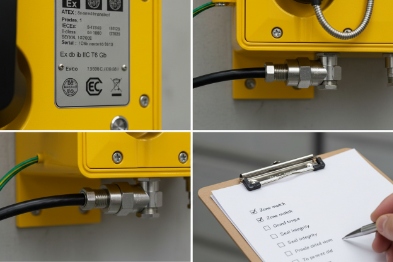
Hazard compliance: match marking to the exact mounting point
A site should list each mounting point and require:
- Zone 1/2 6 or Class I Div 1/2 marking as required
- Gas group and temperature class
- Approved installation instructions, including cable entry rules
The most common compliance failure is not the phone. It is the gland, the adapter, or the cable type.
PoE/PoE+: plan for peak load and cable length
PoE 7 makes installation easier, but it must be designed with margin:
- Include peak load when loudspeakers, beacons, or heaters are present.
- Avoid long copper runs beyond practical limits.
- Monitor PoE events and power consumption.
QoS and VLAN: protect SIP/RTP in mixed traffic
Industrial networks carry CCTV and SCADA bursts. Voice must be protected:
- Put phones in a voice VLAN 8 or a clearly controlled VLAN.
- Mark RTP as DSCP 9 EF and keep signaling in a stable class.
- Trust DSCP only at the correct edge to avoid abuse.
- Ensure uplinks use priority queues and are not congested by video.
Dual LAN: use only with clear security and redundancy intent
Dual LAN can mean two different things:
- A pass-through port for convenience chaining.
- A true redundant network interface.
In industrial plants, pass-through can create security and troubleshooting issues. A safer approach is to use managed industrial switches for chaining, then monitor them. If true redundancy is required, the design should define how failover works and how loops are prevented.
Safe-area placement and barriers
Most network equipment is best placed in the safe area or in controlled cabinets. If an intrinsically safe 10 concept is used for certain circuits, barriers or isolators belong in the safe area or certified enclosures. The project should define what stays in hazardous zones and what stays in safe zones, then keep the wiring and segregation rules clear.
| Requirement | What to specify | Why it matters |
|---|---|---|
| Ex compliance | Marking + approved glands | Prevents site rejection |
| PoE power | Budget with margin | Stops resets and brownouts |
| VLAN/QoS | Voice priority policy | Prevents RTP loss in busy hours |
| Redundancy | Dual proxies and dual paths | Keeps calls during failures |
| Safety segregation | Barriers and safe-area gear | Keeps compliance and maintainability |
Conclusion
Ex telephones integrate with SIP intercom systems when architecture is chosen early, protocols are standardized, emergency call flows are simple and prioritized, and compliance plus QoS are enforced from the switch to the control room.
Footnotes
-
SIP Session Initiation Protocol; a signaling protocol used for initiating, maintaining, modifying and terminating real-time sessions. ↩
-
RTP Real-time Transport Protocol; a network protocol for delivering audio and video over IP networks. ↩
-
Multicast A group communication method where data transmission is addressed to a group of destination computers simultaneously. ↩
-
ONVIF An open industry forum for the development of a global standard for the interface of physical IP-based security products. ↩
-
Modbus A data communications protocol originally published by Modicon (now Schneider Electric) for use with its programmable logic controllers (PLCs). ↩
-
Zone 1/2 Hazardous area classifications defining the probability of explosive gas presence (Zone 1: occasional; Zone 2: unlikely/short duration). ↩
-
PoE Power over Ethernet; technology that passes electric power along with data on twisted pair Ethernet cabling. ↩
-
VLAN Virtual Local Area Network; any broadcast domain that is partitioned and isolated in a computer network at the data link layer. ↩
-
DSCP Differentiated Services Code Point; a field in the IP header that enables different levels of service to be assigned to network traffic. ↩
-
intrinsically safe A protection technique for safe operation of electrical equipment in hazardous areas by limiting the energy available for ignition. ↩








