

In a hazardous area, seconds matter. If SOS reporting is slow or unclear, responders lose time and the caller loses confidence.
An explosion-proof telephone reports SOS by triggering a defined alarm path (voice, paging, relay, or IP events), then repeating, escalating, and logging the event with device identity and accurate time.
What “reporting SOS” really means in the field
An SOS alarm is not only an outbound call. It is a chain of actions that must survive noise, stress, and partial failures. The caller expects three things: the system reacts fast, the system reaches the right people, and the system proves it worked. In practical deployments, an SOS workflow usually includes:
-
Immediate user feedback: LED, tone, or beacon so the caller knows the press was accepted.
-
Primary notification path: most often SIP auto-dial 1 to a dispatch group.
-
Secondary alert path: paging, local relay to a beacon/siren, or a SCADA input.
-
Escalation logic: retries, backup targets, and timeout rules.
-
Evidence: event log with timestamps, device ID, and outcome (answered, failed, acknowledged).
A common failure pattern is a system that can “place a call” but cannot prove delivery. Another is a system that spams events because the button bounces or the network flaps. A good design prevents both. It starts with one clean event, pushes it through clear priorities, and produces one clean record.
Identity and time are part of the alarm, not optional extras
A voice call tells the dispatcher “someone needs help,” but it does not always tell them where. In plants with many Ex stations, the alarm event should carry an identity payload: device name, zone, GPS (if available), MAC, serial, SIP extension, and site tag. This is also why time sync 2 matters. A timestamp that drifts by minutes makes incident review painful and makes SCADA correlation unreliable.
A simple architecture that stays reliable
The most stable pattern is “two layers”:
1) A human-facing layer (call + paging + beacon) to get response moving.
2) A machine-facing layer (webhook/SNMP/syslog/PLC input) to log, correlate, and escalate.
| Layer | Main purpose | Typical technologies | What makes it fail |
|---|---|---|---|
| Human-facing | Immediate response | SIP auto-dial, multicast paging, relay beacon 3 | Wrong priority, codec mismatch, no retry |
| Machine-facing | Proof + automation | HTTP/MQTT, SNMP traps, syslog, PLC input | No time sync, weak auth, noisy event storms |
When these layers are planned together, the SOS button becomes a predictable safety action rather than a “best effort” call.
Next, I break down the most common SOS alarm paths and how they behave under real plant constraints.
Which alarm paths are supported—SIP auto-dial, SIP MESSAGE, multicast paging, and PAGA relay trigger?
In emergencies, the wrong alarm path creates silence. A call that rings the wrong desk or a page that does not play is a system failure.
Most Ex SIP telephones can report SOS through SIP auto-dial to a URI/queue, optional SIP MESSAGE to a server, multicast paging to a group address, and a relay output that can trigger a PAGA controller or local beacon.
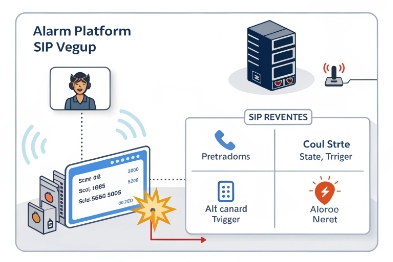
SIP auto-dial: the most direct human response path
SIP auto-dial is the default for a reason. It is simple to explain, easy to drill, and produces a call record. The SOS button triggers a call to:
-
a dispatch console,
-
a ring group,
-
an emergency queue,
-
or a hunt list with escalation.
For reliability, the target should be a logical destination (queue or group), not a single phone. A single desk phone becomes a single point of failure during shift changes.
SIP MESSAGE: useful for metadata, not a replacement for voice
SIP MESSAGE 4 can deliver a short text payload to a server or a dispatch application. It is helpful when the plant wants an immediate event with device ID and location data, even before the voice call is answered. Still, SIP MESSAGE support is not universal across all PBXs and endpoints. When used, it should be treated as an extra signal, not the only SOS method.
Multicast paging: fast broadcast, but strict about endpoints and codecs
Multicast paging is strong when the goal is “tell a group right now.” It avoids setting up many calls. It can also trigger attention tones across multiple stations. The limits are practical:
-
The network must be configured for multicast (IGMP snooping and proper VLAN boundaries).
-
Paging endpoints often accept a limited codec set and fixed packetization.
-
Priority rules must be clear so paging does not get blocked by routine calls.
PAGA relay trigger: the most deterministic “get attention” method
A relay output can trigger a PAGA 5 controller input or a local sounder/beacon. This is the path many safety teams trust because it behaves like classic industrial I/O. It can also work when the call server is degraded, as long as local power exists. The key is to define what the relay means: momentary pulse, latched output, or timed output.
| Path | Best at | Typical weak point | Practical safeguard |
|---|---|---|---|
| SIP auto-dial | Two-way emergency talk | Busy target or wrong routing | Queue + backup target + short timeouts |
| SIP MESSAGE | Fast event + metadata | PBX/app support varies | Use as secondary path |
| Multicast paging | Immediate group alert | Codec/network configuration | Fixed paging profile + IGMP control |
| Relay to PAGA | Deterministic attention | Wiring and proof testing | Periodic proof test + documented reset |
In harsh sites, a combined approach works best: auto-dial for two-way talk, plus a relay-driven beacon or PAGA trigger for immediate attention.
Can SOS send HTTP/MQTT webhooks, SNMP traps, or ONVIF events with timestamps and device IDs?
If the plant runs SCADA, SOC dashboards, or incident software, voice alone is not enough. The alarm must land inside systems that can log and escalate.
Yes, many IP-based Ex telephones can send SOS events as HTTP webhooks or MQTT messages, and some can also produce SNMP traps; ONVIF events are possible on models that support ONVIF event services, especially on video-capable intercom variants.
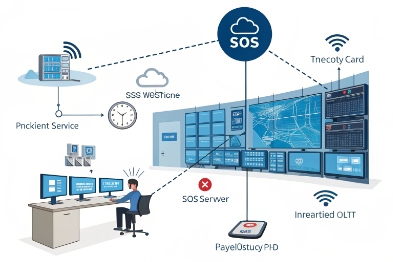
HTTP webhooks: simple and flexible
HTTP is the easiest way to push an SOS event to a platform. A phone can POST to a URL when:
-
SOS is pressed,
-
call is connected,
-
call fails,
-
SOS is cleared.
A good webhook payload includes:
-
device ID (serial, MAC, SIP user),
-
logical location (site/area/zone),
-
event type (SOS_PRESS, CALL_CONNECTED, FAILOVER_USED),
-
timestamp (NTP-synced),
-
correlation ID to link retries and call legs.
Security should not be an afterthought. Even a simple bearer token is better than open endpoints. For high-security sites, client certificates or VPN segmentation are common.
MQTT: strong for OT-style pub/sub
MQTT 6 works well when multiple systems must subscribe to the same SOS topic. It is also efficient on constrained links. A practical approach:
-
Topic:
plant/area/deviceId/sos -
QoS: use QoS 1 when delivery matters
-
Payload: JSON with timestamp, device ID, state, and reason
-
Retain: optional retained “active alarm” state for dashboards
MQTT needs broker governance. If the broker is down, the plant should still have the human-facing alarm path.
SNMP traps: classic NMS integration
SNMP traps 7 can inform network monitoring tools that an SOS event occurred. This is common when the plant already uses SNMP for switches and servers. SNMPv3 is preferred when security policy requires authentication and encryption. SNMP is great for alerting and visibility, but it is not ideal for rich event workflows unless an event collector enriches the data.
ONVIF events: possible, but model-dependent
ONVIF 8 is most common in video security ecosystems. Some IP intercom and video door stations support ONVIF event services so VMS platforms can react to button presses. For Ex deployments, this is relevant mainly when the unit is a video-capable Ex intercom or integrates tightly with CCTV workflows. If the plant wants ONVIF, it should be confirmed as a tested feature, not assumed.
| Method | Data richness | Best fit | What to verify |
|---|---|---|---|
| HTTP webhook | High | Incident platforms, SCADA gateways | Auth method, retry policy, payload fields |
| MQTT | High | OT pub/sub automation | Broker security, QoS, retained state design |
| SNMP trap | Medium | NMS alerting | Trap OIDs, v3 support, rate limiting |
| ONVIF event | Medium | VMS/CCTV workflows | ONVIF event support and tested VMS behavior |
The best practice is to treat these as event channels, while the voice call remains the response channel. Then the system can prove what happened with timestamps and IDs.
How are priorities, retries, and acknowledgments configured—preemption, queueing, debounce, and fail-safe fallback?
A real plant generates noise, not only acoustic noise. Network jitter, busy lines, and human delays all happen. If SOS logic is not planned, the system either fails silently or floods the network with repeats.
SOS reliability comes from clear priority rules (preemption and queueing), controlled retries with backoff, explicit acknowledgments, strong debounce, and fail-safe fallback actions like local relay activation when IP paths fail.
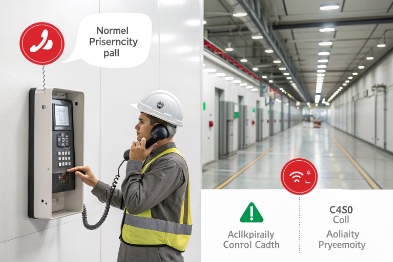
Priority and preemption: decide who can interrupt whom
In many safety workflows, an SOS call must override routine calls. That can be implemented as:
-
higher call priority on the PBX,
-
emergency queue rules that jump ahead,
-
paging override that interrupts standard pages,
-
barge-in rules on endpoints (with clear tones).
The key is consistency. If one phone preempts and another does not, users lose trust fast. Priority should also be limited to authorized endpoints. Not every phone should be able to barge-in to everyone.
Retries and escalation: repeat with discipline
Retries should be structured, not frantic:
-
Try primary destination for a short window.
-
If not answered, fail over to a backup group.
-
If still not answered, trigger a broader page or notify a supervisor path.
-
Stop after a defined number of attempts, then leave a clear “alarm active” state.
Backoff matters. Without it, poor links create an event storm. With it, the system stays stable and logs remain readable.
Acknowledgment: the system must know when help is engaged
Acknowledgment can be:
-
call answered by dispatch (SIP 200 OK plus RTP flow),
-
DTMF acknowledgment from the dispatcher,
-
button press on the dispatch console,
-
SCADA acknowledgment after receiving a webhook.
The most useful approach is to separate delivery from ack:
-
Delivery: “the call reached the queue” or “the page was sent.”
-
Ack: “a responder accepted responsibility.”
This avoids false confidence when a call rings but nobody picks up.
Debounce and hold logic: stop false alarms without slowing true alarms
Mechanical bounce, vibration, and gloves can create accidental triggers. Debounce 9 prevents multi-events from one press. In high false-trigger zones, a short hold-to-confirm can help, but it must provide clear feedback (LED blink) so users do not press repeatedly.
Fail-safe fallback: define what happens when the network breaks
Fail-safe is about predictable behavior:
-
If SIP registration is down, still trigger local beacon relay.
-
If webhook fails, log locally and try again later.
-
If the call fails, trigger a paging tone or alternate path.
| Control element | Recommended approach | Why it helps | Common mistake |
|---|---|---|---|
| Preemption | Emergency profile overrides routine | Guarantees emergency delivery | Overusing preemption creates chaos |
| Queueing | SOS calls go to a monitored group | Avoids single-person dependency | Routing to a single extension |
| Retries | Limited attempts + escalation | Prevents silent failure | Unlimited retries causing storms |
| Ack | Separate delivery vs responder ack | Prevents false confidence | Treating “sent” as “handled” |
| Debounce | One clean event per press | Clean logs, stable PLC input | Multiple triggers from bounce |
| Fail-safe | Local relay/beacon on failure | Works even during partial outages | No local feedback when PBX is down |
When these rules are defined, the SOS alarm becomes predictable. Predictability is the real safety feature.
Can SOS alarms integrate with PLC/SCADA via dry contact I/O, while logging to syslog with NTP-synced time?
A plant often wants two outcomes: the PLC sees a hard signal it can trust, and the IT side gets logs that match other systems. That is the sweet spot for audit and response.
Yes, SOS can integrate to PLC/SCADA using dry contact inputs/outputs, while also logging events to syslog with NTP-synced timestamps, so OT gets deterministic signals and IT gets searchable records tied to the same incident timeline.
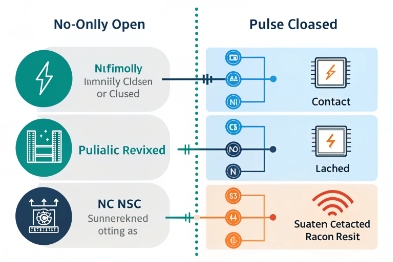
Dry contact I/O: the OT-friendly path
Dry contact outputs can drive PLC digital inputs for:
-
SOS active,
-
call connected,
-
fault state,
-
beacon control.
Dry contact inputs can also be used for external triggers:
-
external SOS mushroom button,
-
door interlock,
-
local alarm sensor.
For PLC integration, the most important design choice is state behavior:
-
Momentary pulse (easy to detect but can be missed if scan timing is poor),
-
Latched alarm (best for safety because it persists until reset),
-
Timed on (balance between pulse and latch).
Many hazardous sites prefer latched alarms with a controlled reset method, because it reduces “alarm disappeared” confusion.
Syslog: centralized evidence and troubleshooting
Syslog 10 is a simple way to stream event logs to a central server. The plant can search by:
-
device ID,
-
zone,
-
timestamp,
-
event type,
-
SIP call result.
A useful syslog strategy includes:
-
rate limiting to prevent floods during network instability,
-
clear message templates,
-
tagging severity levels (info, warning, critical),
-
retaining logs long enough for incident review.
NTP time sync: the glue that makes logs believable
Without time sync, logs do not line up. A good plan includes:
-
NTP servers reachable from the phone VLAN,
-
periodic re-sync,
-
a drift alarm when time sync is lost,
-
UTC vs local time policy (UTC is easier for multi-site correlation).
Putting it together: one incident, one timeline
When SOS is pressed, the PLC sees a stable input, the syslog server records the event, and the dispatch system receives the call and an optional webhook. All of those should share the same timestamp base so incident review is fast.
| Output | Where it lands | What it is used for | Best practice |
|---|---|---|---|
| Relay (dry contact) | PLC/SCADA DI | Deterministic alarm action | Latch until reset + proof test interval |
| Syslog | Log server/SIEM | Audit and troubleshooting | NTP sync + message templates + rate limit |
| SIP call event | PBX/CDR | Voice response and records | Queue targets + failover rules |
| Webhook/MQTT | Platform/SCADA gateway | Automation and dashboards | Auth + retries + correlation ID |
In my deployments, the “two-layer” approach is the most stable: PLC gets a hard, local signal, and syslog plus SIP provides traceable evidence. That combination keeps both OT and IT teams comfortable.
Conclusion
An Ex telephone reports SOS by combining a primary voice path with secondary event and I/O paths, then enforcing priorities, retries, acknowledgments, and time-synced logging for predictable emergency response.
Footnotes
-
A call setup method using Session Initiation Protocol to connect directly to a destination. [↩] ↩
-
Protocol for synchronizing clocks of computer systems over packet-switched, variable-latency data networks. [↩] ↩
-
Network technology for delivering a single stream of information to multiple receivers simultaneously. [↩] ↩
-
SIP method for sending instant messages or short text payloads within a SIP session. [↩] ↩
-
Public Address and General Alarm system used for mass notification in industrial settings. [↩] ↩
-
Lightweight messaging protocol for small sensors and mobile devices, optimized for high-latency networks. [↩] ↩
-
Notifications sent by SNMP agents to a manager when significant events occur on a managed device. [↩] ↩
-
Global open industry forum for the development of a global standard for the interface of IP-based physical security products. [↩] ↩
-
Technique to ensure only one digital signal is registered for a single mechanical switch press. [↩] ↩
-
Standard for message logging that allows separation of the software that generates messages from the system that stores them. [↩] ↩








