
What built-in self-diagnostics can an explosion-proof SIP phone provide for fault detection?
When a hazardous-area phone goes silent, every minute turns into risk, downtime, and finger-pointing between IT and maintenance. Built-in self-tests stop that spiral early.
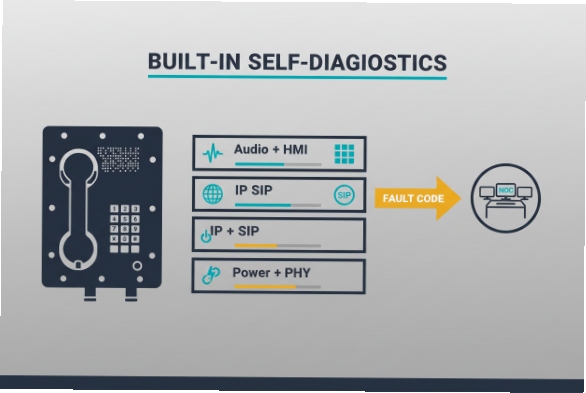
A good explosion-proof SIP phone can self-check power, network, SIP status, audio, and user interface parts, then report clear fault codes to NOC tools so the real cause is found fast.
A practical self-diagnostics framework that works in hazardous-area sites?
In the field, hazardous-area sites 1 is only useful if it answers one question: is the failure in the network, the power path, the SIP service, or the phone hardware. The fastest way to get there is to treat the phone like three stacked layers: power + PHY, IP + SIP, and audio + HMI (human interface). If each layer has a test and a clear alarm output, fault isolation becomes repeatable.
What “built-in” should mean on an industrial EX SIP endpoint
A phone can do more than show “Register Failed.” It can keep timestamps, measure retry loops, record last-known-good parameters, and store a small “black box” of events. For PoE models 2, it can detect undervoltage events and repeated power cycles that often look like “random SIP drops” from the server side. IEEE PoE standards 3 are built around detection and classification stages, which makes power faults observable if the device exposes them in logs or alarms. :contentReference[oaicite:0]{index=0}
Why this matters more in hazardous areas
Hazardous-area sites add two constraints: access is controlled (permits, shutdown windows), and repairs often require certified procedures. That means the phone must help you decide what not to do (for example, do not swap hardware if the root cause is a VLAN change upstream). Clear diagnostics reduce truck rolls and reduce the temptation to “open and poke,” which is the wrong move in EX zones 4.
| Diagnostic layer | What it verifies | Typical evidence | What it helps you decide |
|---|---|---|---|
| Power + Ethernet PHY | Power stability, link, speed/duplex, packet loss hints | PoE brownout counters, link flap logs | “Check switch port / cabling” vs “phone hardware” |
| IP + SIP signaling | DHCP/DNS reachability, registration, call setup | SIP response codes, retry timers, NTP time sync | “Network/SBC/PBX issue” vs “endpoint config issue” |
| Audio + HMI | Mic/speaker/handset path, keypad/hook, internal codec | loopback test, DTMF test, stuck key detection | “Audio hardware” vs “RTP path” vs “user interface fault” |
If the phone reports each layer separately, it becomes simple to set alarm rules: power instability is a plant OT issue, SIP auth errors are a UC issue, and audio path failures are a device issue.
Now, the next step is to get specific about the faults that can be detected automatically, and how they map to actionable alarms.
The most important habit is to treat every alarm as a hypothesis, then confirm it with one more test so the diagnosis is solid and fast.
Which faults can the phone automatically detect, such as SIP registration failure, PoE power issues, mic/speaker faults, and keypad errors?
A “dead phone” report often hides four different failures. If the endpoint can self-detect each one, the first response is no longer guesswork.
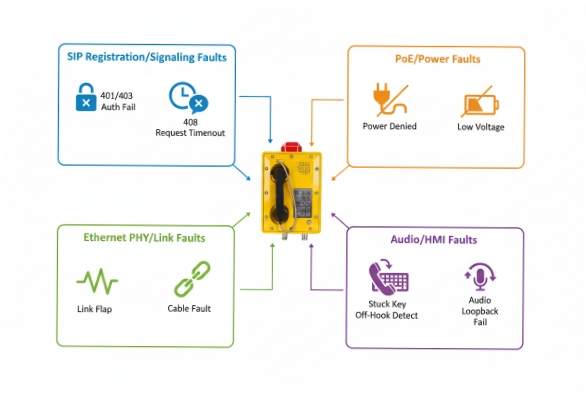
Most industrial SIP phones can automatically detect PoE/link problems, SIP registration and auth failures, audio path faults, and keypad or hook-switch errors, then log each event with a timestamp and cause code.
SIP registration and signaling faults (what “Register Failed” really means)
A capable phone tracks registration state machines: last REGISTER time, next retry, DNS target, and the last SIP response code. SIP status codes 5 are defined in SIP core behavior, so logging the exact code is valuable for triage (401/403 auth issues, 408 timeouts, 5xx server faults). :contentReference[oaicite:1]{index=1}
Practical auto-detections include:
- DNS resolution 6 / wrong NAPTR/SRV/A record (fails before SIP even starts)
- Registrar unreachable (timeouts, repeated retries)
- Auth failures (credential mismatch, realm mismatch)
- Clock drift effects (TLS failures, cert validation issues, nonce problems), often visible when NTP health 7 is unhealthy
PoE power and Ethernet physical faults
PoE problems are common in industrial cabinets: power budget limits, damaged patch cords, water ingress in connectors, or long cable runs. Since PoE includes detection/classification and controlled inrush behavior, phones and PoE interfaces can often expose “under-voltage,” “power denied,” or “reboot due to brownout” patterns in logs. :contentReference[oaicite:2]{index=2}
Auto-detections that matter:
- Link down / link flapping (often a cable or gland issue)
- PoE denied / insufficient class (switch budget or port config)
- Repeated cold boots (power instability that masquerades as SIP instability)
Mic/speaker/handset and keypad/hook faults
Explosion-proof phones often use rugged keypads and sealed audio parts. The failure modes are still predictable: water ingress, corrosion, stuck keys, worn hook-switch, or a damaged handset cord. Good firmware can run:
- DTMF/keypad self-test (detect stuck keys or out-of-range scans)
- Hook-switch state monitoring (off-hook stuck vs normal transitions)
- Audio loopback tests (internal codec loopback, or “play tone + measure return” where supported)
- Speaker load detection (where hardware supports it)
| Fault category | What the phone can detect automatically | What it looks like remotely | Fast first action |
|---|---|---|---|
| SIP registration failure | No response, auth reject, server error, wrong DNS target | “Unregistered” + last code + retry timer | Check PBX/SBC reachability, credentials, DNS |
| PoE power issue | Brownout reboot loop, power denied, low voltage | Frequent reboot logs, link flap | Check switch PoE budget/port errors/cable |
| Mic/speaker fault | Loopback fail, missing tone, abnormal levels (if supported) | Audio test failure flag | Run controlled test call + loopback |
| Keypad/hook error | Stuck key, no key scan, hook stuck | DTMF missing, “key error” event | Inspect keypad seal, hook switch, cord strain |
The goal is not “more logs.” The goal is one clean fault code that points to the right team with the right spare parts.
Can the phone generate alarms to NOC systems via SIP events, SNMP traps, syslog, or HTTP callbacks?
If alarms only live on the phone’s screen, they do not reduce downtime. NOC-grade alerting needs machine-readable events, predictable severity, and a way to correlate many endpoints.
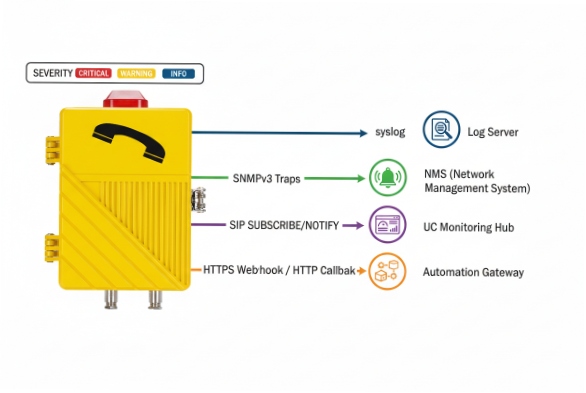
Yes. Industrial SIP phones can push alarms using syslog, SNMP traps, SIP SUBSCRIBE/NOTIFY events, or HTTP callbacks, so NOC tools can alert on power, network, and SIP health in real time.
Syslog: the most universal “always-on” channel
Syslog 8 is simple, fast, and easy to centralize. Severity levels are standardized (0–7), so it is natural to map alarms like “PoE brownout” to Critical, and “config changed” to Notice or Info. :contentReference[oaicite:3]{index=3}
Many industrial voice devices explicitly support syslog-based alarm reporting, and that matters when hazardous-area access is limited. :contentReference[oaicite:4]{index=4}
SNMP traps: best for NMS dashboards and port-level correlation
SNMP traps 9 let the phone act like a managed device in the same tooling used for switches and routers. SNMP notification operations are standardized in SNMP protocol operations. :contentReference[oaicite:5]{index=5}
In practice, traps are excellent for:
- endpoint reachability state changes
- temperature / tamper (if supported)
- registration state change
- reboot reason codes
SIP events: great when UC teams own monitoring
SIP has a standard SIP events 10 notification framework using SUBSCRIBE and NOTIFY, which can be used when the PBX/SBC is the monitoring hub. :contentReference[oaicite:6]{index=6}
This is useful when the same SIP infrastructure that routes calls also wants endpoint health signals.
HTTP callbacks (webhooks): best for modern OT/IT integration
HTTP callbacks are simple to consume in SCADA/CMMS/ITSM pipelines. The phone can post JSON like {device_id, fault_code, severity, timestamp} to a gateway that fans out to Teams/email/ticketing. This method is also friendly to air-gapped or segmented networks when you can only allow outbound HTTPS.
| Method | Best for | Strengths | Watch-outs |
|---|---|---|---|
| Syslog | SIEM + log analytics | Simple, high volume, easy correlation | Needs correct severity mapping :contentReference[oaicite:7]{index=7} |
| SNMP traps | NMS (PRTG, SolarWinds, Zabbix) | Familiar for network teams | MIB design varies by vendor :contentReference[oaicite:8]{index=8} |
| SIP events | UC-owned monitoring | Native to SIP infrastructure | Event package support differs :contentReference[oaicite:9]{index=9} |
| HTTP callback | OT/IT workflows | Easy integration, structured payloads | Requires endpoint security and allowlists |
A simple rule helps: use syslog as the baseline, then add SNMP or HTTP for structured alarms, depending on which team owns first response.
How can remote logs and test calls be used to isolate network vs. device failures in hazardous-area sites?
In hazardous sites, the best troubleshooting is the kind that avoids a field visit. Remote logs and controlled test calls can narrow failures to one of three places: the phone, the network path, or the call control platform.
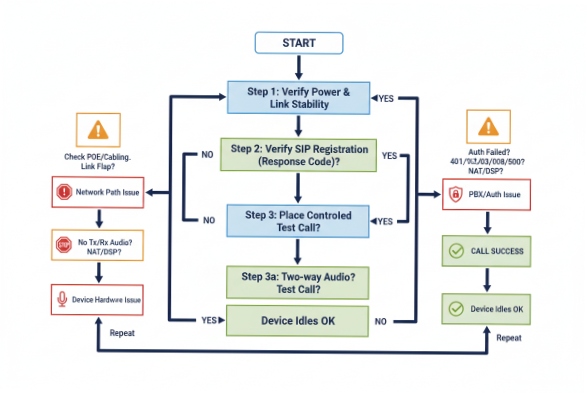
Use a repeatable workflow: confirm power/link stability, confirm SIP registration with exact response codes, then run a controlled test call that separates SIP signaling from RTP audio to pinpoint network vs. device faults.
Step 1: Prove power and link stability first
Before touching SIP, check for reboot loops and link flaps. If syslog shows repeated boot messages or PoE undervoltage patterns, it is usually not a SIP problem. Cisco’s PoE troubleshooting guidance highlights how PoE issues can present at the switch port level, so pulling switch logs and counters is part of the same diagnostic chain. :contentReference[oaicite:10]{index=10}
Step 2: Use registration evidence, not opinions
If the endpoint logs show a clear SIP response code, troubleshooting gets faster:
- 401/403 points to credentials or auth policy issues
- 408/timeout points to reachability, routing, ACL, or SIP ALG behavior
- 5xx points to server-side failure or overload
SIP’s standard behavior and response codes are defined in the core spec, so it is fair to build runbooks around these codes. :contentReference[oaicite:11]{index=11}
Step 3: Run “test calls” that isolate SIP from audio transport
A controlled test call can answer two separate questions:
1) Can signaling complete? (INVITE/200 OK/ACK completes)
2) Can audio flow both ways? (RTP path is healthy)
A simple technique used in many VoIP teams is: place a call to an IVR/echo service (or a known test extension), then compare:
- SIP ladder success (call sets up) vs failure (call never connects)
- one-way audio (RTP blocked in one direction) vs no audio (codec/RTP/port issue) vs distorted audio (packet loss/jitter)
Step 4: Correlate with upstream logs to separate “device” from “path”
For hazardous-area sites, correlation is the difference between a half-day and five minutes:
- Phone syslog shows “link down” at 10:03:21
- Switch log shows “PoE power denied” at 10:03:20
- PBX shows no REGISTER after 10:03:22
That sequence points to a power event, not a SIP bug.
| Symptom | Registration state | Test call result | Most likely cause | Evidence to pull remotely |
|---|---|---|---|---|
| Phone unreachable | Unknown | Not possible | Power/cable/switch port | Switch PoE logs + link counters :contentReference[oaicite:12]{index=12} |
| Unregistered | Fails with 401/403 | Not possible | Credentials / auth policy | Phone SIP log + PBX auth log :contentReference[oaicite:13]{index=13} |
| Registered | OK | Call connects, no audio | RTP blocked / NAT / firewall | SBC media logs, firewall rules |
| Registered | OK | One-way audio | Asymmetric routing / QoS issue | PCAP at SBC, VLAN/QoS stats |
| Registered | OK | Audio loopback fails | Endpoint audio hardware | Device self-test + local tone test |
A short story from a past refinery job still sticks: a “bad batch of phones” turned into a single PoE switch hitting its budget during shift change. The proof was in reboot timestamps and switch port logs, not in guesswork.
What preventive maintenance checks should I include to reduce downtime for industrial explosion-proof phones?
Preventive maintenance for explosion-proof SIP phones should focus on what fails most often: power quality, sealing integrity, corrosion, configuration drift, and forgotten monitoring paths.
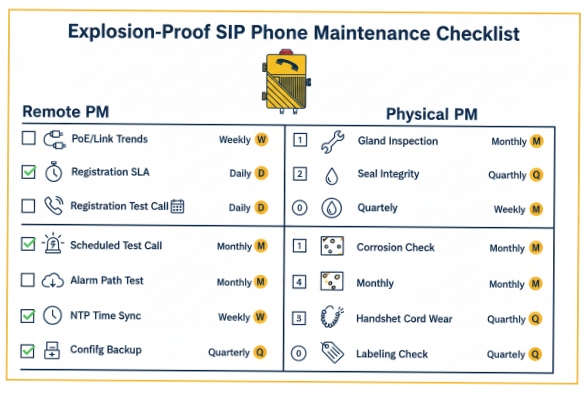
A strong PM checklist includes periodic PoE/link checks, registration health verification, scheduled test calls, seal and cable-gland inspections, firmware/config backup routines, and alarm path tests to the NOC.
Keep the checklist split: safety, reliability, and observability
In EX environments, safety rules always win. Any physical work must follow site permits and the device’s certification limits. That said, many high-value checks are non-invasive and can be done remotely.
Remote PM checks (weekly/monthly) that cut downtime fast
Remote checks scale across many endpoints:
- PoE stability trend: count reboots, link flaps, and voltage-related events
- Registration SLA: track time registered vs unregistered, plus last SIP code
- Scheduled test call: a daily or weekly test to a known endpoint/IVR
- Alarm channel test: send a test syslog/SNMP/HTTP event to confirm the NOC still receives it
- Time sync: verify NTP health so logs and TLS stay reliable
- Config drift control: backup configs and track changes before outages
Syslog is especially useful because severity and facility mapping is standard, so alerting rules can stay consistent across sites. :contentReference[oaicite:14]{index=14}
Physical PM checks (quarterly/turnaround windows)
These checks reduce “mystery failures” caused by the environment:
- Inspect cable glands, strain relief, and conduit seals
- Check grounding/bonding where required by site practice
- Inspect enclosure gaskets and keypad membrane integrity
- Check handset cord wear and hook-switch action
- Look for corrosion on external fasteners and mounting points
- Verify labeling and asset tags are readable for fast dispatch
Spares and runbooks (the part teams forget)
Downtime drops when spares and instructions are ready:
- Keep a small set of spare handsets, cords, and mounting parts
- Store a known-good config template per site
- Maintain a one-page runbook: “If fault code X, do Y, then Z”
| PM item | Frequency | What it prevents | How to verify |
|---|---|---|---|
| PoE/link stability review | Weekly | Reboot loops, silent drops | NOC trend of reboots/link flaps |
| Registration health report | Daily/Weekly | Missed inbound calls | % time registered + last code :contentReference[oaicite:15]{index=15} |
| Test call + audio check | Weekly | Undetected audio failures | Echo/IVR call results |
| Alarm path test (syslog/SNMP/HTTP) | Monthly | “Monitoring blind spots” | NOC receives test event :contentReference[oaicite:16]{index=16} |
| Seal/gland/cord inspection | Quarterly | Water ingress, corrosion | Visual inspection + torque per site practice |
| Firmware + config backup | Quarterly | Known bugs, config loss | Version audit + restore drill |
The mindset is simple: every PM step should either prevent a common failure, or shorten the time to diagnose it when it still happens.
Conclusion
Built-in diagnostics plus NOC-ready alarms turn hazardous-area SIP phones from “mystery endpoints” into predictable assets that fail loudly, clearly, and fast to fix.
Footnotes
-
Explore international standards for explosive atmospheres and equipment certification protocols for global safety. [↩] ↩
-
A comprehensive resource for understanding Power over Ethernet technology and ecosystem interoperability standards. [↩] ↩
-
Official portal for IEEE standards governing power delivery and data communication over Ethernet cables. [↩] ↩
-
Detailed guidance on classification and protection methods for electrical equipment in potentially explosive environments. [↩] ↩
-
Official IANA registry of Session Initiation Protocol response codes used for communication troubleshooting. [↩] ↩
-
Educational guide explaining how the Domain Name System translates human-readable addresses into machine IP addresses. [↩] ↩
-
The official homepage for the Network Time Protocol, essential for synchronizing system clocks across networks. [↩] ↩
-
Technical specification for the Syslog protocol used for transmitting event messages across IP networks. [↩] ↩
-
Learn how to monitor network infrastructure using SNMP traps for real-time fault detection and reporting. [↩] ↩
-
Deep dive into the IETF RFC for SIP-Specific Event Notification mechanisms for endpoint status monitoring. [↩] ↩








