
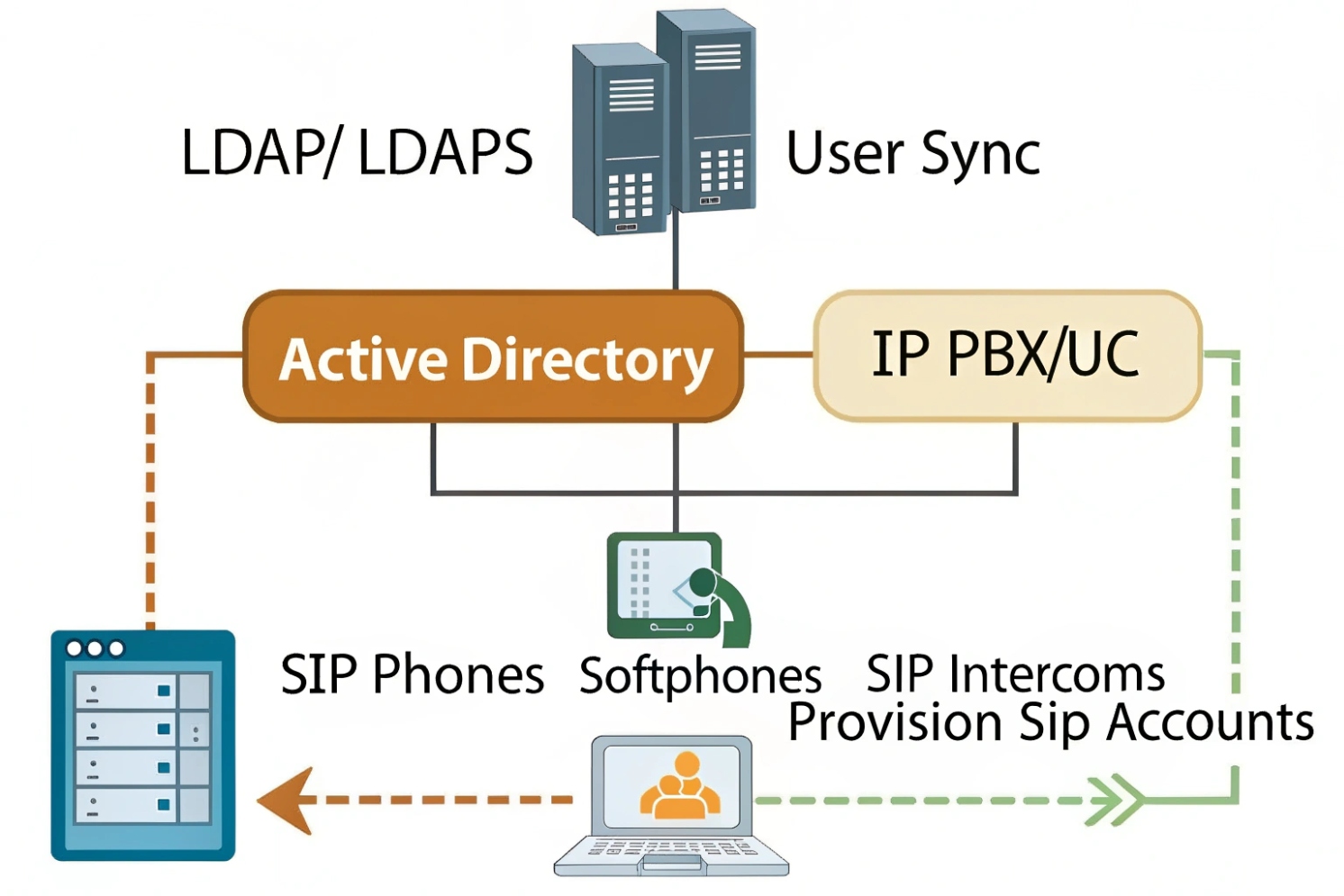
Many SIP projects feel smooth in the lab, then turn messy in production because user accounts are scattered across PBX, apps, and dashboards.
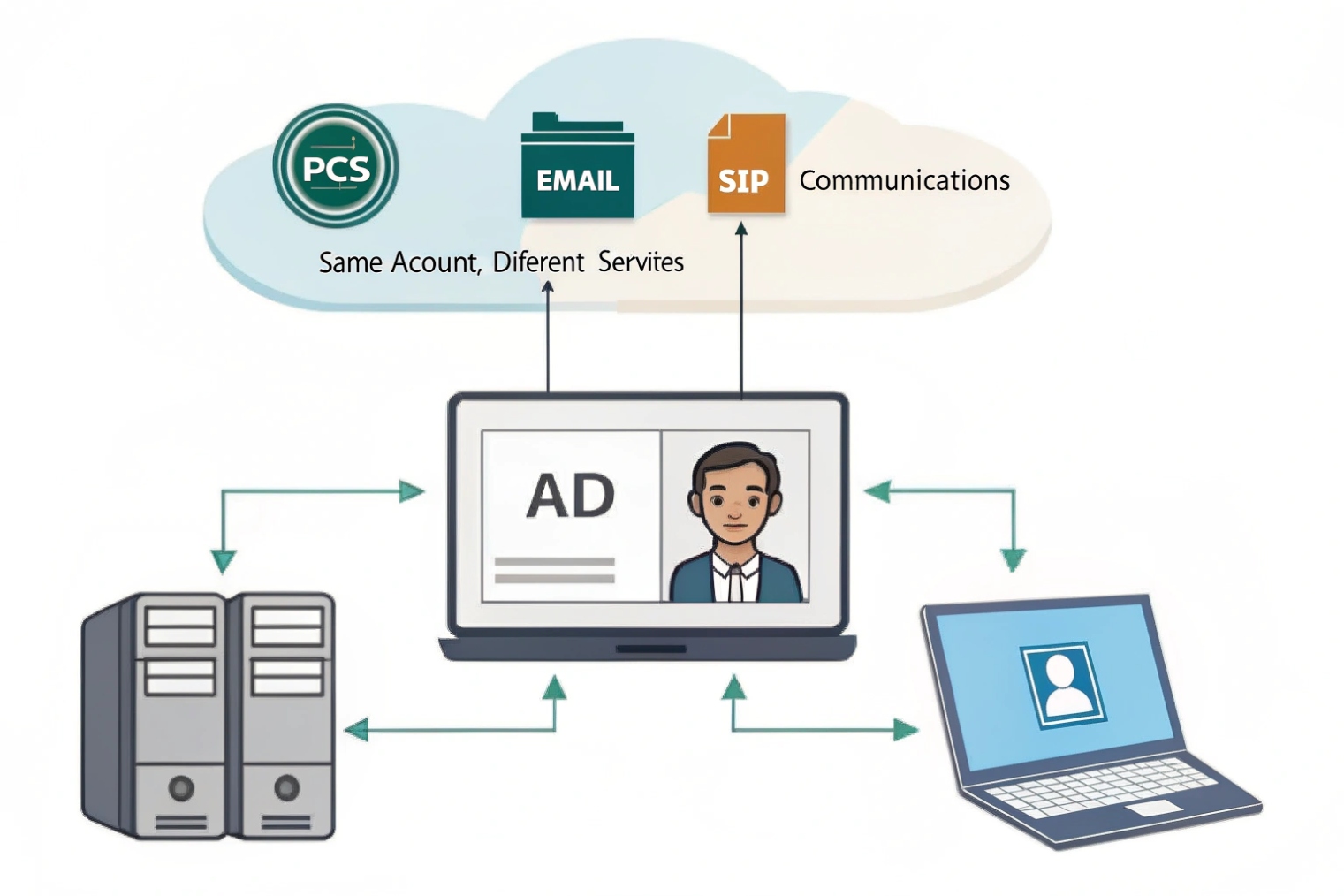
Active Directory is the identity directory that centralizes users and groups, so your IP PBX and SIP apps can authenticate, sync profiles, and apply permissions with the same company credentials.
AD is the identity “source of truth” for SIP and UC
Active Directory (AD) is Microsoft’s Active Directory Domain Services (AD DS) 1 directory service. It stores users, groups, and devices. It also controls authentication and authorization across the business network. In a SIP communication system, AD becomes the place where identity lives, while the PBX and SIP platforms become the places where calling features live.
When AD is not integrated, every platform builds its own users. That creates drift. A user leaves the company, but the SIP account stays active. A user changes department, but the portal role never changes. A helpdesk adds new hires twice, and one account gets a weak password. These are normal problems, and AD is the normal fix.
Most SIP systems do not “run on AD.” They integrate with AD in two common ways:
- Directory sync and lookup via LDAP (Lightweight Directory Access Protocol) 2 or LDAPS, so the PBX can search names, import users, and map fields like display name, email, and phone number.
- Central authentication and SSO via ADFS or Azure AD (Entra ID) using SAML 2.0 single sign-on 3 or OpenID Connect (OIDC) 4, so web portals and apps can use domain credentials and MFA policies.
In practical PBX work, AD integration saves time because provisioning becomes repeatable. It also reduces risk because deprovisioning becomes reliable. When a user is disabled in AD, access can be removed from portals and apps, and the SIP registrations can be revoked by policy.
| AD element | What it controls in a SIP environment | Why it helps operations |
|---|---|---|
| Users | Login identity and profile fields | One place to manage people |
| Groups | Roles, features, and access scope | Clean permission mapping |
| OUs | Which users sync to PBX | Keeps service accounts out |
| Policies (lockout/MFA) | App access behavior | Stops weak login habits |
| AD CS certificates | TLS, 802.1X, trusted endpoints | Stronger device security |
That is the core idea: AD keeps identity consistent, and the PBX uses that identity to stay clean as the system grows.
Next, the real work starts where most admins spend time: user management inside the IP PBX.
How does Active Directory integrate with IP PBX user management?
User management becomes expensive when the PBX has its own identity island. AD integration is how that island connects back to the company directory.
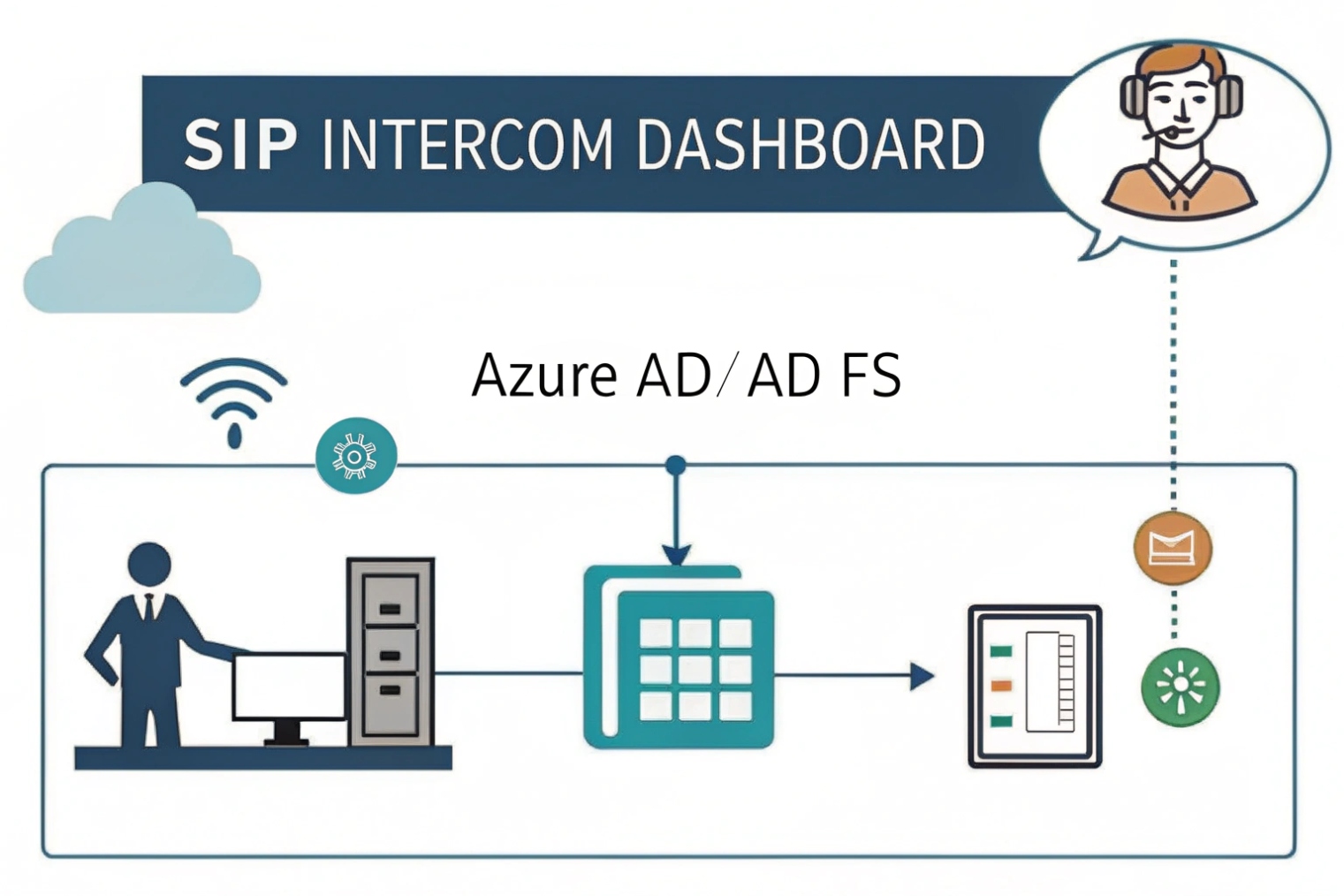
AD integrates with IP PBX user management through LDAP/LDAPS directory sync, attribute mapping, and deprovision rules, so users, names, and permissions stay aligned with domain records.
LDAP sync vs “real login” integration
Most IP PBX platforms offer at least an LDAP directory connection. This usually supports:
- Searching the directory from the phonebook
- Importing users into the PBX
- Updating user fields on a schedule
This is different from SSO. LDAP sync keeps profiles in sync. It does not always mean users log in with AD credentials. Some PBXs do support LDAP authentication for portal login, but many modern platforms prefer SAML/OIDC for web SSO and keep LDAP only for directory queries.
Attribute mapping: where PBX data comes from
A stable integration depends on clean mapping. The PBX needs to know which AD attributes to read. Common mappings include:
displayName→ PBX display namemail→ voicemail-to-email and portal notificationstelephoneNumberor custom attributes → DID or extension referencesdepartment/company→ grouping for directories and reports
Some teams store extensions in a dedicated attribute so the PBX can auto-assign numbers. That can work well if there is a strict numbering plan and clear ownership of changes. If extension planning is still moving, it is safer to keep extensions inside the PBX and only sync names and emails from AD.
| PBX field | Typical AD attribute | Notes for clean operation |
|---|---|---|
| Full name | displayName | Keep naming standard across sites |
| Needed for voicemail delivery and MFA notices | ||
| Extension | ipPhone / telephoneNumber / custom | Avoid conflicts and duplicates |
| Department | department | Useful for directories and reporting |
| Login username | sAMAccountName / userPrincipalName | Choose one and stay consistent |
Deprovisioning: the part that matters most
The best AD integration is the one that removes access when people leave. A clean approach is:
- Disable user in AD → user cannot SSO to portals and apps
- Directory sync marks user inactive → PBX blocks SIP registration or flags for admin action
- Optional automated cleanup → remove queue membership and voicemail delivery
Some ecosystems also support SCIM provisioning (System for Cross-domain Identity Management) 5 for user lifecycle automation. Even without SCIM, scheduled sync plus a policy checklist can keep accounts from lingering.
AD integration is not only for convenience. It is also a control plane. When identity control is solid, the next question is easier: can the same identity model secure SIP intercom dashboards?
Can I use AD for SSO on SIP intercom dashboards?
Intercom dashboards often sit on a web UI. That web UI is where door access logs, video previews, and event rules live. If the dashboard uses local accounts, it becomes a weak link.
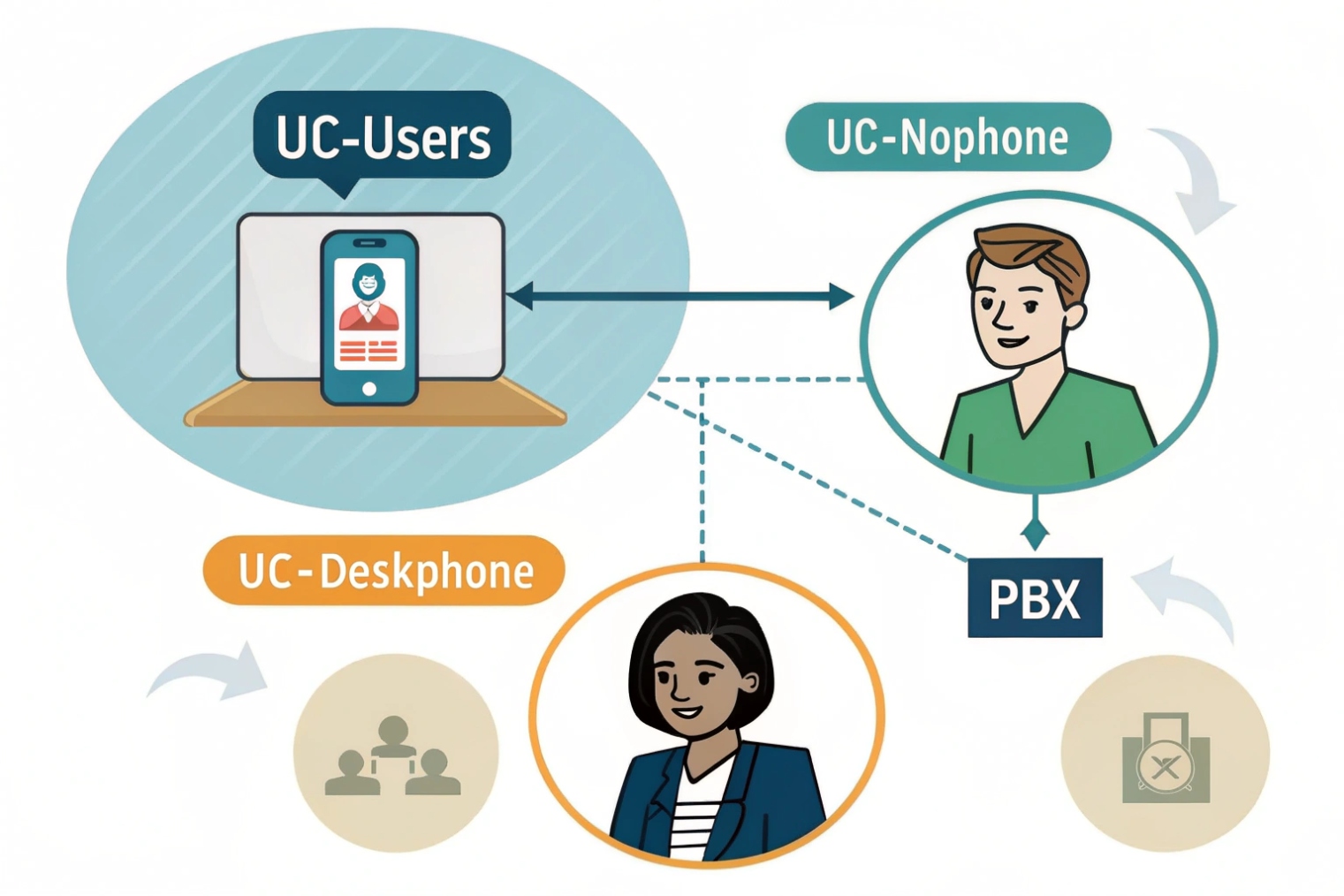
Yes, AD can support SSO for SIP intercom dashboards, but it is usually done through SAML/OIDC via ADFS or Azure AD, not by “AD alone,” while LDAP is often used for directory lookup or basic authentication.
What “SSO with AD” usually means in real deployments
SSO needs an identity provider that can issue tokens to web apps. On-prem AD is the directory, but ADFS or Azure AD (Entra ID) is often the SSO layer. Many intercom dashboards and device management portals support:
- SAML 2.0 for enterprise SSO
- OIDC/OAuth 2.0 for modern app login
- LDAP/LDAPS for username/password checks (not true SSO, but centralized credentials)
If the dashboard only supports LDAP login, it can still use AD credentials, but users will not get the full SSO experience. They will still type passwords, and MFA may not apply unless the vendor supports it in another way.
Why SSO matters for intercom projects
Intercom systems often involve multiple roles:
- Security operators who need live access and quick controls
- Facility admins who need configuration access
- IT admins who need integration and logs
- External contractors who need temporary access
SSO makes access more controlled because it brings AD policies into the dashboard login. Password rules, lockout rules, and MFA can apply. It also reduces shared passwords, which is a common issue in security rooms.
| Dashboard access method | Security strength | Best fit |
|---|---|---|
| Local accounts only | Weak | Small sites with no IT policies |
| LDAP auth to AD | Medium | Simple setups, limited SSO support |
| SAML/OIDC via ADFS/Azure AD | Strong | Enterprise dashboards and compliance needs |
Practical SSO tips that avoid common mistakes
A stable setup usually includes:
- Separate admin roles from operator roles
- Conditional access for remote logins
- Short session timeouts for shared workstations
- Audit logs exported to SIEM when required
SSO is great, but it works best when permissions are mapped cleanly. That leads to the next question: should AD groups drive extensions and PBX permissions?
Should I sync AD groups to assign extensions and permissions?
Permission sprawl is the silent killer of PBX and UC systems. If roles are assigned by hand, they drift over time.
Yes, syncing AD groups is a strong way to assign PBX roles and permissions, but extension assignment should follow a clear numbering plan, and group mapping should be scoped with OUs to avoid syncing the wrong accounts.
Group mapping works best for roles, not for everything
AD groups are perfect for “who should have what access.” They are less perfect for “what extension should this person get,” unless the business already has strict rules.
Good fits for AD group mapping:
- Admin portal access
- Call recording permission
- Queue and ring group membership
- International dialing permission
- Paging and broadcast access
- Intercom dashboard access tiers
Extension assignment is different. Extensions are identifiers tied to sites, dial plans, and sometimes regulations. In many deployments, extensions stay PBX-managed, while AD provides identity fields and role fields.
Use OUs and group scope to avoid syncing noise
A common mistake is syncing the whole directory. That pulls in service accounts, lab users, and contractors. It also creates duplicates and confusion in directories.
A better pattern is:
- Select one or more OUs for “UC Users”
- Sync only those OUs into the PBX
- Use security groups to map roles and features
- Keep device accounts and service accounts in separate OUs
| AD structure tool | What it controls | Why it matters in UC |
|---|---|---|
| OU scoping | Who appears in PBX sync | Keeps identity clean |
| Security groups | Role assignment | Least privilege, easy audits |
| Dynamic groups (cloud) | Auto role mapping | Saves time for large orgs |
| Naming standards | Directory display quality | Better search and caller ID |
A simple role model that scales
A role model that works in many SIP environments is:
- UC-Users: standard calling, voicemail, softphone
- UC-Supervisors: queue tools, reports, limited admin
- UC-Admins: full admin
- UC-International: international dial permission
- Intercom-Operators: view and answer, no config
- Intercom-Admins: config and access rules
This is easy to explain, easy to audit, and easy to change. It also reduces the risk of giving too much access to the wrong person.
Once groups are in place, directory authentication becomes the next critical topic. Secure LDAP settings decide if the integration is safe or risky.
What LDAP or LDAPS settings ensure secure directory authentication?
Directory integration is often treated like a checkbox. In real security reviews, it is a gateway into the identity system, so it must be done right.
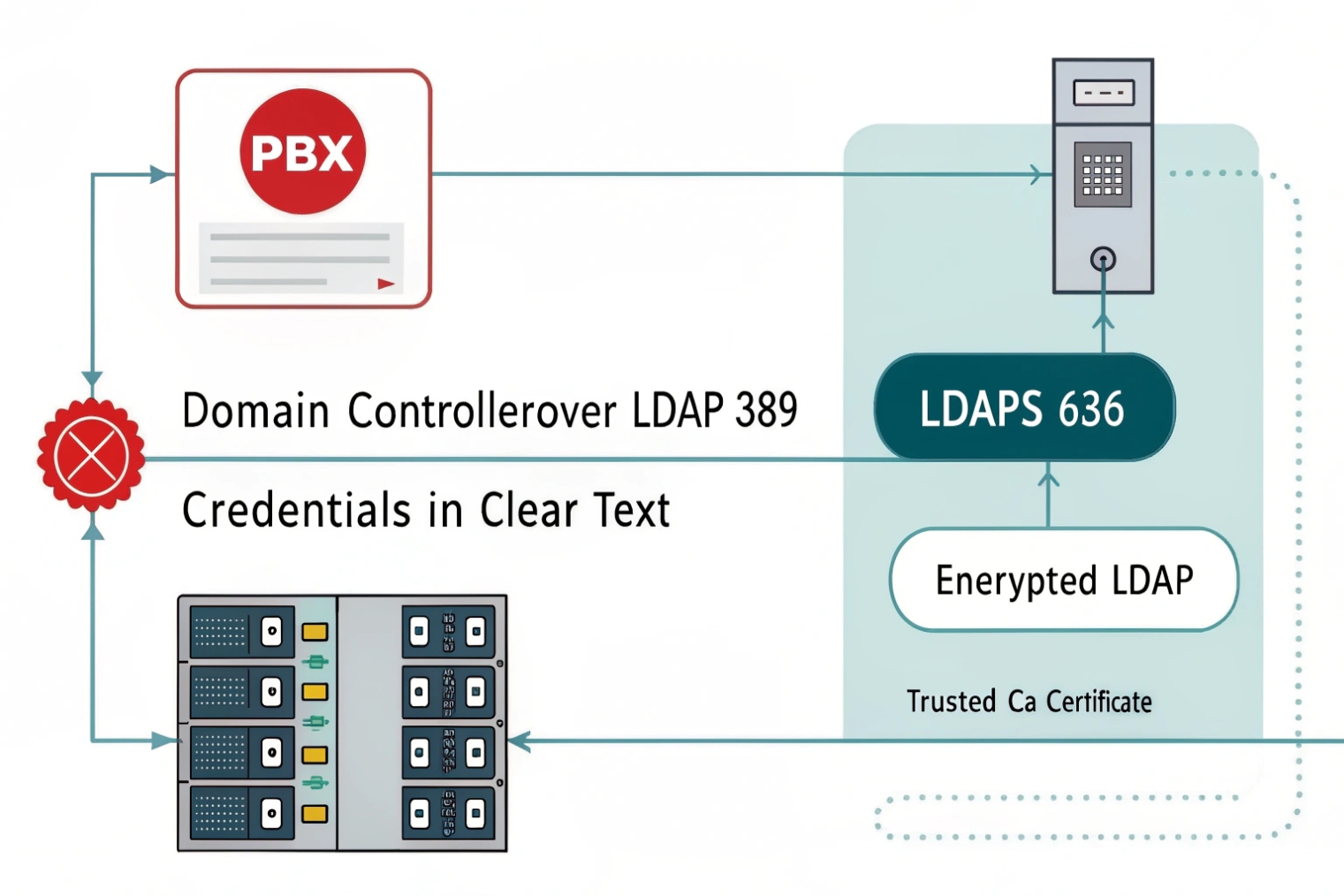
Secure directory authentication uses LDAPS (or LDAP with StartTLS), a least-privilege bind account, scoped search bases, strong certificates, and hardened policies like LDAP signing and controlled firewall port ranges.
Prefer LDAPS or StartTLS, not plain LDAP
Plain LDAP sends credentials in a way that can be exposed on the network. LDAPS encrypts the session. StartTLS can also encrypt sessions on the standard LDAP port if both sides support it.
Common secure options:
- LDAPS on TCP 636
- LDAP on TCP 389 with StartTLS enabled
- Avoid plain LDAP binds without TLS
The PBX or dashboard must also trust the AD certificate chain. If a private CA is used, the PBX needs the CA certificate installed.
Use a dedicated bind account with least privilege
Do not bind as a domain admin. A bind account should only have read access to the attributes needed for UC. If password changes are needed, use a separate workflow and separate permissions.
Also, scope the search:
- Set a clear Base DN for the “UC Users” OU
- Use an LDAP filter that only returns intended accounts
- Avoid broad queries that return the whole forest
Example filter goals (conceptual, not vendor-specific):
- Only enabled users
- Only users in certain groups
- Only users with mail attribute present
Harden AD-side settings when possible
Many Windows environments support stronger LDAP security controls. Depending on policy and compatibility, teams often enable LDAP signing and channel binding 6.
These settings can break older clients, so they must be tested. Still, they raise the bar against credential theft and downgrade attacks.
| Setting area | Recommended baseline | Why it matters |
|---|---|---|
| Transport | LDAPS 636 or StartTLS 389 | Encrypts credentials and queries |
| Certificates | Trusted CA, valid CN/SAN, no expired certs | Prevents MITM and failures |
| Bind account | Read-only, scoped | Reduces blast radius |
| Search base | UC OU only | Avoids syncing unwanted accounts |
| Firewall | Allow only required DCs and ports | Limits exposure |
| Logging | Audit LDAP binds and failures | Speeds up incident response |
Do not forget phones, SBCs, and certificates
In many SIP projects, AD is also used for certificate services. Active Directory Certificate Services (AD CS) 7 can issue certificates for:
- TLS on PBX and SBC
- 802.1X on IP phones
- Device identity for management networks
This is not required for every site, but it can make security cleaner when the business already runs a PKI.
Secure LDAP is not only about “it connects.” It is about “it stays safe, and it is easy to audit.” When that is done, AD becomes a strong backbone for identity across PBX, softphones, and intercom dashboards.
Conclusion
Active Directory gives SIP systems a shared identity plane. With group-based roles and secure LDAPS, user management, SSO, and permissions stay consistent as deployments scale.
Footnotes
-
Microsoft overview of AD DS concepts, domains, and objects for central identity planning. ↩ ↩
-
IETF spec defining LDAP operations and directory query behavior used for PBX sync. ↩ ↩
-
Authoritative SAML 2.0 standard reference for enterprise web SSO to PBX portals and dashboards. ↩ ↩
-
OpenID Connect spec explaining modern token-based login flows for UC and intercom web apps. ↩ ↩
-
SCIM standard for automating user lifecycle provisioning and deprovisioning across SaaS and UC platforms. ↩ ↩
-
Microsoft guidance on LDAP signing/channel binding to reduce credential theft and downgrade risks. ↩ ↩
-
Microsoft docs for AD CS PKI and certificate issuance for TLS, 802.1X, and trusted SIP endpoints. ↩ ↩








