

Contact center agents 1 still flip through many tabs while customers repeat the same story. Handle time grows, notes are messy, and quality teams fight the same errors again and again.
Agent Assist is real-time AI guidance that listens to calls or chats, understands intent, surfaces answers and workflows, and suggests next-best actions so human agents respond faster and with fewer errors.
When Agent Assist platforms 2 are done well, they feel like a quiet co-pilot. They help with answers, notes, and systems, but the human still owns the relationship. Below, I break down how it suggests responses, auto-summarizes ACW, what it needs to connect to, and how to protect data.
How does AI suggest responses in real time?
Agents often listen, type, search, and click through tools at the same time. It is easy to miss details or give an outdated answer when pressure is high.
AI suggests real-time responses by turning live speech or chat into text, detecting intent and entities, retrieving the right knowledge or workflows, and then generating short reply options and next-best actions that the agent can accept, tweak, or ignore.
1. From live conversation to intent
During a voice call, the system uses automatic speech recognition (ASR) 3 to turn audio into text in a few hundred milliseconds. For chat, email, or messaging, the text is already there, so it can skip this step.
Natural language understanding then kicks in. The AI looks for:
- Customer intent (cancel, upgrade, reset password, dispute charge)
- Entities (names, dates, order numbers, locations, product SKUs)
- Sentiment (calm, confused, angry, at risk of churn)
This intent and entity layer is the foundation. Without it, any reply is just a guess. The model learns from real conversations and your own labels, so it becomes more accurate over time for your products and policies.
A simple way to picture it is: the AI listens, tags, and slices the call into “what they want” and “what matters for this case”.
2. Retrieval and response generation
Once the system knows the likely intent, it must find the right answer. Most modern Agent Assist tools use retrieval-augmented generation approaches 4 (RAG):
- Use the intent and entities as a query.
- Search your knowledge base, FAQ, runbooks, and past tickets.
- Pull the top few relevant chunks of content.
- Ask a large language model to draft a short, structured reply based only on those trusted chunks.
To keep things safe, there are confidence thresholds. For example:
- If intent confidence is high and KB content is clear, show a full reply template.
- If confidence is medium, show related articles and a short “answer skeleton”.
- If confidence is low, the system may show only links or prompt the agent to ask a clarifying question.
This balance limits hallucinations and keeps control with the human.
Here is a simple pipeline view:
| Stage | Input | What Agent Assist does | Example outcome |
|---|---|---|---|
| Transcription | Audio / text | Turns speech to text, cleans filler | “I want to change my shipping address” |
| Intent detection | Clean text | Tags reason and urgency | Intent: “change_address”, priority: normal |
| Retrieval | Intent + entities | Queries KB and past cases | Finds policy on address changes in 3 regions |
| Generation | Retrieved content | Drafts reply and next-best actions | Reply + steps for address update workflow |
| Presentation | Agent desktop UI | Shows 1–3 suggested responses and buttons | “Use”, “Edit”, “Ignore” options |
3. Human in the loop and dynamic scripts
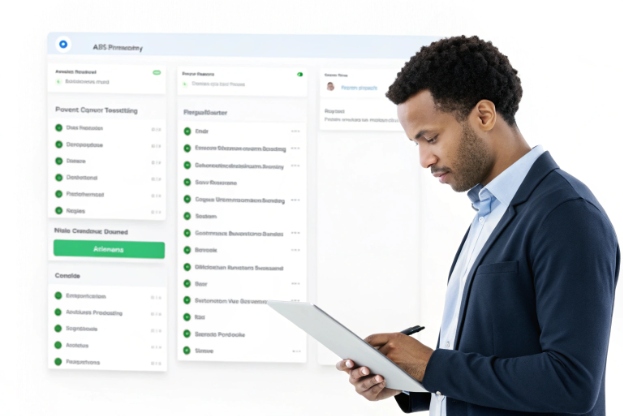
Agent Assist does not replace the agent. It sits in the background and pushes help to the surface at the right time. On the desktop, it may show:
- Suggested replies that can be sent as-is or edited
- Quick actions (open form, trigger refund flow, create case)
- Dynamic script panels that adapt to the call context
- Compliance reminders when required phrases are missing
Agents give feedback by choosing or rejecting suggestions. Some tools let them rate suggestions or mark them as “wrong for this case”. Over time, this feedback reshapes the retrieval and the prompts, so the system feels more “native” to your business.
When real-time suggestions are tuned well, agents stop alt-tabbing to search. They keep eye contact with the customer and trust the co-pilot to handle most of the hunting and gathering work.
Can Agent Assist auto-summarize ACW notes?
After-call work (ACW) often takes longer than the actual fix. Agents retype what happened, guess the right disposition, and copy data into the CRM while the next customer waits in the queue.
Yes. Modern Agent Assist can generate real-time summaries and ACW notes based on the transcript, propose the right disposition, and even auto-populate CRM fields, while still letting the agent review and adjust before saving.
1. From transcript to structured summary
Because Agent Assist already listens to the full interaction, many platforms can generate real-time Agent Assist summaries 5 from that transcript. Right after the call ends, the system:
- Scans the full transcript or chat log
- Extracts key fields (reason for contact, product, steps taken, outcome, follow-up actions)
- Detects sentiment and possible churn risk
- Maps the case to the correct queue or topic
Then it uses a template that matches your business. For example:
- Short headline: “Billing address updated and late fee waived”
- Customer issue: customer could not update address in app
- Actions taken: verified identity, updated address, waived one fee as goodwill
- Next steps: monitor for duplicated invoices next cycle
- Tags / disposition: “Billing > Address change”, “Retention gesture”
Agents see this summary inside their usual desktop. They can edit text, change disposition, or tweak tags. But in many cases, they just make small changes and click “Save”.
2. Shorter ACW and lower cognitive load
When ACW is manual, many notes are too short, too vague, or inconsistent between agents. One person writes an essay, another writes “fixed” as the full description. That hurts handoffs and coaching.
With Agent Assist:
- ACW time drops from minutes to seconds in most cases
- Notes become more structured and easier to search
- Handoffs between tiers or shifts are smoother
- Quality teams can review patterns across many calls faster
Here is a simple before/after view:
| ACW task | Before Agent Assist | With Agent Assist |
|---|---|---|
| Writing call summary | 1–3 minutes of free text | Draft summary in seconds, agent only edits when needed |
| Picking disposition | Manual search in long dropdown | AI suggests top 1–3 options based on intent |
| Filling CRM fields | Copy/paste from notes to form fields | Auto-populated from transcript (name, order, product, reason, tags) |
| Coaching on note quality | Manual spot checks | Standard structure makes patterns easy to review |
In my own deployments, the most visible win is not just time. It is the feeling of “mental space” agents get. They do not replay every detail in their head while racing the timer. They simply confirm what the system already saw.
3. Guardrails and best practices
Even with good models, ACW summarization needs guardrails:
- Always let agents edit and override the summary
- Keep a clear audit trail of the original transcript and the AI’s version
- Tune templates per line of business (support, sales, collections)
- Exclude sensitive phrases or details you do not want stored in free text
- Test on real historical calls and compare against human notes
Used this way, ACW automation becomes a trust-builder. Agents feel supported, not replaced, and leaders finally get clean, structured data without begging for “better notes” every week.
What integrations does Agent Assist need?
A standalone AI sidebar can look impressive in demos but feel weak in production. Without the right contact center AI integrations 6, it cannot see customer context or push updates back into your systems.
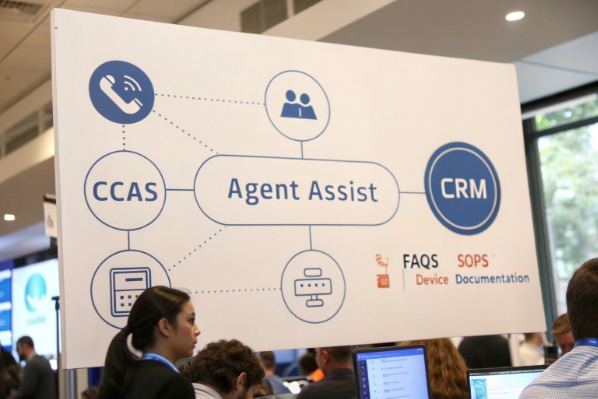
Agent Assist needs tight integrations with your CCaaS platform, CRM, knowledge base, and identity systems. Deeper value comes from links to WFM, ticketing, and RPA so suggestions can trigger real actions, not just text.
1. Core integrations that unlock real value
At minimum, four integration layers matter:
- CCaaS / telephony: So the AI can attach to live calls, get call metadata, and follow the agent’s screen.
- Chat / messaging platform: For digital channels like web chat, WhatsApp, SMS, and in-app messaging.
- CRM / ticketing: To read customer history and write back summaries, dispositions, and case updates.
- Knowledge base / content store: To retrieve trusted answers, policies, and troubleshooting guides.
With these in place, suggestions are not generic. The system can say:
- “This is a platinum customer who called last month about the same device.”
- “The last three contacts were about delivery delays; offer a fee waiver if conditions match.”
- “Open the RMA workflow in your service system and pre-fill the serial number.”
2. Advanced automation with WFM and RPA
Once the basics work, many teams add more links:
- WFM (Workforce Management): tag calls by reason and complexity for better forecasting and scheduling.
- RPA / backend APIs: let agents trigger actions like refunds, plan changes, device resets, or order status checks with one click.
- Quality and coaching tools: feed summaries, sentiment, and flags into QA dashboards.
You can also connect Agent Assist with:
- Single sign-on (SSO) and identity providers, so agents log in once
- Data warehouses or analytics platforms, for deeper reporting and A/B tests
- Internal chat tools, so supervisors can see live insights
A simple map looks like this:
| Integration type | Example systems | What it enables |
|---|---|---|
| CCaaS / Voice | Genesys, Five9, Webex, Amazon Connect | Live audio, call control, call context |
| CRM / Tickets | Salesforce, Zendesk, ServiceNow | Read/write customer data, cases, opportunities |
| Knowledge base | Confluence, SharePoint, custom KB | Trusted answers and procedures for retrieval |
| WFM / Analytics | Verint, NICE, custom BI stack | Volume by intent, handle time, staffing insights |
| RPA / Backend | Custom APIs, iPaaS, bots | One-click actions from AI suggestions |
3. Technical and operational requirements
Integrations are not just about APIs. Operational details matter:
- Low-latency ASR and streaming: voice must be processed fast enough to be useful in real time.
- Stable knowledge governance: clear owners for content, update rules, and versioning.
- Monitoring: dashboards for latency, error rates, and coverage of suggestions.
- A/B testing: compare prompt variants, KB tweaks, and UI layouts with small groups first.
- Change management: training agents on new flows and building feedback loops.
In projects where these pieces are in place, Agent Assist stops feeling like a “shiny add-on” and becomes part of the normal desktop. When they are missing, it often ends up as a nice pilot that never scales.
How do I protect data with Agent Assist?
Every AI feature touches sensitive data: voices, emails, payment problems, health details, and more. If data protection is not clear, even a strong business case will stall. It helps to ground your approach in general AI data privacy best practices 7.
You protect data with Agent Assist by mapping data flows, enforcing PII redaction, using strong access controls and audit logs, setting clear retention and training rules, and relying on retrieval-based answers with confidence thresholds to reduce risky hallucinations.

1. Map your data flows end to end
Before rollout, it helps to answer simple but strict questions:
- What data goes from CCaaS or chat into the AI system?
- Where is it processed and stored (region, cloud, data center)?
- Who can access transcripts, summaries, and analytics?
- What other systems receive outputs (CRM, BI, data lake)?
A clear diagram often calms security teams. It also reveals hidden paths, like exports into spreadsheets or third-party tools. Once you know the full path, you can pick the right controls at each hop: encryption, tokenization, or strict network rules.
2. PII, redaction, and retention
PII control is not just a checkbox. In practice, you need:
- Real-time redaction: detect and mask items like card numbers, ID numbers, bank accounts, and sometimes phone and email.
- Configurable policies: different regions may require different treatment of names, addresses, or IDs.
- Selective storage: keep summaries and intent tags longer, store raw audio or full transcripts for a shorter period.
- Right-to-be-forgotten flows: the ability to delete or anonymize data related to a person if required.
Many teams choose to store only what they really need for quality and analytics. Shorter retention for raw content lowers risk if something goes wrong.
Here is a simple view of risk vs control:
| Risk | Example scenario | Control in Agent Assist setup |
|---|---|---|
| PII leakage in logs | Full card number in transcript export | Real-time redaction and masked values in storage |
| Excessive data retention | Years of raw audio kept “just in case” | Tiered retention by data type |
| Unclear access to transcripts | Too many people can see full conversations | Role-based access, least privilege, detailed audit logs |
| Model training on live data | Vendor uses your data for general models | Contract and config that disable cross-tenant training |
3. Governance, hallucinations, and compliance
Security is not only about encryption. It is also about how the AI behaves:
- Retrieval-first design: answers should come from approved content, not from the model’s general memory.
- Confidence thresholds: low-confidence answers can be hidden or flagged so agents know to double-check.
- Compliance reminders: dynamic scripts that enforce disclosures and required language in regulated industries.
- Audit trails: clear records of what the AI suggested and what the agent actually sent or did.
Regular reviews with legal, risk, and compliance teams help as well. They can test edge cases, like disputed calls or regulated disclosures, and confirm that Agent Assist supports, not weakens, your obligations.
When these controls are built in from day one, Agent Assist becomes easier to approve and easier to trust. It moves the conversation from “Is this safe?” to “Where else can we use this co-pilot model?”
Conclusion
Agent Assist turns AI into a practical co-pilot for agents: faster answers, lighter ACW, smarter integrations, and strong data protection, all while keeping humans in control of the customer relationship.
Footnotes
-
Overview of contact center agents’ responsibilities, workflows, and challenges in omnichannel environments. Back ↩
-
Product page describing Agent Assist capabilities and benefits inside a cloud contact center platform. Back ↩
-
Background on automatic speech recognition technology and how computers convert spoken language into text. Back ↩
-
High-level explanation of retrieval-augmented generation for grounding language models in enterprise knowledge. Back ↩
-
Documentation example of real-time Agent Assist call summaries and note automation for contact centers. Back ↩
-
Reference architecture showing integrations between CCaaS, CRMs, and AI services for contact centers. Back ↩
-
Security and privacy guidance for protecting personal data when using cloud-based AI services. Back ↩








