
When callers pile up, the dashboard can still say “staffed.” That mismatch burns call center service level 1, stresses agents, and makes the queue look broken.
Agent availability is the real-time state that shows which agents are eligible to receive the next queued call based on login, presence, current work, queue rules, and capacity limits.
Availability is “eligible to receive the next contact”
In a queue, “available” does not mean “online.” It means an agent is allowed to receive a new interaction right now. Eligibility is a filter. The queue runs that filter every time it needs to deliver a call. If an agent fails any check, the queue skips that agent, even if the person is sitting at the desk.
Most IP PBX and contact-center style queues use a few core gates:
- Signed-in status (logged in to the agent client, softphone, or queue)
- Queue membership (the agent is assigned to this queue)
- Presence/state (Available, Busy, Away, DND, Break)
- Current interactions (on a call, ringing, on hold, in after-call work)
- Rules (like skills-based routing 2, priorities, and time-of-day schedules)
- Caps (concurrency, occupancy, utilization limits)
Agent availability is also not purely “agent choice.” Supervisors can force states. Schedules can auto-toggle states. Failover rules can remove agents from routing when trunks are down or when a site is in outage mode.
| Gate | What it checks | Typical outcome if failed |
|---|---|---|
| Login | Agent is signed in | Not eligible |
| Membership | Agent is in the queue | Not eligible |
| Presence | Agent is in a routable state | Not eligible |
| Interaction | Agent is already handling a contact | Not eligible (or lower priority) |
| Capacity | Agent hit concurrency/occupancy cap | Temporarily not eligible |
| Policy | Skills, priority, schedule rules | Eligible only for certain calls |
Why this definition matters
If availability is defined as eligibility, it becomes easier to debug the queue. A “no agents available” event is rarely caused by one thing. It is usually a chain: agents are logged in, but in wrap-up; or “Available” is shown, but concurrency is maxed; or the skills filter is too strict for that call type.
This is also where design choices show up. A sales queue should treat after-call work differently than an emergency queue. A support queue should protect agents from overload with occupancy caps. A front-desk queue should respect time-of-day rules and holiday schedules.
Keep reading because the next question is the one that makes all the numbers make sense: how your IP PBX calculates availability.
How is agent availability calculated in my IP PBX?
A queue can look “fully staffed” and still behave like nobody is working. That usually happens when the PBX calculates availability differently than the team assumes.
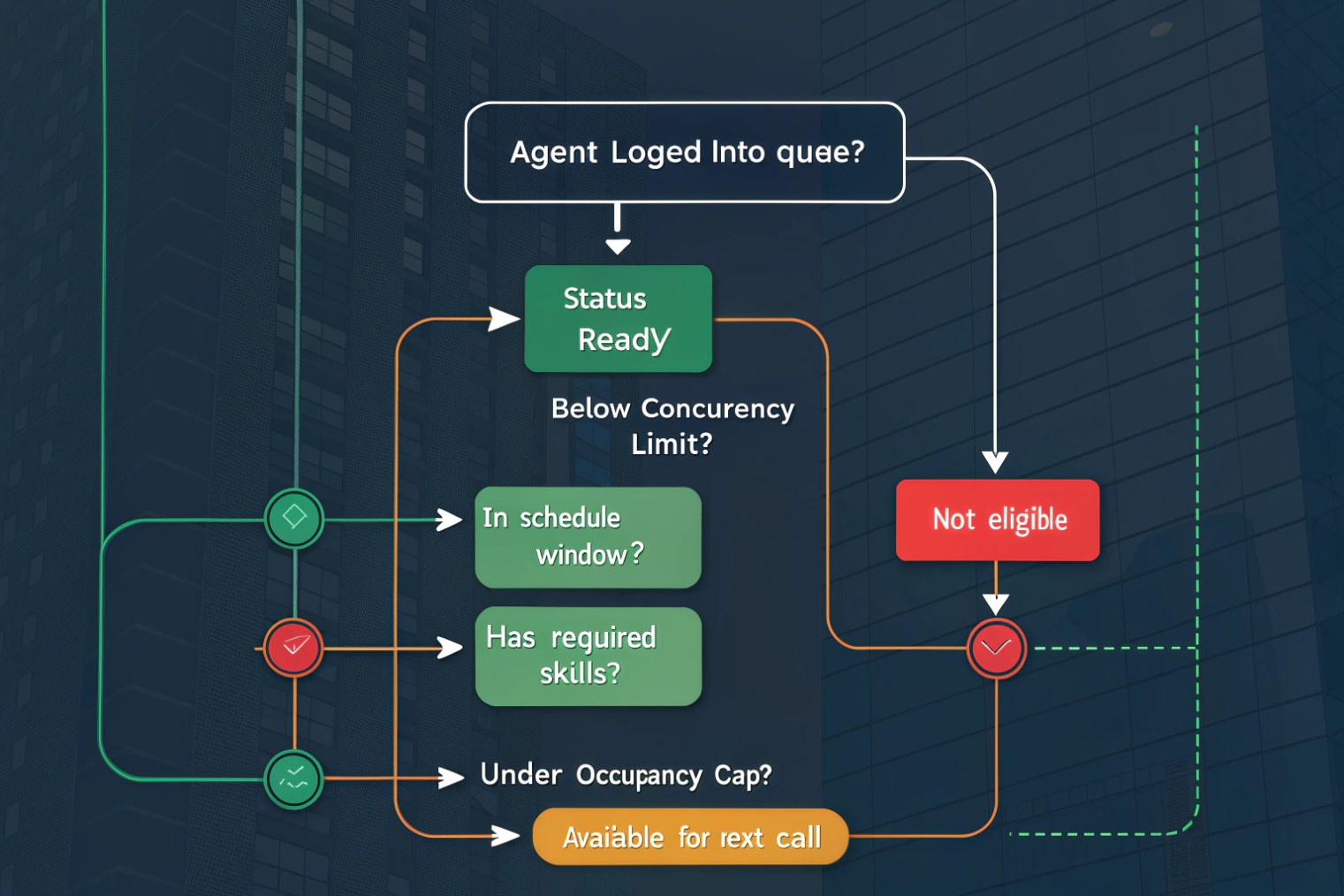
An IP PBX calculates agent availability by combining agent login state, queue assignment, presence status, interaction state (ringing/on-call/ACW), and routing constraints like skills, schedules, and concurrency caps.
The typical calculation model
Most PBX queue engines run a simple sequence. The exact names differ, but the logic is consistent:
- Build a list of agents assigned to the queue.
- Remove agents who are not signed in (or not registered to the agent device/app).
- Remove agents who are not in a routable presence state (DND, Break, Away).
- Remove agents who are already engaged (on a call, ringing, handling another queue).
- Apply skill/proficiency filters and call-type rules.
- Apply caps like max simultaneous contacts or occupancy limits.
- Select the “best” eligible agent based on the routing method.
That final step depends on routing strategy: round robin, longest idle, ring-all, skills-based, priority weighting, or a blend. So availability is not only “is the agent free.” It is “is the agent free and is the agent the right match.”
The states that silently reduce availability
A few states frequently surprise teams:
- Ringing state: the agent is not yet on a call, but the system treats them as busy.
- Wrap-up / after-call work (ACW) 3: the agent ended the call, but is still blocked from new calls.
- Paused: the agent is logged in but not routable.
- Concurrency reached: the agent can still talk, but cannot take more.
A short story from a deployment explains this well. In one busy support queue, the team kept adding agents and still missed SLA. The real problem was a 90-second wrap-up timer enforced by policy. Calls ended, agents were “online,” but they were not eligible. Cutting wrap-up to 30 seconds and adding a “manual ACW only when needed” rule fixed the service level faster than hiring.
| Input | Data source | Common misread |
|---|---|---|
| Signed-in | Agent client/softphone | “Registered phone” is not always “logged in agent” |
| Presence | PBX or UC presence | “Available in chat” is not “available for queue calls” |
| Interaction | Queue engine | Ringing counts as busy in many systems |
| Skills | Queue profiles | Agents may be available globally but not eligible for this queue |
| Caps | Concurrency/occupancy | Agent looks free but is throttled for load control |
What to log when debugging availability
A practical way to troubleshoot is to capture, per agent, the reason they were excluded. The best systems show a “not eligible because…” code. If the PBX does not show it, use reporting:
- agent status timeline
- queue membership list
- call detail records (CDRs)
- wrap-up timers
- concurrency settings
- skill tags and proficiency
Once the calculation model is clear, the next step becomes simple: define which statuses matter and what they really do to routing.
What statuses affect my agents’ availability?
Teams often debate “should this be Away or Break?” because they feel it changes stats. It does. It also changes eligibility.
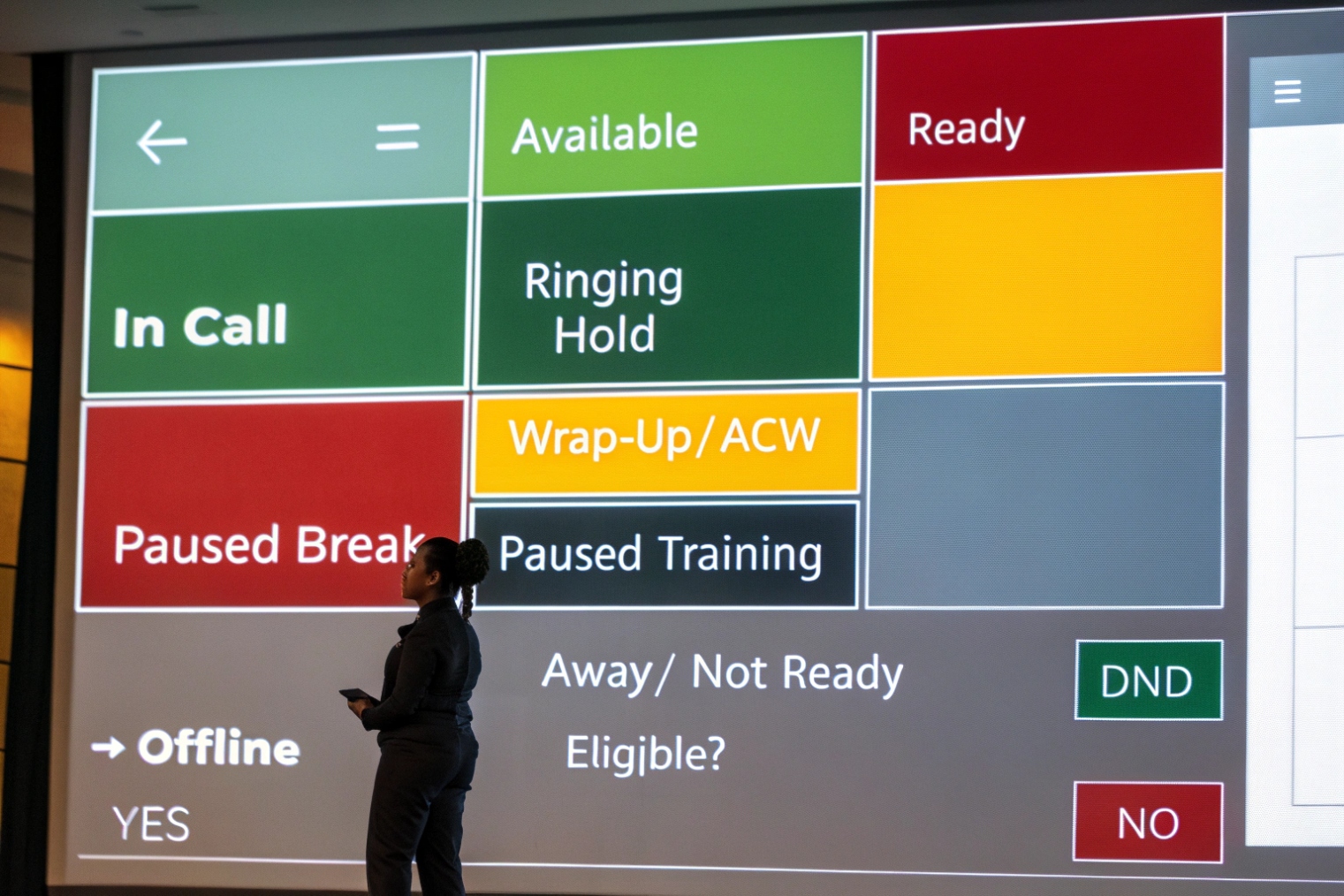
Statuses affect availability when they change routability, such as Available, Busy, Away, DND, Break, Training, and After-Call Work, plus system states like Ringing and Max-Concurrency.
The minimum status set that works in real life
A clean status model is better than a long one. Too many statuses create bad data. A simple set covers most operations:
- Available: eligible for new queue calls
- Busy: on an interaction or blocked by system
- ACW / Wrap-up: finishing notes, not eligible
- Break: paused, not eligible
- Meeting/Training: paused, not eligible, tracked for adherence
- DND: user-triggered block, usually not eligible
- Offline/Logged out: not eligible
Some systems also separate Idle (logged in but not receiving) from Available (receiving). This matters because “Idle” can be a hidden pause state.
Status is a policy tool, not a label
Status determines routing, reporting, and workforce planning. A strong policy answers:
- Which statuses remove the agent from routing?
- Which statuses are allowed during peak hours?
- Which statuses are manual vs auto?
- How long can ACW last before it becomes a staffing problem?
Wrap-up is the big one. If wrap-up is unlimited, agents can accidentally remove themselves from routing for long periods. If wrap-up is forced, it can protect quality but damage SLA. The right answer depends on the queue.
Skills and eligibility make status more subtle
A status can be “Available,” but the agent is still not eligible if the call requires a skill they do not have. This is why dashboards can show 10 available agents while the queue behaves like only 2 exist.
| Status | Eligible for new calls? | Typical use | Common risk |
|---|---|---|---|
| Available | Yes | Ready to take contacts | None, but must be truthful |
| Ringing | Usually no | Call offered | Long ring time reduces capacity |
| On Call / Busy | No | Active interaction | Misread as “unavailable staffing” |
| ACW / Wrap-up | No | Notes, tagging, disposition | Timer too long kills SLA |
| Break / Lunch | No | Rest and compliance | Overuse during peaks |
| Meeting / Training | No | Planned non-phone time | Poor scheduling inflates wait time |
| DND | Usually no | User blocks interruptions | Can hide avoidance |
Supervisor overrides and forced states
Supervisors often need to force a state for coverage. This is powerful and risky. Forced states should leave an audit trail, because they change both routing and agent trust. A good rule is: supervisors can force “Available” only with a reason, and they can force “Offline” for security or misuse cases.
Once statuses are defined, the next issue is the one that business owners care about: how many available agents are enough to hit SLA, and how to set thresholds that trigger action.
How do I set thresholds for available agents and SLAs?
A queue does not miss SLA because of one bad call. It misses SLA because availability drops below a safe floor and stays there.
Set thresholds by linking your target SLA (like “80% answered in 20 seconds”) to busy-hour demand, average handle time, wrap-up time, and a minimum number of eligible agents, then add alerts and overflow rules.
Start with the busy hour, not the daily average
Daily averages hide pain. The busy hour drives staffing and availability thresholds. The inputs that matter most are:
- Incoming contacts per interval (15 minutes is common)
- Average handle time (AHT) 4 including talk + hold + ACW
- Target SLA (speed of answer goal)
- Abandon rate target
- Contact center shrinkage 5 (breaks, meetings, training, unexpected offline)
If you need a math baseline for staffing and predicted waits, many teams start with the Erlang C staffing model 6 and then tune with real interval data.
A simple operational approach is to define a minimum “available agents floor” for each interval. When availability dips below the floor, the system should react.
Practical threshold types that work
There are three thresholds that are easy to run:
- Available agent count threshold
Example: if available agents < 3, trigger overflow. - Queue wait time threshold
Example: if oldest call waiting > 60 seconds, trigger a backup group. - Service level threshold
Example: if SLA drops below 80% for 10 minutes, alert supervisors.
Overflow actions can include:
- route to a secondary queue
- ring a backup group (managers or cross-trained staff)
- offer callback
- change routing from longest-idle to ring-all temporarily
- play updated announcements to reduce abandons
| Metric | What it protects | Example threshold | Typical action |
|---|---|---|---|
| Available agents | Staffing floor | < 3 | Add backup group or disable breaks |
| Oldest wait time | Customer patience | > 60s | Offer callback or overflow |
| SLA (interval) | Contract target | < 80% | Supervisor alert and schedule adjustment |
| Agent occupancy rate 7 | Agent burnout | > 85% sustained | Throttle non-urgent queues, add staff |
| Abandon rate | Lost calls | > 5% | Shorten menus, add announcements |
Include ACW and ring time in the math
AHT is not only talk time. If ACW is long, it eats availability. If ring time is long, it also eats availability because ringing agents are often treated as busy. Tightening ring time and using “auto-answer for headsets” in the right environments can increase effective capacity without adding headcount.
Use routing method as a lever
Routing can protect SLA or harm it:
- Longest idle spreads calls evenly but can slow down if skills are uneven.
- Ring all can answer faster but increases agent disruption.
- Skills-based improves first-call resolution but can reduce the eligible pool.
The best SLA results often come from skills-based routing with a controlled fallback: if no skill-match agent is available within X seconds, expand the eligibility pool.
Once thresholds and SLAs are designed, many teams ask about presence syncing. It sounds simple: “Can AD tell the PBX who is available?” The answer needs careful wording.
Can I sync agent presence with Active Directory or SSO?
Presence sync is often promised as “single pane of glass,” but AD is not a presence system. Mixing these concepts can create wrong expectations.
Active Directory and SSO can unify identity and login, but agent presence usually syncs from the UC/softphone platform, not from AD itself; AD groups can still map roles and queue membership.
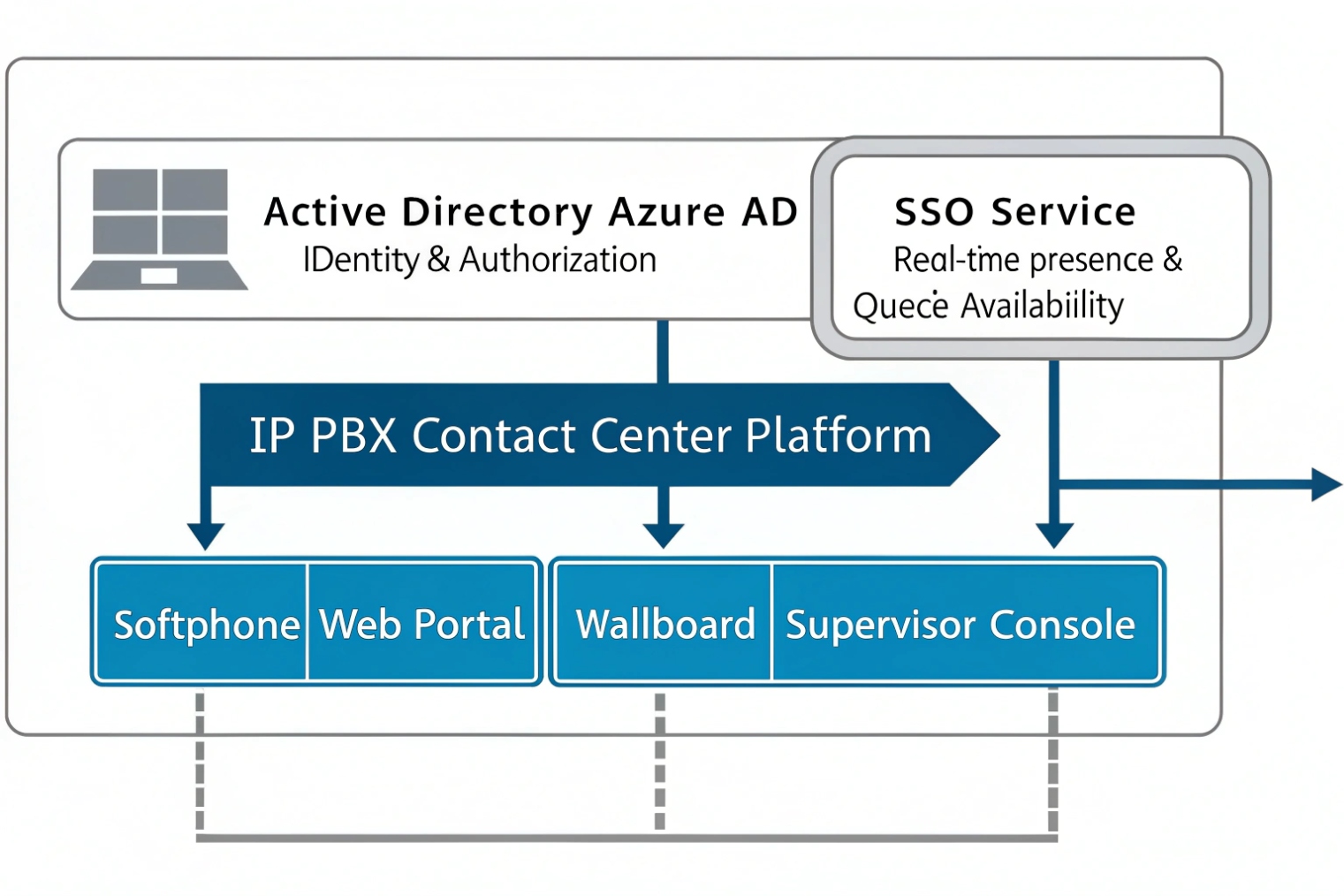
What AD can do well: identity, groups, and access control
AD is excellent for:
- who the user is (identity)
- what groups they belong to (roles)
- password and lockout rules (policy)
- SSO via ADFS or cloud identity (login experience)
So AD can drive:
- agent account provisioning into the PBX
- queue membership based on AD groups
- permission sets (recording rights, supervisor tools, admin portals)
- SSO for agent dashboards and intercom management portals
This keeps governance clean. When a user leaves, disabling the AD account can immediately block portal access and reduce risk.
What AD does not do: real-time presence
Presence is a live state. It changes minute to minute. AD does not track “Available/Busy/ACW.” Presence usually comes from:
- the PBX agent client
- the softphone
- a UC platform’s presence engine
- a contact-center module that owns the state machine
SSO can help users sign in once, but it does not automatically create correct queue presence. Presence still needs explicit state events from the agent tool.
The realistic sync models that work
A practical design separates concerns:
- Identity sync: AD/SSO controls who can access the agent app and dashboard.
- Presence sync: the agent app controls availability states inside the PBX/queue engine.
- Group sync: AD groups map to queues and permissions.
| Goal | Best source | Typical protocol/feature | What to avoid |
|---|---|---|---|
| User provisioning | AD | LDAP/LDAPS sync, scheduled import | Manual user creation at scale |
| Web login | SSO layer | SAML/OIDC | Local admin accounts everywhere |
| Queue membership | AD groups | Group-to-role mapping | Syncing the entire directory |
| Real-time agent state | Agent client/CC module | Presence events, API, app state | Expecting AD to carry “Available” |
Secure directory settings still matter
Even if AD is not providing presence, it is still part of the security boundary. Use secure directory authentication:
- LDAPS or StartTLS for directory queries
- least-privilege bind account
- scoped OUs so only UC users sync
- certificate trust installed on PBX/apps
This keeps the identity plane secure while the queue engine handles the live routing plane.
With identity and presence set correctly, availability stops being a mystery. It becomes a controllable system made of simple rules.
Conclusion
Agent availability is eligibility, not just online status. When calculation rules, statuses, SLA thresholds, and identity sync are designed together, your queue becomes predictable and easier to manage.
Footnotes
-
Definition of service level metrics used to judge queue responsiveness and SLA targets. ↩ ↩
-
Overview of skills-based routing and why skill filters shrink the eligible agent pool. ↩ ↩
-
Explains after-call work (ACW) and how wrap-up time blocks agents from new contacts. ↩ ↩
-
Practical breakdown of AHT components (talk, hold, wrap) and why it drives staffing. ↩ ↩
-
Shrinkage definition to account for paid time agents are unavailable due to breaks, meetings, training, and absences. ↩ ↩
-
Erlang C overview for modeling staffing needs, predicted waits, and the impact of traffic spikes. ↩ ↩
-
Occupancy rate definition and calculation for balancing utilization versus burnout in high-volume queues. ↩ ↩








