
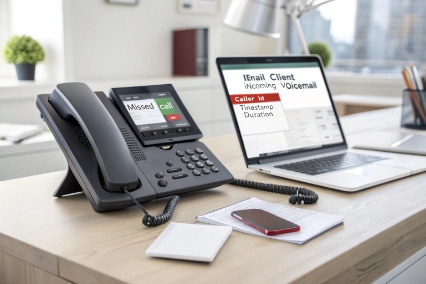
Missed calls turn into missed deals when messages stay trapped on one desk phone. Teams waste time dialing in, replaying prompts, and guessing who should reply.
Virtual voicemail is a cloud-hosted voicemail box that stores recordings on a server and delivers them to email, apps, and IP phones with visual lists, alerts, and optional transcription.
Virtual voicemail is voicemail that lives in the network, not the handset
Virtual voicemail in VoIP means the voicemail system is not a chip inside a desk phone. It is a unified messaging service 1 running on a cloud platform, an on-prem IP PBX, or a hosted UC server. Calls that are not answered get routed to a voicemail application. That application records audio, stores it as a file, and ties it to metadata like caller ID, timestamp, and duration.
This design changes daily operations. Messages can show up on a web portal, a mobile app, or a desktop softphone. Many systems also push a copy to email as an attachment (WAV or MP3). Some systems add speech-to-text so the user can read the message first and decide if playback is needed.
Virtual voicemail is often paired with visual voicemail. Visual voicemail is the user interface layer, often implemented as a visual voicemail interface 2. It lists messages in a queue. It lets the user tap-to-play, delete, archive, or call back. This is not just “nice to have.” It cuts response time, and it helps teams share coverage when reception, sales, and support all handle missed calls.
Virtual voicemail also matters for SIP endpoints. IP phones and softphones depend on Message Waiting Indicator (MWI) so users notice new messages. Many SIP systems use the SIP Message Waiting Indication (MWI) event package 3 so the mailbox can live on the server while the phone shows the lamp or badge.
| Part | What it is | Where it runs | What the user sees |
|---|---|---|---|
| Voicemail service | Records and stores messages | Provider cloud, IP PBX, or voicemail server | “You have a new voicemail” |
| Visual voicemail | Message list UI | App, portal, or softphone | List with caller ID and timestamps |
| Delivery | Email/app notifications | SMTP/push/SMS | Alerts and attachments |
| MWI | Message waiting state | SIP server + phone | Lamp/badge turns on/off |
Virtual voicemail is simple in concept. But the real value is how it routes and delivers messages across the tools a team already uses.
The next step is to understand the delivery paths, because that is where features and costs show up.
How does virtual voicemail route messages to email and apps?
Voicemail is useless if it stays hidden. Teams need messages to land where work happens, and they need it to happen fast and reliably.
Virtual voicemail routes a recording from the voicemail server to users through app inboxes and web portals, and it can also send voicemail-to-email with an audio attachment and a text transcript.
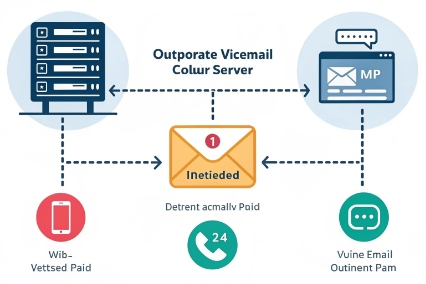
The main routing paths: portal, app, and email
A virtual voicemail platform usually stores messages in a mailbox on the server. From there, it exposes the mailbox to clients:
- Web portal: a browser shows a message list and playback controls.
- Mobile app: a visual voicemail inbox with push notifications.
- Desktop softphone: voicemail tab plus MWI badge.
- Email delivery: voicemail-to-email with attachment and details.
Email delivery is often the most used feature because it fits existing habits. The system can send a WAV or MP3 file and include caller ID, time, and duration in the subject line or body. Some teams use distribution lists or shared mailboxes so multiple people can cover one department.
Departments often need shared voicemail. A simple pattern is a department DID that routes to a shared mailbox. Then the mailbox forwards messages to a shared email inbox, or it shows the same mailbox in multiple apps. This is where permissions matter. Admins may allow playback but block downloads, or allow downloads only for supervisors.
| Routing method | Speed | Best for | Risk to manage |
|---|---|---|---|
| App push notification | Fast | Mobile-first teams | Device access control |
| Web portal inbox | Medium | Desk workers and admins | Browser session security |
| Voicemail-to-email | Fast | Shared coverage and ticketing | Email forwarding leakage |
| SMS alert only | Fast | Simple alerting | No secure content delivery |
Transcription and workflow automation
speech-to-text transcription 4 turns a voice recording into readable text. Accuracy depends on audio quality, language, accents, and noise. It also depends on how the provider’s model handles your language and terms. For business workflows, transcription is a triage tool. It helps decide if a callback is urgent. It also helps search old messages.
Some systems can push voicemail events into CRMs and helpdesk tools. A voicemail can create a ticket, attach the audio file, and add the transcript. That is a strong fit for sales and support, where missed calls are not “missed.” They are leads.
Custom greetings and time rules
Routing is not only delivery after recording. It also includes how calls land in voicemail. Many systems support:
- No-answer greeting
- Busy greeting
- Holiday greeting
- Time-of-day greeting
- Company-wide enforced greeting for compliance
This matters when the same DID needs different behavior at night, on weekends, or during holidays.
The routing story is powerful. But it only helps if users can reach voicemail from anywhere, including SIP phones and softphones.
Can I access virtual voicemail remotely from IP phones and softphones?
Remote work is normal now. A voicemail feature that only works on a desk phone is a weak link in the chain.
Yes. Virtual voicemail is designed for remote access through softphones, mobile apps, and web portals, and SIP IP phones can access mailboxes using voicemail dial codes and MWI updates.
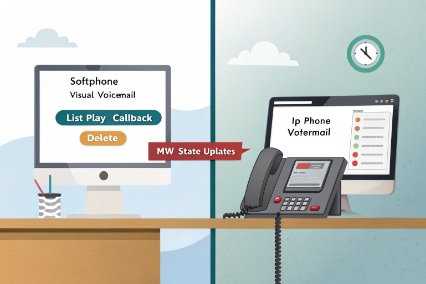
Remote access methods that actually get used
Remote voicemail access usually falls into two camps:
- Visual voicemail on apps and softphones
- Traditional voicemail menu from an IP phone or dial-in number
Apps and softphones are the smooth path. They show a list, they play audio, and they support quick actions like callback and delete. IP phones still matter, especially for desk workers, factories, and shared phones. For those, the phone usually uses a voicemail button or a feature code to call the voicemail system.
A dial-in method also exists in most systems. It can be a special internal extension, or an external DID that prompts for mailbox and PIN. This is helpful when a user is on a mobile network with no app access, or when the company policy blocks voicemail in personal email.
SIP phones rely on MWI so users do not miss messages. A server can send SIP event notifications (SUBSCRIBE/NOTIFY) 5 to tell the phone there are new messages. The phone then lights the lamp or shows a badge. When the user listens and clears messages, the server updates the state again.
The user flow is simple, but the admin flow needs clean mailbox mapping. Each phone must know which mailbox it belongs to. Shared phones must be treated carefully so mailbox access stays correct.
| Endpoint type | Best access method | What feels fastest | Common setup detail |
|---|---|---|---|
| Desk IP phone | Voicemail key + MWI | One-touch access | Correct mailbox assignment |
| Desktop softphone | Visual voicemail tab | Click-to-play | App login and policy |
| Mobile app | Visual voicemail + push | Instant alert | Push + device security |
| Web portal | Inbox list | Easy admin view | SSO and session timeout |
Remote access and call routing together
Remote access is not only about listening. It is also about what happens next. A good system supports:
- One-click callback from the voicemail list
- Forward to teammate
- Assign to a group or shared mailbox
- Add notes or tags (in some platforms)
When a voicemail triggers a workflow, remote teams act faster. So voicemail stops being “after the call.” It becomes a task item in the workday.
Now it is time to talk about features that buyers ask for in the first meeting: transcription, audio attachments, and SIP notifications.
Does virtual voicemail support transcription, WAV attachments, and SIP notifications?
If voicemail feels like the 1990s, people ignore it. Modern voicemail needs quick reading, easy playback, and clear “new message” alerts on every device.
Most virtual voicemail systems support speech-to-text transcription, email audio attachments (often WAV or MP3), and SIP message waiting notifications so IP phones and softphones show new-message indicators.
Transcription: helpful, but not magic
Transcription helps users scan messages quickly. It also helps search. But it is not perfect. Noise, speaker distance, accents, and low bitrate codecs can reduce accuracy. A good way to deploy it is to treat the transcript as a preview. The audio file remains the source of truth.
Transcription also raises privacy and compliance questions. Some teams need opt-in. Some teams need to keep transcripts only for a short window. Some teams must store them in a specific region. These rules should be set early, not after an audit.
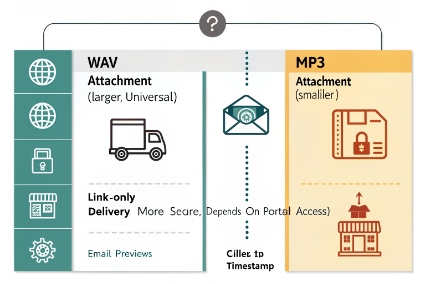
WAV and MP3 attachments: delivery choices and tradeoffs
WAV is common because it is simple and widely supported. MP3 is smaller and easier on storage and email limits. Some systems let admins choose the format, or choose “link only” so email does not carry the file. Link-only delivery is safer in strict environments, but it depends on portal access.
| Feature | What it enables | Common format | Key tradeoff |
|---|---|---|---|
| Audio attachment | Listen in email client | WAV or MP3 | Email can leak outside the org |
| Transcript | Read and search | Text | Accuracy varies by audio |
| Visual list | Fast triage | UI list | Needs app/portal access |
| SIP notifications (MWI) | Lamp/badge alerts | SIP NOTIFY | Needs correct SIP event support |
SIP notifications: how “new voicemail” lights up
In SIP systems, MWI is often delivered using SIP NOTIFY. The server tells the endpoint how many new and old messages exist. The phone updates its lamp. Softphones update a badge.
This looks small, but it changes behavior. Users call back faster when they see the lamp. And teams do not miss time-sensitive calls.
Content sharing and recordings in the same ecosystem
Voicemail often sits beside call recording. Some platforms store both and bill storage separately. That is why a voicemail policy should include storage planning. A company that keeps every voicemail forever can end up with avoidable storage costs and risk.
Features are great, but security decides if the feature can be used at all. So the next section focuses on PINs, encryption, and retention.
How do I secure virtual voicemail with PINs, encryption, and retention policies?
Voicemail contains customer names, phone numbers, and sometimes payment or medical info. If voicemail leaks, the business carries the risk.
Secure virtual voicemail uses mailbox PINs for phone access, TLS for signaling and web access, encryption at rest for stored recordings, and retention rules that limit how long audio and transcripts are kept.
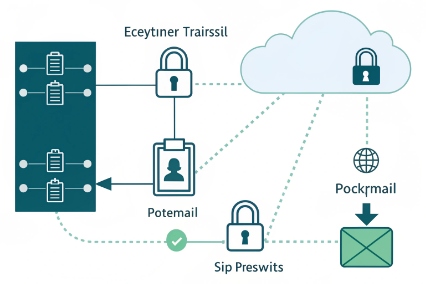
PINs and access control: stop mailbox guessing
A voicemail PIN still matters. It protects dial-in access from any phone. The best practice is simple:
- Enforce minimum PIN length
- Block common PINs (like 0000, 1234)
- Rate-limit failed attempts
- Lock mailboxes after repeated failures
- Require PIN change on first use
For app and portal access, use strong identity controls. SSO is ideal when available, because it ties voicemail access to company identity rules.
Encryption in transit and at rest
Voicemail touches multiple paths:
- SIP signaling between endpoints and PBX
- Web/app traffic between clients and portals
- Storage where audio files and transcripts live
- Email paths if voicemail-to-email is enabled
Encryption should cover each path. Transport Layer Security (TLS 1.3) 6 protects portal sessions and other in-transit connections when properly enforced. Encryption at rest protects stored files on disks. For email delivery, security depends on the email system. If email forwarding is allowed, files can leave the company boundary. Some teams choose “notification only” emails with a secure portal link.
Retention rules and legal needs
Retention is where security meets compliance. A clear retention policy answers:
- How long are voicemails kept?
- Are transcripts kept longer than audio, or the same time?
- Can users delete messages, or only admins?
- Can users download audio to personal devices?
- Are backups included in retention logic?
A simple retention policy often reduces risk and cost. Many teams follow the idea behind the GDPR storage limitation principle 7 even outside the EU: keep messages only as long as needed.
| Control | Goal | Recommended baseline | Notes |
|---|---|---|---|
| Mailbox PIN | Protect dial-in access | Enforce strong PIN + lockout | Stops brute force attacks |
| TLS | Protect sessions in transit | Require TLS for portal/app | Reduces credential theft risk |
| Encryption at rest | Protect stored audio | Enable at-rest encryption | Important for cloud storage |
| Retention policy | Limit exposure | 30–180 days typical | Depends on industry rules |
| Download controls | Prevent data leakage | Restrict or audit downloads | Useful for regulated orgs |
Practical deployment rules that keep risk low
A secure setup often includes these simple habits:
- Disable voicemail-to-email attachments for sensitive teams, or use link-only delivery.
- Use shared mailboxes with strict membership rules.
- Audit access logs for high-risk mailboxes like reception and support.
- Keep separate policies for executives, HR, and customer support lines.
- Train staff to treat voicemail like customer data, not like personal notes.
When security is done right, voicemail stays useful. It also stays compliant. That balance is the goal in real deployments.
Conclusion
Virtual voicemail stores messages in the cloud and delivers them to phones, apps, and email. With MWI, transcription, and strong security policies, it stays fast and safe.
Footnotes
-
Overview of unified messaging and how voicemail integrates with email and apps. ↩ ↩
-
Explains visual voicemail lists, tap-to-play controls, and message management. ↩ ↩
-
Defines the SIP MWI “message-summary” event package used for voicemail indicators. ↩ ↩
-
Background on speech recognition and why transcription accuracy varies with audio conditions. ↩ ↩
-
Details SIP event notifications (SUBSCRIBE/NOTIFY) commonly used to deliver MWI updates. ↩ ↩
-
Authoritative TLS 1.3 specification for protecting in-transit portal and service connections. ↩ ↩
-
GDPR text that includes the “storage limitation” concept useful for designing voicemail retention. ↩ ↩








