

Noisy calls hurt trust. Customers ask us to repeat. Agents feel stress. We can fix this with the right suppression and gear. The steps are clear and practical.
Noise suppression in audio processing 1 removes unwanted background sounds so speech is clearer. It works in real time, on the device or in the cloud, and it is not the same as active noise cancellation for headphones 2.
In this guide, the key ideas come first, then tools and settings you can use today. Each section ends with simple tables you can act on. The aim is clarity, not hype.
What is noise suppression?
Open-plan offices add chatter, keyboards, HVAC hum, and traffic. The customer hears all of it. Calls feel messy. We need the mic to pass voice and reduce the rest.
Noise suppression estimates non-speech sounds and turns them down. It keeps speech as natural as possible. It runs before encoding so the network carries a cleaner signal.

Core concept in one line
Noise suppression separates “speech” from “not speech.” It reduces the latter and preserves the former. It is a front-end speech enhancement step, not a comfort feature like ANC.
How it differs from active noise cancellation
Active noise cancellation uses microphones and speakers to cancel ambient sound for the listener. It protects the ear. Noise suppression filters the microphone signal for the remote party. It protects the call. These are different paths in the chain, and they can work together without conflict.
Where suppression runs
Suppression can sit in several places. It can run inside a headset’s DSP. It can live in the OS audio stack. It can run in the browser via WebRTC audio processing 3. It can run in the softphone or UC client. It can also run server-side in your media platform. The earlier it runs, the less the encoder wastes bits on noise.
Typical noises and how suppression treats them
Constant hum from HVAC or fans is easy to estimate. Key clicks, door slams, or barking dogs are harder. Speech-like noise from nearby talkers is hardest. Good systems adapt to changing rooms. They track energy and spectra frame by frame and apply gain that spares vowels and consonants.
Quick reference
| Item | What it is | What suppression does |
|---|---|---|
| HVAC hum | Narrow-band, steady | Strong reduction with few artifacts |
| Keyboard clicks | Impulsive, wideband | Partial reduction, may leave soft tails |
| Nearby talker | Masking, speech-like | Limited reduction, beamforming helps |
| Street noise | Broad, variable | Moderate reduction, depends on SNR |
How do DSP and AI noise removal compare?
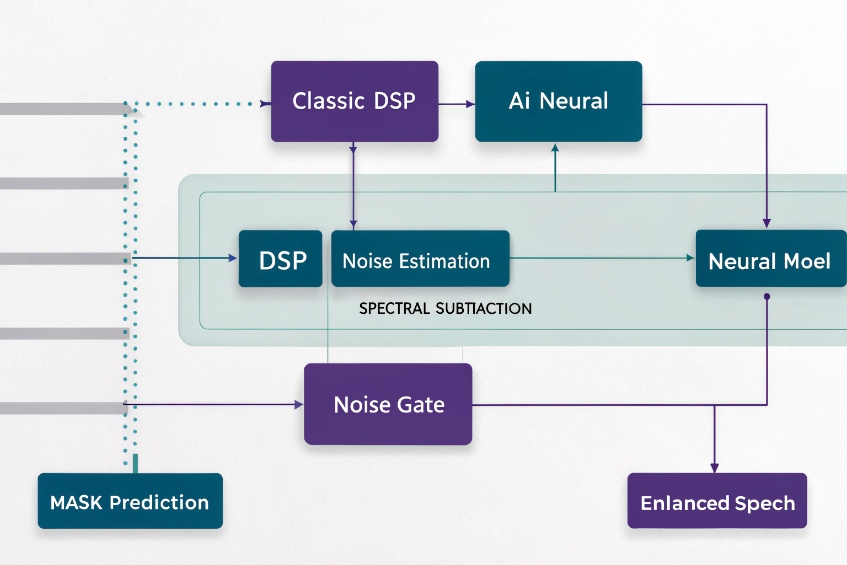
Classic DSP is fast and predictable. AI sounds more “magical.” Both have trade-offs. The right choice depends on latency, CPU, noise type, and privacy rules.
DSP methods rely on rules like spectral subtraction and gating. AI methods learn patterns to separate speech and noise. AI often sounds cleaner, but it needs more compute and careful tuning.
What “DSP” usually means here
Traditional approaches include spectral subtraction and Wiener filtering 4, and noise gating. They estimate a noise floor, then subtract or attenuate it in the frequency domain. They are small, fast, and stable. They introduce “musical noise” when estimates are wrong. They shine on steady noise.
What “AI” means in practice
Modern systems use small neural networks for speech enhancement 5 trained on mixed audio. They predict a mask that keeps speech and suppresses noise. They handle non-stationary sounds better, like dishes, typing, or kids. They can retain the timbre of the voice. They may add slight latency and need CPU or a small NPU. Lightweight models can run in real time on laptops and phones.
Latency and compute budget
Some DSP pipelines add under 5 ms of algorithmic delay. Neural models often add 10–20 ms or more, depending on frame size and lookahead. On contact center desktops, this is fine. On hard real-time intercoms or radio links, keep budgets tight. Measure end-to-end, not just the filter.
Artifacts and speech quality
Over-aggressive DSP can leave metallic “chirps.” Over-aggressive AI can smear consonants or pump ambience. Both can reduce ASR accuracy when they distort sibilants and plosives. A balanced setting often beats “max” noise removal.
Privacy and deployment
On-device DSP keeps audio local. Cloud AI may send media to a service. Many teams prefer browser or client-side AI to avoid data transfer. Check your policy and your customer contracts.
Side-by-side summary
| Dimension | Classic DSP | AI / Neural |
|---|---|---|
| Steady noise | Very good | Very good |
| Non-stationary noise | Fair to good | Good to excellent |
| Nearby talker | Limited | Better with learned masks |
| Latency | Very low | Low to moderate |
| CPU/GPU | Minimal | Moderate |
| Tunability | High, many knobs | Fewer knobs, data-driven |
| Typical artifacts | Musical noise | Speech smearing |
Which headset and mic choices help my agents?
The best algorithm cannot fix a bad microphone. Source quality wins. A good headset makes every downstream step easier and cheaper.
Choose a noise-rejecting mic with proper placement, stable USB or DECT transport, and fit that agents keep on all day. Favor cardioid or dual-mic beamforming near the mouth.

Mic type matters more than brand
A boom mic that sits two finger-widths from the corner of the mouth beats a pretty earbud from any brand. Cardioid dynamic capsules reject room sound. Dual-microphone arrays with beamforming also work well when tuned for speech. Avoid far-field mics for busy floors. They hear the room first, the voice second.
Wired vs. wireless
USB headsets remove analog noise from the PC jack and are easy to standardize. DECT wireless headsets for offices 6 have longer range and stable links in offices. Bluetooth is fine when you lock codecs and disable auto EQ. Latency varies. Test call-control features with your softphone.
Fit, wear, and hygiene
Agents keep what feels good. Light clamp force and soft pads reduce fatigue. Replace cushions on a schedule. Keep spare windshields for booms. Train agents to place the mic off-center to avoid breath pops.
Practical selection table
| Choice | Why it helps | What to check |
|---|---|---|
| Boom headset (USB/DECT) | Best SNR near mouth | Position, pad comfort, replaceable parts |
| Cardioid capsule | Rejects room sound | Off-axis rejection vs plosive control |
| Dual-mic beamforming | Cuts side noise | Firmware updates, pairing stability |
| Pop filter/windscreen | Stops breath and HVAC | Cleanability, spare stock |
| In-line mute with LED | Clear UX | Works with UC app mute state |
Room and desk tweaks that cost little
Soft desk mats cut keyboard impact noise. Small desk shields reduce direct path from neighbors. A short rug under the chair reduces wheel noise. These small steps lower the load on any algorithm and raise call quality fast.
How do I tune suppression without clipping speech?
Too much suppression sounds clean but wrong. Words clip. Callers say “you faded out there.” We want quiet calls and natural voice at the same time.
Start with moderate strength, confirm levels and AGC, then adjust gate, attack, and release. Use test phrases with sibilants and plosives. Track MOS and handle rates, not just “sounds good.”
A simple, repeatable tuning plan
- Set levels first. Aim for −18 dBFS RMS with peaks near −6 dBFS on speech. Disable double AGC. One gain control is enough.
- Choose a moderate profile. Many tools have Low/Medium/High. Start at Medium.
- Protect consonants. Use test lines like “six sharp swings” and “please pack the box.” If consonants blur, lower strength or shorten lookahead.
- Tame only the floor. Raise the noise gate threshold only until room tone dips. Keep hold/decay gentle so soft words survive.
- Watch post-processing. A compressor after suppression can re-raise noise between words. Use a slow release and modest ratios.
- Measure, do not guess. Log double-talk loss, clipping count, and customer “couldn’t hear you” tags.
Key parameters and what they do
| Parameter | What it controls | If set too high | If set too low |
|---|---|---|---|
| Suppression strength | Amount of attenuation | Speech pumping, dull tone | Residual noise |
| Voice activity sensitivity | VAD trigger | Word starts cut off | Noise passes as speech |
| Attack time | How fast it kicks in | Harsh, choppy edges | Late noise reduction |
| Release time | How fast it lets go | Tail pumping | Noise swells between words |
| Gate threshold | Mute below level | Missing soft words | Audible room tone |
| Lookahead/buffer | Future peek | Latency, smear | Artifacts on transients |
Test once, then codify
Create a 60-second test script that includes quiet speech, fast speech, sibilants, and plosives. Record in a quiet room and a busy room. Save waveforms and settings. Compare objective metrics like SNR improvement and short-term PESQ, then listen. Roll the winning preset to all agents through device management so settings stay consistent.
Does network jitter affect perceived noise?
Yes, the network can “sound” like noise. Packet loss and jitter fill the gaps with PLC. Listeners hear warbles, mutes, and high-frequency grit.
Jitter does not add room noise, but it harms clarity. A jitter buffer trades delay for continuity. Good suppression cannot fix missing packets, so fix transport first.
What changes in the ear
When packets arrive late or drop, the decoder uses packet loss concealment in VoIP codecs 7. It reuses old frames or predicts new ones. This sounds like robotic warble or a sandpaper hiss. Customers call it “static” or “noise,” even though it comes from the network, not the room.
Jitter buffer tuning
Most UC stacks adapt buffers between 20–120 ms. Too small, and audio gaps appear. Too large, and agents talk over each other. If your calls span regions, allow a slightly larger target jitter buffer. Keep end-to-end mouth-to-ear under ~200 ms for natural turn-taking. For local contact center traffic, aim lower.
Transport basics that pay off
Use wired Ethernet for agent PCs when possible. Prefer QoS with DSCP for real-time media. Keep Wi-Fi on 5 GHz or 6 GHz with strong RSSI and low channel load. Close heavy background sync tasks. Split media and screen share where the platform supports it. These steps reduce concealment events that people hear as “noise.”
How suppression interacts with network issues
Suppression cannot restore lost packets. It only shapes the signal that makes it to the encoder. In some cases, strong suppression reduces codec complexity and helps PLC a bit because the input is cleaner. But if loss is over a few percent, transport wins over any extra suppression.
Quick checklist
| Symptom | Likely cause | First fix |
|---|---|---|
| Robotic voice, warble | Jitter/PLC | Increase jitter buffer, fix Wi-Fi |
| Momentary silences | Packet loss | QoS, wired link, check AP load |
| Metallic echo | Double-processing or PLC | Disable extra DSP, test loopback |
| Constant room noise | Acoustic source | Tweak suppression, move mic |
Conclusion
Noise suppression helps most when source audio is solid and the network is steady. Pick good mics, set moderate strength, and fix transport first. Then fine-tune.
Footnotes
-
Overview of noise reduction techniques used to improve speech clarity in digital audio and telephony. ↩ ↩
-
Explains how active noise control works in headphones and why it differs from microphone-side suppression. ↩ ↩
-
Official WebRTC site with architecture, audio processing details, and implementation resources for browsers and apps. ↩ ↩
-
Technical description of spectral subtraction methods commonly used for classic DSP-based noise reduction. ↩ ↩
-
Introduces modern speech enhancement using neural networks for denoising and improving intelligibility. ↩ ↩
-
Background on DECT radio technology and why it suits cordless office headsets. ↩ ↩
-
Describes packet loss concealment techniques that hide missing audio packets in real-time voice applications. ↩ ↩








